Page 1 of 1
How to create single devices from a device showing 3 values
Posted: Friday 25 November 2022 17:56
by BartSr
Given situation:
Airvalve sending ppm value , temperature , %open
There is no dummy device for such so I tried some who can receive 3 different values.
I ended with 3-phase amp meter.
L1 shows ppm
L2 shows temp
L3 shows % open
Of course they all say AMPERE
Now I am looking for a workaround to get either a device showing these 3 values
Or
3 dummy devices for such.
Any suggestion?
TIA
-Bart
Re: How to create single devices from a device showing 3 values
Posted: Friday 25 November 2022 18:32
by waltervl
How is that air valve sending it's data?
Can Domoticz get the values with an url? Because then you can use http/https poller or a dzvents script to read the values and put them directly in the correct devices.
Re: How to create single devices from a device showing 3 values
Posted: Saturday 26 November 2022 9:12
by BartSr
Data comes from a modbus which is converted.
Re: How to create single devices from a device showing 3 values
Posted: Saturday 26 November 2022 21:50
by waltervl
And how do you do that? With a domoticz script/plugin or outside Domoticz?
Re: How to create single devices from a device showing 3 values
Posted: Monday 28 November 2022 21:18
by BartSr
The modbus goes into a nodemcu with ESP easy software.
I just understood that from ESP easy you may use in different tasks same modbus ID#
Futhermore I learnt that ESP Easy has the opportuniy to select a single value and sent to Domoticz by MQTT.
So if there is no easy way inside Domoticz to handle 3 values a time other than using the 3phase amp dummy I will have my heading in the ESP way
-Bart
Re: How to create single devices from a device showing 3 values
Posted: Monday 28 November 2022 21:44
by waltervl
There is indeed no way to get 3 different values in one device unless it are temp/humidity/barometer values. So you have to split those values on the ESPeasy side.
Re: How to create single devices from a device showing 3 values
Posted: Sunday 19 March 2023 9:15
by habahabahaba
Hi.
You can use virtual sensor type of "text" and put there any string you want.
Code: Select all
return {
	on = {
		timer = { 'every minute',
		}
	},

	execute = function(domoticz , timer)


		local AQI = domoticz . devices(40)

		local temp = '15℃'
		local humi = '65%'
		local anything = '15'..'mg/м³'

		local outStr = temp..';   '..humi..';   '..anything


	    AQI  .updateText(outStr)  --just an example to set the value


        domoticz . log(outStr..' - AQI value', domoticz.LOG_ERROR)


	end
}
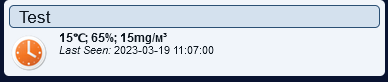
- 2023-03-19_11-07-32.png (5.08 KiB) Viewed 977 times
Re: How to create single devices from a device showing 3 values
Posted: Sunday 19 March 2023 9:17
by habahabahaba
Of course you can take values from any sensors you want and combine them
Re: How to create single devices from a device showing 3 values
Posted: Sunday 19 March 2023 19:45
by BartSr
Thanks for your assistance. Unfortunily it is not a solution for my problem. Let me explain. I have a airquality sensor which measures ppm CO2, temp and airpressure. That sensor is hooked up to a nodeMCU. It is not possible for me to forward those three values to three different Domoticz IDX-s. So in Domoticz at long last used a dummy devices for three phase amp. That worked in way off L1 shows ppm, L2 shows temp and L3 shows mBar. This results in a tripleAmp device showing L1 400 Amp. L2 19 Amp L3 1080 Amp. Whereas I need a result showing 400 ppm, 19C, 1080 mBar. For now I have solved the problem by sending the three values individual using command
Code: Select all
on CO2#PPM do Publish domoticz/in, '{"idx":951,"nvalue":[CO2#PPM]}'[code/] So MQTT is my friend. IDX is a domoticz dummy value. I did same for temp and airpress. Bart
Re: How to create single devices from a device showing 3 values
Posted: Monday 20 March 2023 1:01
by FlyingDomotic
You may create an MQTT message (using EspEasy MQTT controller) with all required values, and then extract these values to multiple Domoticz devices.
To extract MQTT message, you may use
https://github.com/FlyingDomotic/domoti ... per-plugin, which is able to map MQTT messages without having HomeAssistant description, but definitions in a JSON file.
I can help creating JSON mapping file if required.