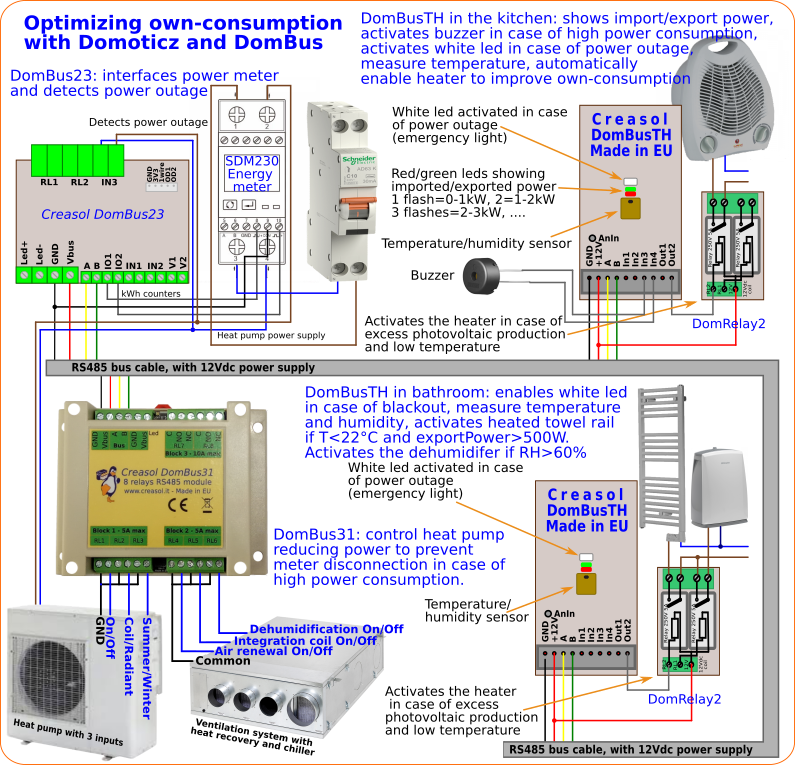
I've written a LUA script for Domoticz that add the following functions to Domoticz:
* power outage detect => turns on Leds (and other devices) in case of blackout (power failure)
* import and export power displaying, through red/green leds on DomBusTH (red led flashes 1 time if import power <1kW, 2 times if <2kW, ... green led flashes 1 time if export power <1kW, 2 times if power < 2kW, ....)
* in case of high power usage, program heat pump to work at lower level, or disconnect loads to prevent power disconnect. In case there are not any load that can be disconnect, send alert through leds/buzzer/siren, and send alert by Telegram
* automatically enable loads in case of extra power from renewable sources, to increase the own-consuming: for example activate an electric heater if temperature is below a level and available power is greater than heater power.
This is the procedure to install it (just copy and paste in the linux shell): for any troubles, don't hesitate to contact me by PM or Telegram ( creasol_psubiaco ).
Code: Select all
#from linux shell, type the following commands (copy and paste): lines starting with # are comments, and can be ignored
#become root
sudo su -
#enter domoticz directory /scripts/lua
cd ~pi/Domoticz/scripts/lua
if [ -d domoticz_lua_scripts ]; then
  cd domoticz_lua_scripts
  #update domoticz_lua_script local repository
  git pull
  cd ..
else
  which git
  if [ $? -ne 0 ]; then
    #install git
    apt install git
  fi
  #download domoticz_lua_scripts repository with all scripts
  git clone https://github.com/CreasolTech/domoticz_lua_scripts.git
fi
cp -i domoticz_lua_scripts/script_device_power.lua domoticz_lua_scripts/config_power.lua .
if [ ! -r globalvariables.lua ]; then cp domoticz_lua_scripts/globalvariables.lua . ; fi
if [ ! -r globalfunctions.lua ]; then cp domoticz_lua_scripts/globalfunctions.lua . ; fi
#now edit config file
nano config_power.luBelow a schema that resumes what the script does: obviously, it works with any device supported by Domoticz.