Page 1 of 1
Dashticz v3.8 master
Posted: Saturday 10 April 2021 13:34
by Lokonli
I've released a new stable master version 3.8
It contains the functionality of the beta releases until 3.7.7
Main changes are in the area of Dials.
Before updating from a version before 3.7.2:
Make a backup of custom/custom.css and custom/config.js
For update instructions see:
https://dashticz.readthedocs.io/en/mast ... 27-12-2020
For a full list of changed functionality, see:
https://dashticz.readthedocs.io/en/mast ... r-9-4-2021
Re: Dashticz v3.8 master
Posted: Sunday 11 April 2021 13:14
by pvklink
Got it, and working great!
Is there a place where we can request functionality?
When my devices are on, they are yellow.
With on/off dials this is possible too, but with selector-devices i cant fix it...

- Naamloos.jpg (15.73 KiB) Viewed 724 times
Re: Dashticz v3.8 master
Posted: Sunday 11 April 2021 20:50
by Lokonli
pvklink wrote: Sunday 11 April 2021 13:14
Got it, and working great!
Is there a place where we can request functionality?
When my devices are on, they are yellow.
With on/off dials this is possible too, but with selector-devices i cant fix it...
Naamloos.jpg
You can do this with some customization tricks.
First add the right device status via the device hook in custom.js :
Code: Select all
function deviceHook(device) {
    if (device.idx==9) {
        var level=parseInt(device.Level);
        device.deviceStatus='level'+level
    }
}
In this example I assign the status level10, level20, level30 to device with idx 9.
As a next step, add the styling to custom.css:
Code: Select all
/*ring color*/
.level10 .dial-center {
    box-shadow: 0 0 25px 1px green !important;
}

/*selected item color*/
.level10 .status {
    --dial-color: green !important
}

/*ring color*/
.level20 .dial-center {
    box-shadow: 0 0 25px 1px red !important;
}

/*selected item color*/
.level20 .status {
    --dial-color: red !important
}
If the selector switch has level10, the ring color as well as the selector text will turn green.
If the selector switch has level20, the ring color as well as the selector text will turn red.
Re: Dashticz v3.8 master
Posted: Monday 12 April 2021 11:49
by pvklink
Love tricks, gonna try that next wednesday and give feedback
Re: Dashticz v3.8 master
Posted: Monday 12 April 2021 12:28
by pvklink
Could not wait, so during lunch

It works !
Only a small thing with the colors, i use in both cases( switch and selector) value gold.
But they look different:
- one changes the color on the second ring(on/off) and the selector the first ring
- the color gold is interpreted different for both, i tried opacity with the selector switch but that did not work...
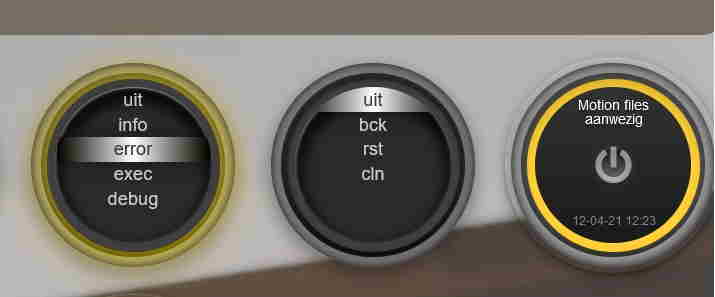
- dialring.jpg (12.15 KiB) Viewed 676 times
Script: one if-statement to check all selectors
function deviceHook(device)
{
if (device.idx==2269)
{
var rpiactive = device.Data;
device.deviceStatus = rpiactive=='Geen melding' ? 'good':'bad';
}
if (!(device.idx in [,2253,2197,2254,etc])){
var level=parseInt(device.Level);
device.deviceStatus='level'+level
}
}
Re: Dashticz v3.8 master
Posted: Sunday 25 April 2021 12:15
by jake
As of version 3.80 there is a strange behaviour with the icons of buttons: on a lower resolution screen, some of these buttons show a very big icon.
I tested the version on a chromebook tablet with high resolution and both 3.7.6 and 3.8.1 were identical while switching between them. However, when I put that tablet in portrait mode, I see the same behaviour as on my 8" Tab3 with increased icons.
my setup is for columns: 5 - 5 - 2. The issue occurs in the '2' column where I defined the buttons and blocks with size 12. All buttons misbehave there with icons, but the one 'block' in that column is the only one with a correct icon.
(I have no buttons in other columns, but putting one in a '5' wide column makes no differnce, the behaviour is the same)
Icons are of the type fas fa-solar-panel etc
Re: Dashticz v3.8 master
Posted: Sunday 25 April 2021 13:39
by Lokonli
jake wrote: Sunday 25 April 2021 12:15
As of version 3.80 there is a strange behaviour with the icons of buttons: on a lower resolution screen, some of these buttons show a very big icon.
I tested the version on a chromebook tablet with high resolution and both 3.7.6 and 3.8.1 were identical while switching between them. However, when I put that tablet in portrait mode, I see the same behaviour as on my 8" Tab3 with increased icons.
my setup is for columns: 5 - 5 - 2. The issue occurs in the '2' column where I defined the buttons and blocks with size 12. All buttons misbehave there with icons, but the one 'block' in that column is the only one with a correct icon.
(I have no buttons in other columns, but putting one in a '5' wide column makes no differnce, the behaviour is the same)
Icons are of the type fas fa-solar-panel etc
I had to change the css files a bit, because there was an interaction with the icons in the dials.
However, I expected the icon scaling for normal blocks should still be correct on smaller screens as well.
Do you have anything in custom.css related to this?
Re: Dashticz v3.8 master
Posted: Sunday 25 April 2021 13:55
by Lokonli
jake wrote: Sunday 25 April 2021 12:15
As of version 3.80 there is a strange behaviour with the icons of buttons: on a lower resolution screen, some of these buttons show a very big icon.
I tested the version on a chromebook tablet with high resolution and both 3.7.6 and 3.8.1 were identical while switching between them. However, when I put that tablet in portrait mode, I see the same behaviour as on my 8" Tab3 with increased icons.
my setup is for columns: 5 - 5 - 2. The issue occurs in the '2' column where I defined the buttons and blocks with size 12. All buttons misbehave there with icons, but the one 'block' in that column is the only one with a correct icon.
(I have no buttons in other columns, but putting one in a '5' wide column makes no differnce, the behaviour is the same)
Icons are of the type fas fa-solar-panel etc
I think I've found the issue. Can you add the following to custom.css and test?
Code: Select all
@media (max-width: 975px) {
    .col-icon .fas,
    .col-icon .far,
    .col-icon .fab,
    .col-icon .wi {
      font-size: 15px !important;
    }
}
Re: Dashticz v3.8 master
Posted: Sunday 25 April 2021 16:54
by jake
Lokonli wrote:
I think I've found the issue. Can you add the following to custom.css and test?
Code: Select all
@media (max-width: 975px) {
    .col-icon .fas,
    .col-icon .far,
    .col-icon .fab,
    .col-icon .wi {
      font-size: 15px !important;
    }
}
Yes, this is fixing it!
Should I keep it permanently, or is this for you just a test to see what way to go?
Re: Dashticz v3.8 master
Posted: Sunday 25 April 2021 17:30
by Lokonli
I'll release a new master and beta within a few days. I've to do some more testing first.
Verstuurd vanaf mijn AC2003 met Tapatalk