Page 1 of 1
mqtt setup script
Posted: Monday 15 March 2021 19:48
by pvklink
Hi Waaren
I wanna use your mqtt script to pass data to mqtt (nodered) when a uservar changes. (for the volume script you just got working

So i changed the variables section with the right uservar.
Questions
1. Does this script uses the mqtt hardware plugin with the mqtt username and password ?
2. Which value do i use for MQTTTopic = "sometopic/somesubtopic"
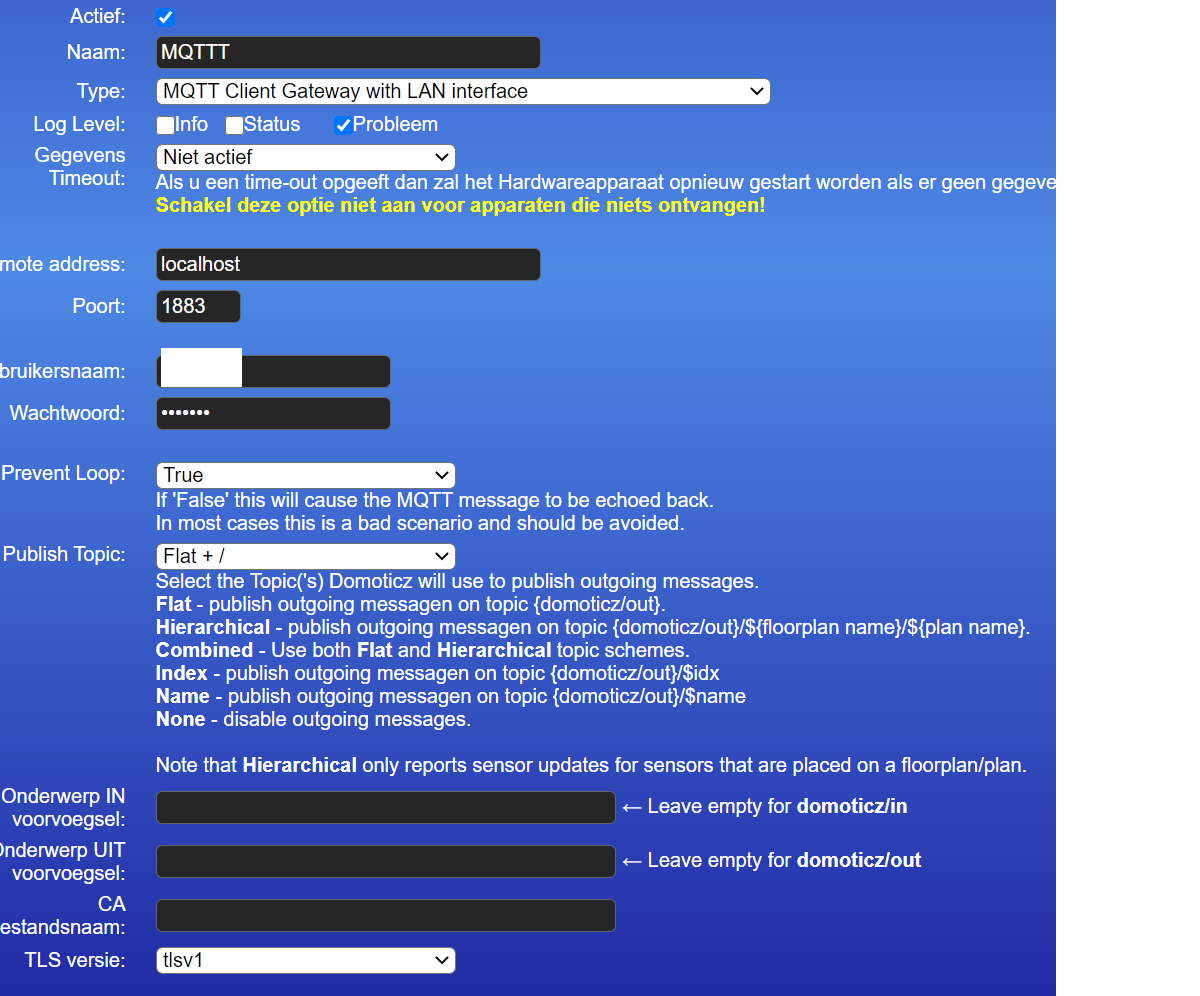
see my mqtt attachment, do i have to fill this with "domoticz/out" ?
Code: Select all
-- mqqt
-- gebruikt deze domoticz mqtt username en pwd ?
-- welke waarde moet ik intikken bij MQTTTopic? domoticz/in domoticz/out
--
return
{
    on =
    {
        devices =
        {
            "",
        },

        variables =
        {
            "NRvolume",
        },
    },

    logging =
    {
        level = domoticz.LOG_DEBUG,
    },

    execute = function(dz, item)
        _G.logMarker =  _G.moduleLabel

        local MQTTTopic    = "sometopic/somesubtopic"
        local payload

        local function osCommand(cmd)
            dz.log('Executing Command: ' .. cmd,dz.LOG_DEBUG)

            local fileHandle = assert(io.popen(cmd .. ' 2>&1 || echo ::ERROR::', 'r'))
            local commandOutput = assert(fileHandle:read('*a'))
            local returnTable = {fileHandle:close()}

            if commandOutput:find '::ERROR::' then     -- something went wrong
               dz.log('Error ==>> ' .. tostring(commandOutput:match('^(.*)%s+::ERROR::') or ' ... but no error message ' ) ,dz.LOG_ERROR)
            else -- all is fine!!
                dz.log('ReturnCode: ' .. returnTable[3] .. '\ncommandOutput:\n' .. commandOutput, dz.LOG_DEBUG)
            end

            return commandOutput,returnTable[3] -- rc[3] contains returnCode
        end

        if item.isDevice then payload = item.text
        elseif item.isVariable then payload = item.value
        end

        local mqttCommand  = "mosquitto_pub -t " .. MQTTTopic .. " -m '" .. payload .. "'"
        osCommand(mqttCommand)

    end
}
- mqtt.jpg (129.99 KiB) Viewed 1383 times
Re: mqtt setup script
Posted: Monday 15 March 2021 21:10
by pvklink
Got in working in domoticz, but Node-red does likt the message it gets...not proper json....
My changes
payload = '{"device":' .. '"NRvolume",' .. '"value":' .. item.value .. "}"
local mqttCommand = "sudo mosquitto_pub -u xxx -P xxx -t domoticz/out -m " .. payload
Re: mqtt setup script
Posted: Monday 15 March 2021 21:18
by jvdz
That jason forming line doesn't look right....maybe:
Code: Select all
payload = '{"device":"'..NRvolume..'","value":' .. item.value .. '}'
and think you need "" around the message payload in the os.execute:
Code: Select all
local mqttCommand = 'sudo mosquitto_pub -u xxx -P xxx -t domoticz/out -m "' .. payload..'"'
Re: mqtt setup script
Posted: Monday 15 March 2021 21:52
by pvklink
and the solution for those who also want to send a more complex msg to node-red via mqtt
with thanks to @waaren who made the original script
This version has a
- username pwd extention
- a more complex msg to publish to mqtt
Code: Select all
return
{
    on =
        {
        variables = {"NRvolume",},
        },

    logging =
        {
        level = domoticz.LOG_DEBUG,
        },

    execute = function(dz, item)
        _G.logMarker =  _G.moduleLabel

        local MQTTTopic    = "domoticz/out"
        local payload

        local function osCommand(cmd)
            dz.log('Executing Command: ' .. cmd,dz.LOG_DEBUG)

            local fileHandle = assert(io.popen(cmd .. ' 2>&1 || echo ::ERROR::', 'r'))
            local commandOutput = assert(fileHandle:read('*a'))
            local returnTable = {fileHandle:close()}

            if commandOutput:find '::ERROR::' then     -- something went wrong
               dz.log('Error ==>> ' .. tostring(commandOutput:match('^(.*)%s+::ERROR::') or ' ... but no error message ' ) ,dz.LOG_ERROR)
            else -- all is fine!!
                dz.log('ReturnCode: ' .. returnTable[3] .. '\ncommandOutput:\n' .. commandOutput, dz.LOG_DEBUG)
            end

            return commandOutput,returnTable[3] -- rc[3] contains returnCode
        end

        local payload = '{ "name" : "NRvolume", "xxx" : 0, "value" : ' .. item.value .. ' }'
        local mqttCommand  = "sudo mosquitto_pub -u youruser -P yourpwd -t " .. MQTTTopic .. " -m '" .. payload .. "'"

        osCommand(mqttCommand)

    end
}
Re: mqtt setup script [Solved]
Posted: Tuesday 16 March 2021 0:17
by waaren
pvklink wrote: Monday 15 March 2021 21:52
and the solution for those who also want to send a more complex msg to node-red via mqtt
Looks good!
It might be worthwhile to look at the dz.executeShellCommand() command. This will process the command in a true async way using its own tread.
Code: Select all
-- requires dzVents >= 3.1

local scriptVar = 'sendMQTT'

return
{
    on =
    {
        variables =
        {
            "NRvolume",
        },
        shellCommandResponses =
        {
            scriptVar,
        }
    },

    logging =
        {
            level = domoticz.LOG_DEBUG,
        },

    execute = function(dz, item)
        _G.logMarker =  scriptVar

        if item.isVariable then
            local MQTTTopic    = "domoticz/out"
            local value

            if not(tonumber(item.value)) then value = '"' .. item.value .. '"' end

            local payload = '{ "name" : "NRvolume", "xxx" : 0, "value" : ' .. ( value or item.value )  .. ' }'
            local mqttCommand  = "sudo mosquitto_pub -u youruser -P yourpwd -t " .. MQTTTopic .. " -m '" .. payload .. "'"

            dz.executeShellCommand(
            {
                command = mqttCommand,
                callback = scriptVar,
                timeout = 120 -- in seconds
            })

        elseif item.isShellCommandResponse and item.ok then
            dz.log('MQTT successfully send', dz.LOG_DEBUG)
        else
            dz.log('No valid response from MQTT command: ' .. item.statusCode, dz.LOG_ERROR)
            dz.log(item, dz.LOG_DEBUG)
        end
    end
}
Re: mqtt setup script
Posted: Tuesday 16 March 2021 8:51
by pvklink
Okay!
I will try that!
Node-red receives my json and continues the flow started in domoticz/dzvents, its great to see how things can work together
Re: mqtt setup script
Posted: Tuesday 16 March 2021 10:31
by pvklink
Works great!
and learned a new command....
Re: mqtt setup script
Posted: Wednesday 17 March 2021 12:42
by pvklink
@waaren:
Perhaps another place for this functionality is the mqtt plugin ?
Option to manages which type of devices, variables etc come in and out ?
Re: mqtt setup script
Posted: Wednesday 17 March 2021 12:56
by waaren
pvklink wrote: Wednesday 17 March 2021 12:42
Perhaps another place for this functionality is the mqtt plugin ?
Yes, would be a nice feature. Hmm... now only find someone with enough c++, js and html knowledge, time and involvement to code this..
Re: mqtt setup script
Posted: Wednesday 17 March 2021 15:02
by pvklink
wish i had the brains... little js but c+++ is like russian to me..
but the dzvents script works perfect and quick ! Very happy with it...
My Node-red implementation, receives via mqtt the device or var changes and adjust the speaker volume of my sonos and the volumes of nesthub
Re: mqtt setup script
Posted: Wednesday 17 March 2021 15:50
by jvdz
waaren wrote: Wednesday 17 March 2021 12:56
pvklink wrote: Wednesday 17 March 2021 12:42
Perhaps another place for this functionality is the mqtt plugin ?
Yes, would be a nice feature. Hmm... now only find someone with enough c++, js and html knowledge, time and involvement to code this..
Wouldn't a plugin just require Python knowledge, or do you means as internal Notification option?
Re: mqtt setup script
Posted: Wednesday 17 March 2021 15:59
by waaren
jvdz wrote: Wednesday 17 March 2021 15:50
Wouldn't a plugin just require Python knowledge, or do you means as internal Notification option?
The MQTT module is now implemented as native hardware so C++ I guess this is what @pvklink refers to.
The html and js knowledge would be required if the individual device settings must be configured just like it is done now by the various push links.
I don't see any advantage in using a Python plugin over a dzVents script but I also do not consider myself as very objective in this matter
Re: mqtt setup script
Posted: Wednesday 17 March 2021 16:09
by jvdz
waaren wrote: Wednesday 17 March 2021 15:59
I don't see any advantage in using a Python plugin over a dzVents script but I also do not consider myself as very objective in this matter
Agree... I actually have 2 ways I send MQTT messages:
- In LUA use os.execute(), like you do here in dzVents, for any other than "domoticz/out" topic messages..eg messages to ZIGBEE2MQTT and MILIGHT bridge.
- Use a Text device eg "MsgFromDomo" and update that in my LUA event scripts with the message text I want to send to NodeRed, and in Nodered filter for changes in that Domoticz "MsgFromDomo" device and process its changed text. Only disadvantage of this option is the max length of the text .
Re: mqtt setup script
Posted: Wednesday 17 March 2021 16:25
by waaren
jvdz wrote: Wednesday 17 March 2021 16:09
Agree... I actually have 2 ways I send MQTT messages:
Understand and nice solution. In dzVents you could use the domoticz.emitEvent() , on = customEvents {} construction to communicate directly to a script so you could use 1 script to receive/collect and send2MQTT (all topics).
What is the current limit for number of chars in text devices?
Re: mqtt setup script
Posted: Wednesday 17 March 2021 16:33
by jvdz
waaren wrote: Wednesday 17 March 2021 16:25
What is the current limit for number of chars in text devices?
64 characters I believe.