Hello Hans,
@manjh
I think this topic is a follow up of
https://www.domoticz.com/forum/viewtopi ... =4&t=30330, although it is not exactly the same.
You found already howto write a value into a uservariable.
You can do that either with MQTT or HTTP in a JSON call.
But how do I read a uservariable from Domoticz? I was hoping for something like "getuservaruable", but cannot find anything about that command.
Any ideas? Suggestions for a way to do this?
Yes, "getuservariable" exist. See:
https://www.domoticz.com/wiki/Domoticz_ ... _variables
You can add, update, list all, list one and delete a variable with an API call.
I do it with HTTP, as I don't think MQTT can be used.
Example below:
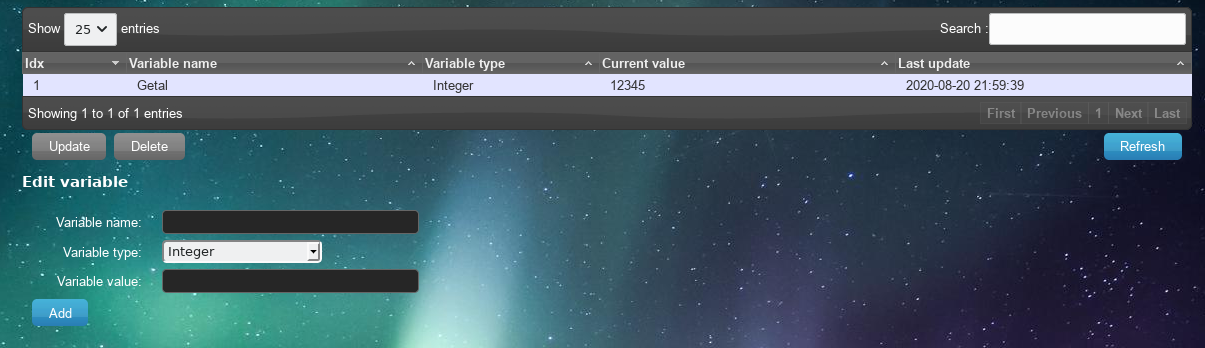
- Screenshot_user_variable1.png (240.59 KiB) Viewed 2149 times
I created just a User Variable, with the name "Getal", and the type "Integer" and a value of "12345" as an example.
The following flow will get the User variable to Node Red.

- Screenshot_user_variable2.png (9.85 KiB) Viewed 2149 times
And it will give the following output:
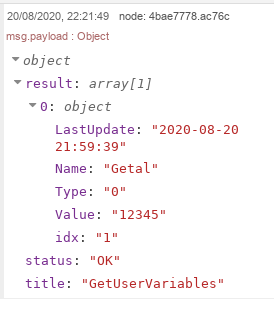
- Screenshot_user_variable3.png (16.69 KiB) Viewed 2149 times
As you can see an array of objects has been returned, each containing info about the user variable.
You can also ask for a specific IDX by changing the call and add the IDX, but in this case the returned msg is identical.
Please find the flow below (for a single IDX).
Code: Select all
[{"id":"c194714d.dd08b","type":"inject","z":"4268f77.7847488","name":"","props":[{"p":"payload"},{"p":"topic","vt":"str"}],"repeat":"","crontab":"","once":false,"onceDelay":0.1,"topic":"","payload":"","payloadType":"date","x":160,"y":220,"wires":[["a77e308e.7145b8"]]},{"id":"a77e308e.7145b8","type":"function","z":"4268f77.7847488","name":"Prepare URL RPi1","func":"var url = \"http://127.0.0.1:8080\";\nmsg.url = url + \"/json.htm?type=command¶m=getuservariable&idx=1\";\nreturn msg;","outputs":1,"noerr":0,"initialize":"","finalize":"","x":370,"y":220,"wires":[["4f6ff499.397524"]]},{"id":"4f6ff499.397524","type":"http request","z":"4268f77.7847488","name":"HTTP","method":"PUT","ret":"obj","paytoqs":"ignore","url":"","tls":"","persist":false,"proxy":"","authType":"","x":570,"y":220,"wires":[["4bae7778.ac76c"]]},{"id":"4bae7778.ac76c","type":"debug","z":"4268f77.7847488","name":"","active":true,"tosidebar":true,"console":false,"tostatus":false,"complete":"payload","targetType":"msg","statusVal":"","statusType":"auto","x":750,"y":220,"wires":[]}]
I think, this is where you are looking for.
Regards

 and summarize
 )
)