Page 1 of 1
Collecting multiple scripts in a single script
Posted: Sunday 05 July 2020 14:11
by Jan Jansen
Today I managed to convert a Blockly script to DzVents.
Code: Select all
return {
	on = {
		devices = {
			'Screen deur slaapkamer 1'
		},
    },

	execute = function(domoticz, switch)
	    if (switch.state == 'Op' and switch.level ~= '10') then
	        domoticz.devices('Relais ^ deur slaapkamer 1').switchOn().forMin(1)
		    domoticz.devices('Relais v deur slaapkamer 1').switchOff()
	    elseif (switch.state == 'Neer' and switch.level ~= '30') then
	        domoticz.devices('Relais ^ deur slaapkamer 1').switchOff()
		    domoticz.devices('Relais v deur slaapkamer 1').switchOn().forMin(1)
		elseif (switch.state == 'Stop') then
		    domoticz.devices('Relais ^ deur slaapkamer 1').switchOff()
		    domoticz.devices('Relais v deur slaapkamer 1').switchOff()
	end
end
}
There are multiple screens so there are also multiple Blockly scripts, which are basically the same. Only the devices listed in the script are different. I wonder if the different Blockly scripts can be collected in a single DzVents script. If so, how to start?
Thanks in advance!
Re: Collecting multiple scripts in a single script
Posted: Sunday 05 July 2020 14:12
by waaren
Jan Jansen wrote: Sunday 05 July 2020 14:11
There are multiple screens so there are also multiple Blockly scripts, which are basically the same. Only the devices listed in the script are different. I wonder if the different Blockly scripts can be collected in a single DzVents script. If so, how to start?
A good start would be to show the Blockly's as the are now.
Re: Collecting multiple scripts in a single script
Posted: Sunday 05 July 2020 14:32
by Jan Jansen
@ waaren,
Thanks you for your quick reply.
The scripts looks like:
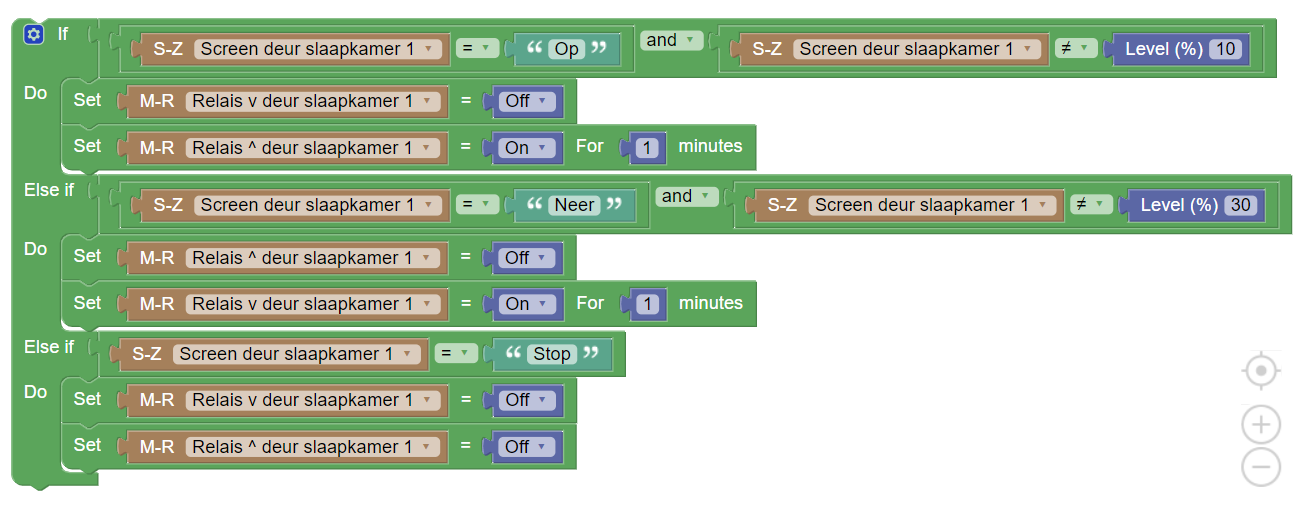
- Aantekening 2020-07-05 141552.png (111.19 KiB) Viewed 1310 times
I also use this one:
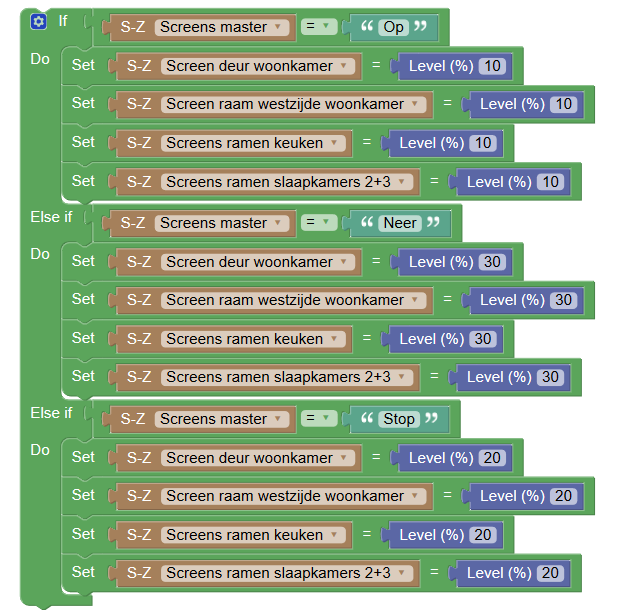
- Screens master.png (86.8 KiB) Viewed 1310 times
Regards
Re: Collecting multiple scripts in a single script
Posted: Sunday 05 July 2020 17:03
by waaren
Jan Jansen wrote: Sunday 05 July 2020 14:11
Today I managed to convert a Blockly script to DzVents.
Not sure if this is what you mean but if the only difference between the screens is the number this should do it.
Code: Select all
return
{
    on =
    {
        devices =
        {
            'Screen deur slaapkamer*',
        },
    },

    logging =
    {
        level = domoticz.LOG_DEBUG, -- change to domoticz.LOG_ERROR when all ok
        marker = 'screens',
    },

    execute = function(domoticz, switch)
        roomNumber = switch.name:sub(-1,-1) -- get the last char of the switchname

        if (switch.state == 'Op' and switch.level ~= '10') then
            domoticz.devices('Relais ^ deur slaapkamer ' .. roomNumber).switchOn().forMin(1)
            domoticz.devices('Relais v deur slaapkamer ' .. roomNumber).switchOff()
        elseif (switch.state == 'Neer' and switch.level ~= '30') then
            domoticz.devices('Relais ^ deur slaapkamer ' .. roomNumber).switchOff()
            domoticz.devices('Relais v deur slaapkamer ' .. roomNumber).switchOn().forMin(1)
        elseif (switch.state == 'Stop') then
            domoticz.devices('Relais ^ deur slaapkamer ' .. roomNumber).switchOff()
            domoticz.devices('Relais v deur slaapkamer ' .. roomNumber).switchOff()
        end

    end
}
Re: Collecting multiple scripts in a single script
Posted: Sunday 05 July 2020 17:04
by Jan Jansen
I discovered that "switch.level ~= '10' " makes no sense. With "switch.level ~= '10' " I wanted to prevent an unnecessary next action if, for example, the 'Up' button is pressed a second time.
It can be solved with a user variable as done in the following Blockly script.
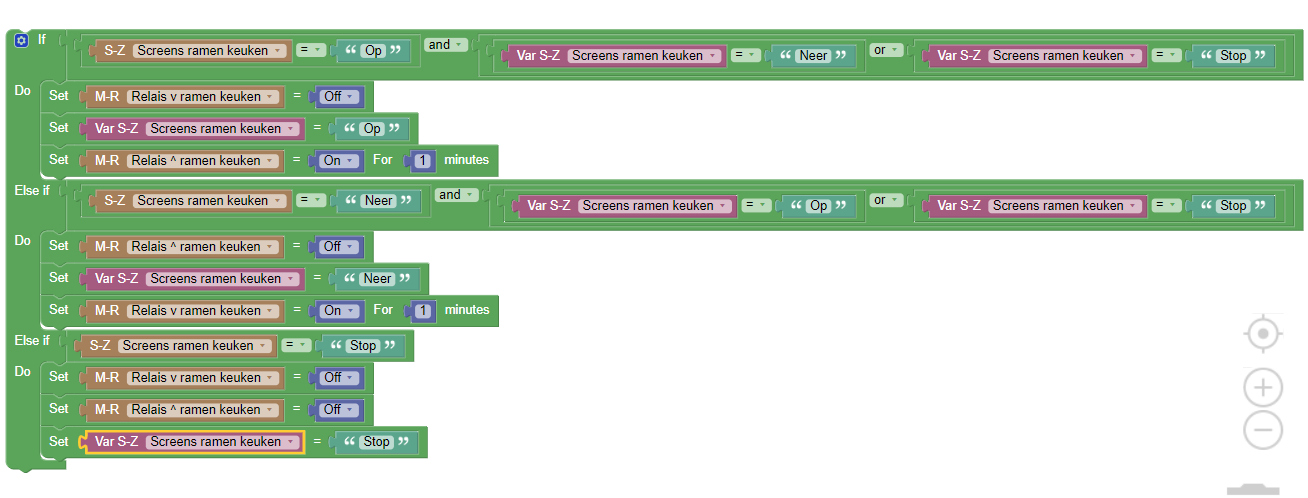
- blockly screens ramen keuken.png (88.86 KiB) Viewed 1277 times
Is this possible in DzVents without a user variable?
Re: Collecting multiple scripts in a single script
Posted: Sunday 05 July 2020 17:28
by waaren
Jan Jansen wrote: Sunday 05 July 2020 17:04
...It can be solved with a user variable. Is this possible in dzVents without a user variable?
something like this ?
Code: Select all
return
{
    on =
    {
        devices =
        {
            'Screens ramen keuken',
        },
    },

    logging =
    {
        level = domoticz.LOG_DEBUG, -- change to domoticz.LOG_ERROR when all ok
        marker = 'screens ramen',
    },


    execute = function(dz, item)

        local up =     dz.devices('Relais ^ ramen keuken')
        local down = dz.devices('Relais v ramen keuken')

        if item.state == 'Op' and up.state ~= 'On' then
            down.switchOff()
            up.switchOn()
            up.switchOff().afterSec(60)
        elseif item.state == 'Neer' and down.state ~= 'On' then
            up.switchOff()
            down.switchOn()
            down.switchOff().afterSec(60)
        elseif item.state == 'Stop' then
            up.switchOff()
            down.switchOff()
        end
    end
}
Re: Collecting multiple scripts in a single script
Posted: Monday 06 July 2020 13:05
by Jan Jansen
waaren wrote: Sunday 05 July 2020 17:28
Jan Jansen wrote: Sunday 05 July 2020 17:04
...It can be solved with a user variable. Is this possible in dzVents without a user variable?
something like this ?
It is not the solution I was looking for, unfortunately. Using the Blockly script (including the user variable) it works as desired. When I press the 'Up' button on the selector switch, the screen goes up. However, this only happens if the previous position of the selector switch was 'Stop' or 'Down'.
Re: Collecting multiple scripts in a single script
Posted: Monday 06 July 2020 13:21
by waaren
Jan Jansen wrote: Monday 06 July 2020 13:05
It is not the solution I was looking for, unfortunately.
Can you check this one?
Code: Select all
return
{
    on =
    {
        devices =
        {
            'Screens ramen keuken',
        },
    },

    logging =
    {
        level = domoticz.LOG_DEBUG, -- change to domoticz.LOG_ERROR when all ok
        marker = 'screens ramen',
    },


    execute = function(dz, item)

        local up =     dz.devices('Relais ^ ramen keuken')
        local down = dz.devices('Relais v ramen keuken')

        if item.state == 'Op' and ( up.state ~= 'On' or item.lastUpdate.secondsAgo > 59 )  then
            down.switchOff()
            up.switchOn()
            up.switchOff().afterSec(60)
        elseif item.state == 'Neer' and ( down.state ~= 'On' or item.lastUpdate.secondsAgo > 59 ) then
            up.switchOff()
            down.switchOn()
            down.switchOff().afterSec(60)
        elseif item.state == 'Stop' then
            up.switchOff()
            down.switchOff()
        end
    end
}
Re: Collecting multiple scripts in a single script
Posted: Monday 06 July 2020 14:53
by Jan Jansen
waaren wrote: Monday 06 July 2020 13:21
Can you check this one?
First thank you for your time and attention!
The last script doesn't do what I want either. When I press the 'Neer' button, 'Relais v ramen keuken' is activated. For example, if I press the same button again after 5 minutes, 'Relais v ramen keuken' will be activated again. I do not want that relay to be reactivated when pressing the 'Neer' button again.
Regards
Re: Collecting multiple scripts in a single script
Posted: Monday 06 July 2020 15:55
by waaren
Jan Jansen wrote: Monday 06 July 2020 14:53
The last script doesn't do what I want either. When I press the 'Neer' button, 'Relais v ramen keuken' is activated. For example, if I press the same button again after 5 minutes, 'Relais v ramen keuken' will be activated again. I do not want that relay to be reactivated when pressing the 'Neer' button again.
If I understand correctly what you want I don't think it is possible without saving the last action in some way. Below script does that using dzVents persistent data.
Code: Select all
return
{
    on =
    {
        devices =
        {
            'Screens ramen keuken',
        },
    },

    logging =
    {
        level = domoticz.LOG_DEBUG, -- change to domoticz.LOG_ERROR when all ok
        marker = 'screens ramen',
    },

    data =
    {
        screenState = { initial = '' },
    },

    execute = function(dz, item)

        local up = dz.devices('Relais ^ ramen keuken')
        local down = dz.devices('Relais v ramen keuken')

        if item.state == 'Op' and dz.data.screenState ~= 'Up' then
            dz.log('Going up',dz.LOG_DEBUG)
            down.switchOff()
            up.cancelQueuedCommands()
            up.switchOn()
            up.switchOff().afterSec(60)
            dz.data.screenState = 'Up'
        elseif item.state == 'Neer' and dz.data.screenState ~= 'Down' then
            dz.log('Going down',dz.LOG_DEBUG)up.switchOff()
            down.cancelQueuedCommands()
            down.switchOn()
            down.switchOff().afterSec(60)
            dz.data.screenState = 'Down'
        elseif item.state == 'Stop' and dz.data.screenState ~= 'Stop' then
            dz.log('Stop',dz.LOG_DEBUG)
            up.cancelQueuedCommands()
            down.cancelQueuedCommands()
            up.switchOff()
            down.switchOff()
            dz.data.screenState = 'Stop'
        else
            dz.log('nothing to do ',dz.LOG_DEBUG)
        end
    end
}
Re: Collecting multiple scripts in a single script [Solved]
Posted: Monday 06 July 2020 16:27
by Jan Jansen
@ waaren,
Now it works as desired, thanks a lot!
regards.