Page 1 of 1
Problem with dzvents Hue Bridge check status script
Posted: Sunday 10 May 2020 20:11
by pgielen
I have installed the script for the Hue Bridge status check that is in the Domoticz wiki, but last lamp added to the Bridge leads to an error when te script is run. In the log, this is shown:
2020-05-10 16:48:00.318 Status: dzVents: Info: ------ Finished Hue Bridge check status
2020-05-10 16:48:00.311 Error: dzVents: Error: (3.0.2) There is no device with that name or id: Bathroom Light
The last line comes after the 'Finished' message, but as you can see by the timestamp, the Error was created 7 microseconds before the Status message. Also, if I turn off the script. the Error does appear.
So what could cause this? The lamp with the name Bathroom Light does exist in Domoticz and in the Hue app and is spelled exactly the same on both. Since it is the last lamp that I have added to the Hue bridge, I wonder if it has something to do with that.
Re: Problem with dzvents Hue Bridge check status script
Posted: Sunday 10 May 2020 22:28
by waaren
pgielen wrote: Sunday 10 May 2020 20:11
2020-05-10 16:48:00.318 Status: dzVents: Info: ------ Finished Hue Bridge check status
2020-05-10 16:48:00.311 Error: dzVents: Error: (3.0.2) There is no device with that name or id: Bathroom Light
So what could cause this? The lamp with the name Bathroom Light does exist in Domoticz and in the Hue app and is spelled exactly the same on both. Since it is the last lamp that I have added to the Hue bridge, I wonder if it has something to do with that.
Did you set the light to used in the devices tab ? (By clicking on the green arrow)
Re: Problem with dzvents Hue Bridge check status script
Posted: Sunday 10 May 2020 23:14
by pgielen
Yes, of course
Re: Problem with dzvents Hue Bridge check status script
Posted: Sunday 10 May 2020 23:43
by waaren
pgielen wrote: Sunday 10 May 2020 23:14
Yes, of course
Can you set dzVents logging to Debug (everything) in [setup] [settings] [other] , apply settings and look at the contents of
Code: Select all
<domoticz dir>/scripts/dzVents/domoticzData.lua
after the script ran once?
Interesting to see if domoticz dumps the attributes of your device 'Bathroom Light' in that file.
sort of off topic: Do you stil experience differences in device states between Hue and domoticz? I thought this was solved a long time ago.
Re: Problem with dzvents Hue Bridge check status script
Posted: Monday 11 May 2020 8:30
by pgielen
There is no file named domoticzData.lua, do you mean: :~/domoticz/scripts/dzVents/data/ '__data_Hue Bridge check status.lua'?
The lamp named Bathroom Lamp is not mentioned in that file. What's more, only 10 of the 21 lamps I have in the house are mentioned in this file.
Now, when a lamp is turned off manually and therefore is unreachable, the status 'On' is still shown in Domoticz as well as the Hue Bridge. This is the main reason that I wanted to use this script: to turn the status of all unreachable lamps to 'Off'.
Re: Problem with dzvents Hue Bridge check status script
Posted: Monday 11 May 2020 8:37
by pgielen
On the second run of the script, I do see 20 devices in '__data_Hue Bridge check status.lua' but still not the Bathroom Light.
I decided to disable the script and make a new copy of the 'Update: dzVents version' script from
https://www.domoticz.com/wiki/Simple_sc ... Hue_status, just to rule out that I have made some typo in the script myself, but the Error returns. The only thing left to try now is to remove the device entirely from Domoticz.
Re: Problem with dzvents Hue Bridge check status script
Posted: Monday 11 May 2020 8:51
by waaren
pgielen wrote: Monday 11 May 2020 8:37
On the second run of the script, I do get 20 devices in '__data_Hue Bridge check status.lua' but still not the Bathroom Light.
If you set dzVents to debug logging via the GUI in [setup][settings][other]
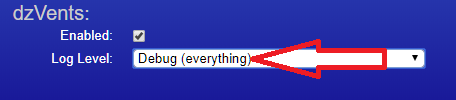
- Debug.png (8.11 KiB) Viewed 1626 times
, the file ~/domoticz/scripts/dzVents/domoticzData.lua will be created at every execution of dzVents.lua (at least once a minute)
Re: Problem with dzvents Hue Bridge check status script
Posted: Monday 11 May 2020 9:06
by pgielen
Sorry, I forgot to save the settings last time I turned that to Debug Everything. I have done that now and the lamp is in there:
Code: Select all
	[107] = {
		["deviceID"] = "00000015";
		["lastUpdate"] = "2020-05-08 17:51:04";
		["changed"] = false;
		["name"] = "Bathroom Light";
		["signalLevel"] = 12;
		["description"] = "";
		["baseType"] = "device";
		["lastLevel"] = 83;
		["batteryLevel"] = 255;
		["switchTypeValue"] = 7;
		["timedOut"] = true;
		["switchType"] = "Dimmer";
		["subType"] = "Switch";
		["data"] = {
			["hardwareName"] = "HUE BRIDGE";
			["icon"] = "dimmer";
			["_nValue"] = 2;
			["_state"] = "Set Level: 83 %";
			["usedByCamera"] = false;
			["protected"] = false;
			["unit"] = 1;
			["maxDimLevel"] = 100;
			["hardwareTypeValue"] = 38;
			["hardwareID"] = 14;
			["levelVal"] = 83;
			["hardwareType"] = "Philips Hue Bridge";
		};
		["deviceType"] = "Light/Switch";
		["protected"] = false;
		["id"] = 478;
		["rawData"] = {
			[1] = "83";
		};
	};
Re: Problem with dzvents Hue Bridge check status script
Posted: Monday 11 May 2020 9:09
by pgielen
The last update seems to have been 3 days ago, but the lamp has been on and off numerous times since.
Re: Problem with dzvents Hue Bridge check status script
Posted: Monday 11 May 2020 9:23
by waaren
pgielen wrote: Monday 11 May 2020 9:09
The last update seems to have been 3 days ago, but the lamp has been on and off numerous times since.
Could it be that the device-name in Hue contains a character that cannot be displayed / processed in domoticz / dzVents?
You could check this by deleting the device in domoticz and in Hue and recreate it in Hue. It should then be re-created in domoticz after a deactivate / activate cycle of the Hue module in domoticz while accepting new hardware. When it is re-created you will have to set it to used again on the devices tab.
Re: Problem with dzvents Hue Bridge check status script
Posted: Monday 11 May 2020 9:32
by pgielen
An interesting thing just happened: I also installed the update groups dzVent script and now I am getting a lot of not found errors both about existing and not existing Groups on my system.
For example, I get 2 errors about the 'Bedroom' group:
Code: Select all
2020-05-11 09:14:00.879 Error: dzVents: Error: (3.0.2) There is no device with that name or id: Bedroom
2020-05-11 09:14:00.889 Error: dzVents: Error: (3.0.2) There is no device with that name or id: Group Bedroom
In the Domoticz devices list, only 'Group Bedroom' exists. In the Hue app, only 'Bedroom' exists. Somehow, something went wrong with the synchronisation between both systems. That may also have caused the error with the Bathroom Light.
I am starting to fear that I will not only have to completely remove the Bathroom Light, but the whole Hue Bridge and its devices from Domoticz and add everything again...
Re: Problem with dzvents Hue Bridge check status script [Solved]
Posted: Monday 11 May 2020 9:48
by pgielen
waaren wrote: Monday 11 May 2020 9:23
Could it be that the device-name in Hue contains a character that cannot be displayed / processed in domoticz / dzVents?
Yes! That was the problem. The name in the Hue app had a trailing space in it. Now I am feeling stupid. And a bit annoyed that the Hue app does not remove trailing spaces from a form field automatically. Now only the question about syncing the groups remains.