Page 1 of 1
Dzvents as sprinkler controler
Posted: Saturday 19 October 2019 0:24
by Dembe
Hello everyone,,
i would like to control my sprinkler system (4 valves visible as switches in domoticz)
what would be best approach to create dummy switch controlled with dzvents
i want to run (on switch)
https://www.quickppsr.com.au/
1 valve (x min on then switch off)
2 valve (x min on then switch off)
3 valve (x min on then switch off)
4 valve (x min on then switch off)
it even possible to run script for so long?
problem is that i want to be able switch off at anytime and interrupt program and disable valves anytime....?
Re: Dzvents as sprinkler controler
Posted: Saturday 19 October 2019 0:48
by waaren
Dembe wrote: Saturday 19 October 2019 0:24
I would like to control my sprinkler system (4 valves visible as switches in domoticz)
Sorry but I don't understand your requirement. Can you please explain in a bit more words what you try to to achieve ?
Re: Dzvents as sprinkler controler
Posted: Saturday 19 October 2019 13:07
by hoeby
Could this be a start?
Code: Select all
--Script version: 19101902

local valve1dummy = dz.devices("Valve1dummy")  -- Change name between " " to your dummy device name.
local valve1name  = dz.devices("Valve1name")   -- Change name between " " to your valve device name.
local valve1on    = "5"                        -- Change number between " ", this is time valve is ON, in minutes.

local valve2dummy = dz.devices("Valve2dummy")  -- Change name between " " to your dummy device name.
local valve2name  = dz.devices("Valve2name")   -- Change name between " " to your valve device name.
local valve2on    = "5"                        -- Change number between " ", this is time valve is ON, in minutes.

local valve3dummy = dz.devices("Valve3dummy")  -- Change name between " " to your dummy device name.
local valve3name  = dz.devices("Valve3name")   -- Change name between " " to your valve device name.
local valve3on    = "5"                        -- Change number between " ", this is time valve is ON, in minutes.

local valve4dummy = dz.devices("Valve4dummy")  -- Change name between " " to your dummy device name.
local valve4name  = dz.devices("Valve4name")   -- Change name between " " to your valve device name.
local valve4on    = "5"                        -- Change number between " ", this is time valve is ON, in minutes.

debug = false                                  -- Set to true to enable extra log-info, set to false to disable extra log-info.

-------------------------------------------------------
------------ Do not modify below this line ------------
-------------------------------------------------------

return {
	on = {
		devices = {
			Valve1dummy,
			Valve2dummy,
			Valve3dummy,
			Valve4dummy,
		}
	},
	execute = function(dz, device)
	    --Valve 1 script
	    if dz.devices(Valve1dummy).state == 'On' then
	        valve1name.switchOn().forMin(valve1on)
	        if debug then
	            print ('Debug valve-script, ' ..valve1name.. ' is switch on for ' ..valve1on.. ' minutes.')
	        end
	    else
	        valve1name.switchOff()
	        if debug then
	            print ('Debug valve-script, ' ..valve1name.. ' is switch off.')
	        end
	    end

             --Valve 2 script
	     if dz.devices(Valve2dummy).state == 'On' then
	        valve2name.switchOn().forMin(valve2on)
	        if debug then
	            print ('Debug valve-script, ' ..valve2name.. ' is switch on for ' ..valve2on.. ' minutes')
	        end
	    else
	        valve2name.switchOff()
	        if debug then
	            print ('Debug valve-script, ' ..valve2name.. ' is switch off.')
	        end
	    end

	    --Valve 3 script
	    if dz.devices(Valve3dummy).state == 'On' then
	        valve3name.switchOn().forMin(valve3on)
	        if debug then
	            print ('Debug valve-script, ' ..valve3namen.. ' is switch on for ' ..valve3on.. ' minutes')
	        end
	    else
	        valve3name.switchOff()
	        if debug then
	            print ('Debug valve-script, ' ..valve3name.. ' is switch off.')
	        end
	    end

	     --Valve 4 script
	     if dz.devices(Valve4dummy).state == 'On' then
	        valve4name.switchOn().forMin(valve4on)
	        if debug then
	            print ('Debug valve-script, ' ..valve4namen.. ' is switch on for ' ..valve4on.. ' minutes')
	        end
	    else
	        valve4name.switchOff()
	        if debug then
	            print ('Debug valve-script, ' ..valve4name.. ' is switch off.')
	        end
	    end
    end
}

--[[
Release notes:
V19101901: Script is made. Not tested.
V19101902: Debug added.

]]--
Re: Dzvents as sprinkler controler
Posted: Wednesday 23 October 2019 22:25
by pvklink
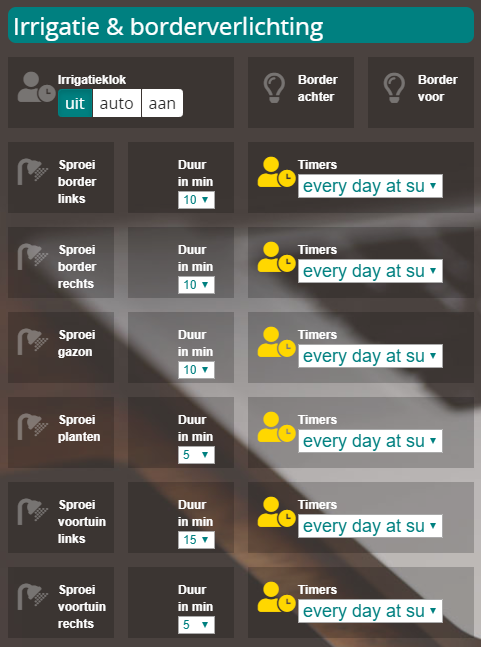
Is this what you want? (i have 6 irrigation zones, each zone has his own timers)
- irri.png (130.43 KiB) Viewed 577 times
Re: Dzvents as sprinkler controler
Posted: Wednesday 23 October 2019 22:52
by besix
pvklink wrote: Wednesday 23 October 2019 22:25
Is this what you want? (i have 6 irrigation zones, each zone has his own timers)
irri.png
Can you share a solution? It's interesting.
Thanks in advance