Page 1 of 1
Smart Led Messenger
Posted: Thursday 05 September 2019 22:01
by laco
I bought Smart Led Messenger. Someone can tell me how to set them up in DOMOTICZ.
I want to see the temperature, the clock, the on / off switch, and more.
https://www.smartledmessenger.com
Re: Smart Led Messenger
Posted: Thursday 05 September 2019 22:32
by elmortero
Hi,
This Page (in French) says that you can send your text using
http://ip_address/?message=TEXT&intensity=AA&speed=BB
where ip_address is the ip of your messenger
TEXT = the text you want to display
AA = the brightness
BB = the scroll speed is the how fast your text moves
So, with this you can use your favorite scripting language to get the info from Domoticz and send it to the smart led messenger
Re: Smart Led Messenger
Posted: Friday 06 September 2019 8:34
by laco
Can also be used in blockly?
Re: Smart Led Messenger
Posted: Friday 06 September 2019 9:38
by elmortero
I never tried that, but according to this topic
https://www.domoticz.com/forum/viewtopic.php?t=17006 it should work
With dzvents and bash I could help you but not blockly.
Re: Smart Led Messenger
Posted: Friday 06 September 2019 18:11
by laco
Thank you it works for me perfectly. As it moves, it sends the text to the messenger and displays the digital clock sleep after 5 seconds.
Now I need to figure out how to send the temperature information. This may require a script.
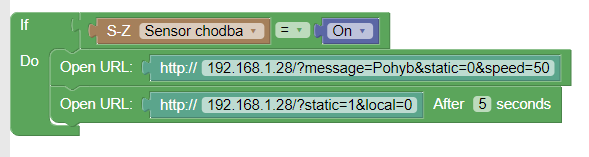
Re: Smart Led Messenger
Posted: Friday 06 September 2019 21:00
by laco
Can you please create a script that sends temperature information every 5 minutes?
Re: Smart Led Messenger
Posted: Saturday 07 September 2019 21:33
by elmortero
The script I am posting is for dzVents.
I understand that you are not yet familiar with it so please read these hints from
waaren
by waaren
using dzVents would be an option. See below how that could look like. From your profile I cannot see which domoticz version you use.
When not yet familiar with dzVents please start with reading Get started Before implementing (~ 5 minutes). Special attention please for "In Domoticz go to Setup > Settings > Other and in the section EventSystem make sure the checkbox 'dzVents disabled' is not checked. Also make sure that in the Security section in the settings you allow 127.0.0.1 to not need a password. dzVents uses that port to send certain commands to Domoticz. Finally make sure you have set your current location in Setup > Settings > System > Location, otherwise there is no way to determine nighttime/daytime state."
More info on dzVents:
https://www.domoticz.com/wiki/DzVents:_ ... _scripting
This script (change to match your setup):
Code: Select all
return {
	on = {
		timer = { 'every 5 minutes'}
	},

	execute = function(domoticz, triggerItem)
	local smart_led_ip = '192.168.1.28' --replace by the ip address of your smart led messenger
	local static = 1 -- change to 0 if you want scrolling text

	local sensor = domoticz.devices('thermometer') -- replace thermometer by the EXACT name of your sensor
    	local tempe = sensor.temperature

	local url = 'http://'..smart_led_ip..'/?message='..tempe..'&static='..static
	domoticz.openURL(url)
	--domoticz.openURL('http://'..smart_led_ip..'static=0&local=0').afterSec(30)
	-- remove the -- from line above if you want to turn off the screen after 30 seconds
	end
}
Please let me know if you know more command, I have ordered a Smart Led Messenger too

Re: Smart Led Messenger
Posted: Sunday 08 September 2019 17:19
by laco
It works great. Displays the temperature to 10 decimal places. This should be rounded to 1 decimal place or not. It would be good to add text about what temperature it is, exterior or interior.
Thank you very much for the great work.
VIDEO:
https://photos.app.goo.gl/c7QJSLhMCCAyLJrs9
Re: Smart Led Messenger
Posted: Sunday 08 September 2019 17:30
by elmortero
laco wrote: Sunday 08 September 2019 17:19
It works great. Displays the temperature to 10 decimal places. This should be rounded to 1 decimal place or not. It would be good to add text about what temperature it is, exterior or interior.
1: easy: change "local tempe = sensor.temperature" to local tempe = domoticz.utils.round(sensor.temperature,1)
2: even easier:
In the line
Code: Select all
local url = 'http://'..smart_led_ip..'/?message='..tempe..'&static='..static
add your text between message= and '..tempe like for example
Code: Select all
local url = 'http://'..smart_led_ip..'/?message=Hall: '..tempe..'&static='..static
Re: Smart Led Messenger
Posted: Sunday 08 September 2019 18:03
by laco
Everything works but not rounding.
Re: Smart Led Messenger
Posted: Sunday 08 September 2019 18:09
by laco
Sorry it works. I had it badly written.
Video:
https://photos.app.goo.gl/cNHTgj6Fy1shPoiV7
Function code dzVents:
Code: Select all
return {
	on = {
		timer = { 'every 5 minutes'}
	},

	execute = function(domoticz, triggerItem)
	local smart_led_ip = '192.168.1.28' --replace by the ip address of your smart led messenger
	local static = 0 -- change to 0 if you want scrolling text

	local sensor = domoticz.devices('Sklenník') -- replace thermometer by the EXACT name of your sensor
    	local tempe = domoticz.utils.round(sensor.temperature,1)

	local url = 'http://'..smart_led_ip..'/?message=Sklennik:'..tempe..'°C&static='..static
	domoticz.openURL(url)
	domoticz.openURL('http://'..smart_led_ip..'/?static=1&local=0').afterSec(10)
	-- remove the -- from line above if you want to turn off the screen after 10 seconds
	end
}
Re: Smart Led Messenger
Posted: Sunday 08 September 2019 18:21
by laco
It might be good to send data only when the temperature changes.
Re: Smart Led Messenger
Posted: Wednesday 25 March 2020 19:15
by laco
I need to round the result to an integer.
I get 10.0 on the display and only need 10.
I ask for help.
Code: Select all
return {
	on = {
		timer = { 'every 1 minutes'}
	},

	execute = function(domoticz, triggerItem)
	local smart_led_ip = '192.168.1.146' --replace by the ip address of your smart led messenger
	local static = 0 -- change to 0 if you want scrolling text

	local sensor1 = domoticz.devices('Corona nakazení SK')
    	local tempe1 = domoticz.utils.round(sensor1.counter)
	local sensor2 = domoticz.devices('Corona nakazení vo svete')
    	local tempe2 = domoticz.utils.round(sensor2.counter)


	local url = 'http://'..smart_led_ip..'/?message=Corona-nakazeni-SK:'..tempe1..'_ludi_Corona-SVET:'..tempe2..'_ludi&intensity=1&speed=50&static='..static
	domoticz.openURL(url)
	--domoticz.openURL('http://'..smart_led_ip..'static=0&local=0').afterSec(30)
	-- remove the -- from line above if you want to turn off the screen after 30 seconds
	end
}
Re: Smart Led Messenger
Posted: Wednesday 25 March 2020 22:05
by waaren
laco wrote: Wednesday 25 March 2020 19:15
I need to round the result to an integer.
I get 10.0 on the display and only need 10.
Can you try this ?
Code: Select all
return {
    on = {
        timer = { 'every 1 minutes'}
    },

    execute = function(domoticz)
        local smart_led_ip = '192.168.1.146' --replace by the ip address of your smart led messenger
        local static = 0 -- change to 0 if you want scrolling text

        local sensor1 = domoticz.devices('Corona nakazení SK')
        local tempe1 = math.floor(sensor1.counter + 0.5)
        local sensor2 = domoticz.devices('Corona nakazení vo svete')
        local tempe2 = math.floor(sensor2.counter + 0.5)

        local url = 'http://'..smart_led_ip..'/?message=Corona-nakazeni-SK:'..tempe1..'_ludi_Corona-SVET:'..tempe2..'_ludi&intensity=1&speed=50&static='..static
        domoticz.openURL(url)
        --domoticz.openURL('http://'..smart_led_ip..'static=0&local=0').afterSec(30)
        -- remove the -- from line above if you want to turn off the screen after 30 seconds
    end
}
Re: Smart Led Messenger
Posted: Thursday 26 March 2020 9:17
by laco
Perfect thank you very much.
Re: Smart Led Messenger
Posted: Thursday 26 March 2020 18:57
by laco
I added a reading from Custom Sensor, how do I set it up correctly?
Code: Select all
        local sensor3 = domoticz.devices('Dnes nakazený SK')
        local tempe3 = math.floor(sensor3.customsensor + 0.5)
2020-03-26 18:56:00.449 Error: dzVents: Error: (3.0.1) An error occurred when calling event handler Script #9 SLM CORONA
2020-03-26 18:56:00.449 Error: dzVents: Error: (3.0.1) ...ripts/dzVents/generated_scripts/Script #9 SLM CORONA.lua:15: attempt to perform arithmetic on a nil value (field 'customsensor')
Re: Smart Led Messenger
Posted: Thursday 26 March 2020 19:51
by waaren
laco wrote: Thursday 26 March 2020 18:57
I added a reading from Custom Sensor, how do I set it up correctly?
you can do
Code: Select all
        local sensor3 = domoticz.devices('Dnes nakazený SK')
        local tempe3 = math.floor(tonumber(sensor3.rawData[1]) + 0.5)