Page 1 of 1
How to force removal of a dead node?
Posted: Tuesday 25 June 2019 15:41
by thelbekk
I'm running Domoticz 4.10926 with an AEON Labs ZW090 Z-Stick Gen5 EU interface, and everything is working great! However, there's this one device that accidentally got completely reset while I was adding it to the system, and then added again - leaving its first presence under another node number in the Z-Stick. I keep removing it from the Domoticz GUI, but every time, a failure is logged:
Jun 23 10:53:20 barsoom domoticz: OpenZWave: Remove Failed Device initiated...
Jun 23 10:53:20 barsoom domoticz: OpenZWave: RemoveFailedNode ControllerCommand - Starting
Jun 23 10:53:20 barsoom domoticz: OpenZWave: RemoveFailedNode ControllerCommand - Failed
...and the unwanted node shows up again the next time Domoticz is restarted. It's also always visible in the "Neighbors" tab. (Speaking of which: am I right in assuming that the colored lines in the Neighbors wheel indicate that the node that has the same color as the line is saying that it is able to reach the other node directly? Just wondering...)
Is there a way to get this erroneous entry out of the Z-Stick?
Re: How to force removal of a dead node?
Posted: Friday 06 December 2019 7:59
by thelbekk
Still wondering if someone might have a hint for me...
Re: How to force removal of a dead node?
Posted: Tuesday 10 December 2019 8:05
by gizmocuz
Did you try selecting this node from the node list and press the delete button ?
Re: How to force removal of a dead node?
Posted: Thursday 12 December 2019 8:49
by thelbekk
gizmocuz wrote: Tuesday 10 December 2019 8:05
Did you try selecting this node from the node list and press the delete button ?
Yeah, I did - and it then seems to disappear nicely, but the above mentioned error messages are logged, and when domoticz is later restarted, it shows up again (because the Aeotec Z-Wave controller USB stick still knows about it).
Re: How to force removal of a dead node?
Posted: Monday 16 December 2019 10:51
by efarmer1
- did you find a solution have samo here
Re: How to force removal of a dead node?
Posted: Monday 16 December 2019 11:08
by binbo
I had the same problem - but with 5 dead nodes!!
You have to stop the domoticz services, then manually edit the config file to remove all the xml associated with the node.
Restart the domoticz service, then you can delete the nodes in the openzwave control panel.
Re: How to force removal of a dead node?
Posted: Tuesday 17 December 2019 8:36
by thelbekk
I run a new enough domoticz (current, from git) to not have that config file, but I've tried, unsuccessfully, to use the openzwave control panel to delete this node. Openzwave thinks the node is sleeping, so it's not on its dead list, and it seems that leaves me with no removal option.
Re: How to force removal of a dead node?
Posted: Tuesday 17 December 2019 12:50
by smaus
I have the same problem
Re: How to force removal of a dead node?
Posted: Tuesday 17 December 2019 14:49
by Plantje
binbo wrote: Monday 16 December 2019 11:08
I had the same problem - but with 5 dead nodes!!
You have to stop the domoticz services, then manually edit the config file to remove all the xml associated with the node.
Restart the domoticz service, then you can delete the nodes in the openzwave control panel.
Same issue here...
Has anyone tried above solution? I have removed the XML asociated to the node and restarted the Domoticz service after it. Will it only work if the service is stopped during the deletion?
Re: How to force removal of a dead node?
Posted: Tuesday 17 December 2019 22:55
by Plantje
Tried this approach.... Didn't work. The nodes keep coming back
Re: How to force removal of a dead node?
Posted: Wednesday 18 December 2019 6:30
by qwerk
Same here, tried several times over the last year with several different beta versions of domoticz.
Re: How to force removal of a dead node?
Posted: Thursday 19 December 2019 9:52
by Plantje
Anyone ever been able to do this?
Re: How to force removal of a dead node?
Posted: Monday 30 December 2019 23:16
by smaus
efarmer1 wrote: Monday 16 December 2019 10:51
- did you find a solution have samo here
After some try's all my dead nodes are gone, tomorow i do a reset and look off nodes are still gone.
Re: How to force removal of a dead node?
Posted: Tuesday 31 December 2019 10:04
by Plantje
smaus wrote: Monday 30 December 2019 23:16
efarmer1 wrote: Monday 16 December 2019 10:51
- did you find a solution have samo here
After some try's all my dead nodes are gone, tomorow i do a reset and look off nodes are still gone.
Sounds good! Are they still gone?
How did you do that?

Re: How to force removal of a dead node?
Posted: Friday 10 January 2020 15:26
by fargle
I had the same problem, old nodes on the
Controller that wouldn't go away.
Eventually used this Windows software tool from Silicon Labs :
Z-Wave - PC controller Version 5.38
I couldn't register to download it from their site, but its around out there.
That got rid of them....
Caution-use with care!
Why does ZWave have to be such a pain

.
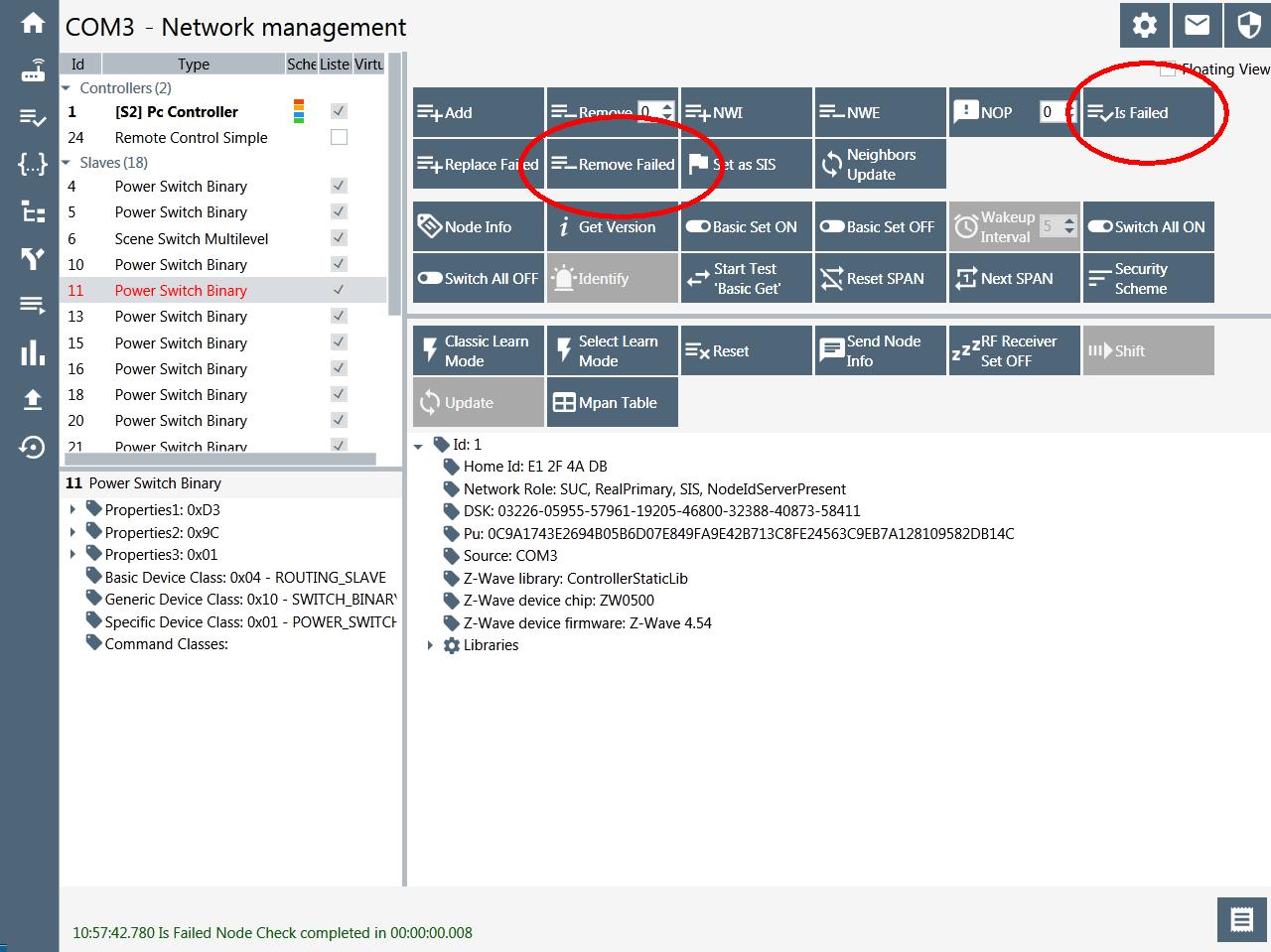
- Z-Wave PC Controller.jpg (136.27 KiB) Viewed 4090 times
Re: How to force removal of a dead node?
Posted: Friday 10 January 2020 16:46
by Plantje
Thank you very much! Why do you need to use this with care? It is pretty easy to see which ones need to be removed, right?
Strange, seems that you can only remove the failed nodes... why not just select and remove?
Anyway: good find!
Re: How to force removal of a dead node?
Posted: Friday 10 January 2020 18:11
by fargle
Plantje wrote: Friday 10 January 2020 16:46
Why do you need to use this with care? It is pretty easy to see which ones need to be removed, right?
No. Because this is being run on a separate Windows pc, and not the real Domoticz instance,
none of the nodes are registered to it, so they won't talk to it. What you see is just what's on the controller itself. So
all the nodes will show as failed if scanned. It's possible to easily delete working nodes.
So I only selected, scanned and deleted the known dead ones.
That's all I have done with this tool, I may do some more playing with a spare Z-Stick, but not with my production one.
Forgot to mention that there is a manual for this software
here. Not easy reading...
Re: How to force removal of a dead node?
Posted: Saturday 11 January 2020 13:46
by u01pei2
I also had this problem and it looks like I just solved it, without the use of additional software (
Short story:
The failed node might have several instances in de XML file. delete them all
Long story:
First step, download the config file as a backup. If you mess-up the config file, you might end up having to reset and re-include every node!
In domoticz check the Node ID for the erroneous Node. for example my node is 045 (0x2d). Stop domoticz and open the config XML file in your favorite editor (you might need to change the editing rights for the file first). Search for id="45", off course you need to replace the 45 for the number you found. In my case I had 5 instances of this number found in the file. All were the same: some basic info, but further empty.
Now for all the instances you found: delete the block of text for the instance. every block starts and ends with </CommandClass> so after the delete block before and after the erroneous node should fit together again with 2x </CommandClass> (ending one block and starting another).
save the file and start domoticz. The node is gone!
I deleted my node several times and it always came back pretty quickly. At the moment of writing this, I performed the manual delete about an hour ago and it has not returned for now, which is considerably longer than before, so I guess it will stay like this.
Re: How to force removal of a dead node?
Posted: Saturday 11 January 2020 15:33
by Plantje
I think I always removed everything, but I will check it again…
So, you stopped the server, only removed the erroneous node in the file and then started the server again?
Re: How to force removal of a dead node?
Posted: Wednesday 08 April 2020 10:22
by Plantje
In my case, I've installed the new version of Domoticz and this provided some more information:

- Removed node.png (16.05 KiB) Viewed 3774 times
In my case this is the node that keeps on popping up.