Page 1 of 1
Script not running?
Posted: Tuesday 18 June 2019 0:23
by FearNaBoinne
Hi all,
I made this quick script:

I have tried with trigger set both as Time and User Variable, but I never see it run in the logs, nor do I see the text devices change...
Any suggestions what is wrong? I just don't see it (anymore)!
Re: Script not running?
Posted: Tuesday 18 June 2019 8:41
by waaren
FearNaBoinne wrote: Tuesday 18 June 2019 0:23
Any suggestions what is wrong? I just don't see it (anymore)!
You try to use the Value of a text device as trigger for the script (in the
if part) but in Blockly this value can only be used in the
do part. See the tooltip for this element when you hover over it with your mouse-pointer.
You can find an alternative way of doing this in
this topic
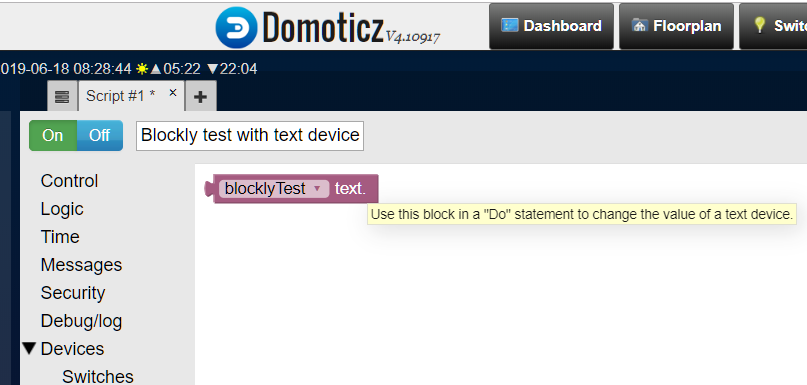
- Blockly with
- Blockly.png (49.36 KiB) Viewed 1614 times
Re: Script not running?
Posted: Tuesday 18 June 2019 10:15
by FearNaBoinne
Thanks! I did not see the mouseover tooltip... There's some weird restrictions with Blockly...

I actually tried to do it in the LUA script that builds the user variables sunset and sunrise, but was unable to figure out how to set both text devices (Sunrise.text and Sunset.text) from LUA (I could not find examples for that)... So if someone can show me how to set the text of a text device from LUA, I'll be happy too! (Or actually happier, as I can lose a script and consolidate...)
Re: Script not running?
Posted: Tuesday 18 June 2019 10:36
by waaren
FearNaBoinne wrote: Tuesday 18 June 2019 10:15
I actually tried to do it in the LUA script that builds the user variables sunset and sunrise, but was unable to figure out how to set both text devices (Sunrise.text and Sunset.text) from LUA (I could not find examples for that)...
Have a look at this
topic (dzVents = 100% Lua)