Page 1 of 1
K2000 keypad
Posted: Wednesday 23 January 2019 16:24
by remko2000
I've bought a K2000 security keypad. I've seen that I can link this keypad to a fibaro binair sensor. I was wondering if I its possible to link this keypad to a wemos D1 with ESP easy instead of a fibaro sensor. This is a working connection diagram to a fibaro sensor:
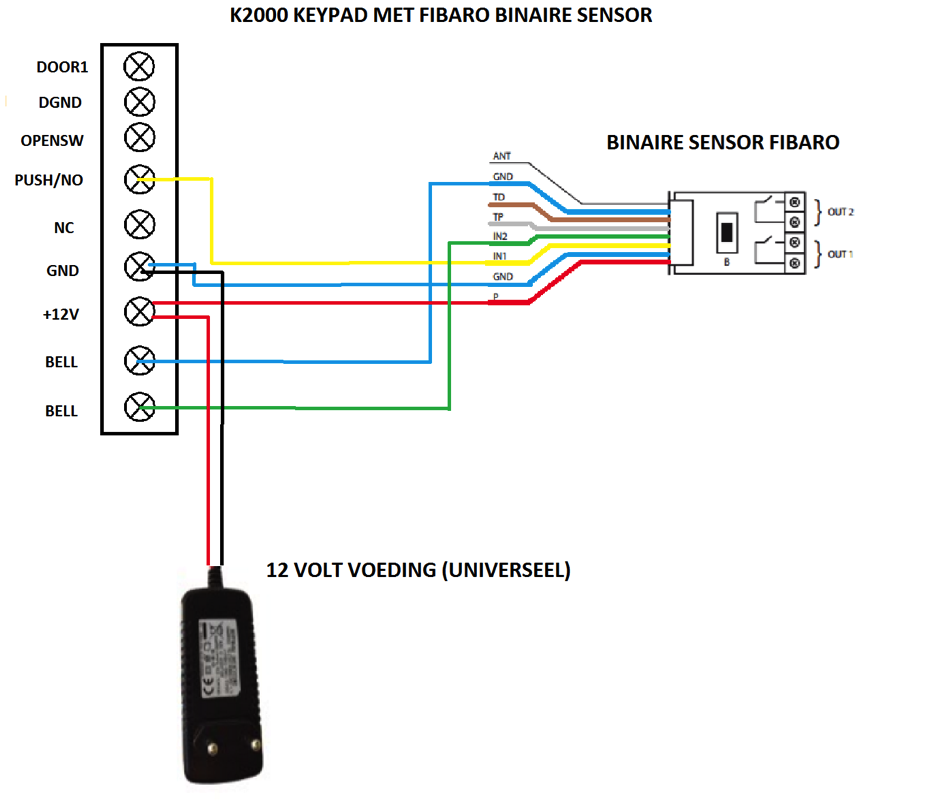
- k2000.png (134 KiB) Viewed 1661 times
This is the diagram of the K2000 panel:
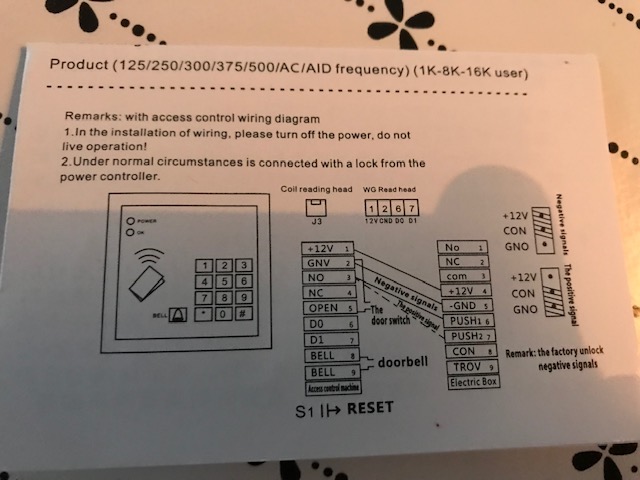
- k20002.jpg (73.57 KiB) Viewed 1661 times
I only want to switch my alarmsysteem (in domoticz) on or off. I do not want to pair with a doorbell or doorlock. If it's possible how do I connect this? Do I need a (dual)relayboard? Which contacts of the K2000 do I need? In the fibarodiagram I see the only use 3 contacts beside power/ground If I have to use a dualrelayboard I need 4 contacts I should think.
I don't want to damage my panel so somekind of hardwareconnectionstips are welcome.
Re: K2000 keypad
Posted: Saturday 26 January 2019 16:35
by remko2000
The system is with 12V so I think I have to use first a buckconverter to convert 12V tot 3,3V for the GPIO's of the Wemos? Someone?
Re: K2000 keypad
Posted: Saturday 02 February 2019 13:48
by remko2000
I am now further. I connect the two "BEL' contacts to Ground and GPIO12. With this switchinput I want to set my alarm ' IN'.This works fine.
The contact NO (normally in)/push on the panel I've connected to GPIO13.With this switchinput I want to set my alarm 'OUT'.
When I enter the correct alarmcode on the panel to set sometimes it works and sometimes it does not work. The signal on GPIO13 is very instable.
The output in the log when enter the correct code:
93787: SW : Switch state 1 Output value 0
93795: EVENT: NOAlarmuit#Switch=0.00
93987: SW : Switch state 0 Output value 1
93990: EVENT: NOAlarmuit#Switch=1.00
94187: SW : Switch state 1 Output value 0
94190: EVENT: NOAlarmuit#Switch=0.00
94687: SW : Switch state 0 Output value 1
94690: EVENT: NOAlarmuit#Switch=1.00
94987: SW : Switch state 1 Output value 0
94990: EVENT: NOAlarmuit#Switch=0.00
95687: SW : Switch state 0 Output value 1
95690: EVENT: NOAlarmuit#Switch=1.00
95787: SW : Switch state 1 Output value 0
95790: EVENT: NOAlarmuit#Switch=0.00
95887: SW : Switch state 0 Output value 1
95890: EVENT: NOAlarmuit#Switch=1.00
95987: SW : Switch state 1 Output value 0
95990: EVENT: NOAlarmuit#Switch=0.00
96097: SW : Switch state 0 Output value 1
96100: EVENT: NOAlarmuit#Switch=1.00
96287: SW : Switch state 1 Output value 0
96290: EVENT: NOAlarmuit#Switch=0.00
96787: SW : Switch state 0 Output value 1
96790: EVENT: NOAlarmuit#Switch=1.00
I think because it is a pushcontact that I get multiple switch changes. I would like to have the same output when I pressing the bellcontact:
244087: SW : Switch state 0 Output value 0
244089: EVENT: belalarmin#Switch=0.00
244187: SW : Switch state 1 Output value 1
244189: EVENT: belalarmin#Switch=1.00
i have experimented with the different switch settings in esp easy from my wemos but nothing helps.This is the output when I set to normal switch (no logic and pull up).
Another setting maybe? Maybe a rull? Or can I set a delay after the first Switch state change so the rest is ignored?
Re: K2000 keypad
Posted: Thursday 28 March 2019 15:58
by wvries
You would need a level shifter to connect it to the GPIO's of the ESP.
If I see it correctly, the pins 1,2,6 and 7 have the name WG on top of it. It is Wiegand, standard supported by ESPEASY SW.
you can use that to send the data from the keypad to a text sensor in DZ and work from there with the data.
Doing it with a wiegand interface from a RFID reader for many years already without any issues (also 12V).