Page 1 of 3
UV index readings realtime
Posted: Thursday 16 August 2018 17:18
by capman
I use wunderground from my weather value readings. But the pws for my location is no UV Index. Or not so accurate that I can use it.
So I found a site who have some UV readings (API + Json call). But I have no knowledge how to begin for using the data in a script into domoticz.
Is there anybody who know how to do is , and to set me in the right direction ? I'm not a scripter , just copy past to get the result a want

.
Thanks.
Site a found >>>
https://www.openuv.io/
Re: UV index readings realtime
Posted: Thursday 16 August 2018 17:47
by remb0
Re: UV index readings realtime
Posted: Thursday 16 August 2018 20:35
by capman

My search string UV was not working on the site. To short
Thanks remb0 , I will try this

.
Re: UV index readings realtime
Posted: Wednesday 27 May 2020 17:17
by Toulon7559
A plugin for Domoticz is a nice way to extract the info from OpenUV.io, but as part of a Python-script I just need the JSON-response from OpenUV.io
Should be possible with just one scriptline (as adapted line from the examples at the Website of OpenUV.io), like
Code: Select all
page1 = urllib.urlopen('https://api.openuv.io/api/v1/uv?lat=LATITUDE&lng=LONGITUDE&altitude=ALTITUDE' -H 'x-access-token: API_KEY')
But the URL-call in that line fails with error report
pointing to the last but one character of the line:
'
Tried several variants for the end of the line with the token-input, but then get reply 'No API-key provided'
No difference whether Python2.x or Python3.x
Must be something subtle.
Anybody a suggestion for correction?
Re: UV index readings realtime
Posted: Wednesday 27 May 2020 18:58
by FireWizard
Hi,
Quick guess. Did you try:
Code: Select all
page1 = urllib.request.urlopen('https://api.openuv.io/api/v1/uv?lat=LATITUDE&lng=LONGITUDE&altitude=ALTITUDE' -H 'x-access-token: API_KEY')
Regards
Re: UV index readings realtime
Posted: Wednesday 27 May 2020 20:23
by Toulon7559
Unfortunately the insertion of 'request' is not making a difference.
In some way the problem is related to the end-section of the line, because that is the difference with other scripts
Looking 'under the hood' at the website of OpenUV.io I have seen the API-key-insertion in various ways, but none of those constructions could make my scriptline error-free.
Suspicion coming up that the packaging & syntax around the API-Key is not correct for this script-line:
see
https://docs.python.org/2/library/urllib.html
But no idea yet how to remedy ......
Perhaps using the plugin is an easier solution.
Re: UV index readings realtime
Posted: Wednesday 27 May 2020 22:15
by FireWizard
Ho,
@Toulon7559
If you have Mosquitto and Node Red installed, I have described a solution, using these tools at:
https://www.domoticz.com/forum/viewtopi ... 12&t=32438
Perhaps as alternative for the script.
Regards
Re: UV index readings realtime
Posted: Thursday 28 May 2020 16:25
by Toulon7559
MQTT & NodeRed is on my ToDo-list.
Therefore time required for the learning curve:
this may be a good exercise ........
Re: UV index readings realtime
Posted: Thursday 28 May 2020 16:38
by waaren
Toulon7559 wrote: Thursday 28 May 2020 16:25
MQTT & NodeRed is on my ToDo-list.
Therefore time required for the learning curve.
Meanwhile looking for something quick&dirty-but-effective .......
In case you are interested.... I have a working dzVents script
Re: UV index readings realtime
Posted: Thursday 28 May 2020 17:10
by FireWizard
@Toulon7559
@waaren wrote:
In case you are interested.... I have a working dzVents script
In that case, I should accept this generous offer

.
Regards
Re: UV index readings realtime
Posted: Thursday 28 May 2020 22:59
by Toulon7559
@waaren
Thanks for the offer!
Sure better (and much easier) than reinventing the wheel ....
As earlier indicated, looking for a script getting hold of the localised json-file, aiming at extraction of some data.
Re: UV index readings realtime
Posted: Friday 29 May 2020 0:12
by waaren
Toulon7559 wrote: Thursday 28 May 2020 22:59
@waaren
Thanks for the offer!
Sure better (and much easier) than reinventing the wheel ....
As earlier indicated, looking for a script getting hold of the localised json-file, aiming at extraction of some data.
Here you go...
Probably some quite old constructs in the script because I have not touched it since a long time but it is still functional.
Code: Select all
--[[ openUV.lua for [ dzVents >= 2.4 ]
]]--

return {
    on      =   {   timer           =   { "every 30 minutes at daytime" }, -- Triggers the getJsonPart
                    httpResponses   =   { "openUV_Response" }               -- Trigger the handle Json part
                },

    logging =   {   level     =   domoticz.LOG_ERROR,
                    marker    =   "openUV"
                },

    data    =   {   openUV_Longitude          = {initial = "4.51234"                           },  -- I store my longitude, latitude, APIkey, filename in data
                    openUV_Latitude           = {initial = "51.81234"                          },  -- You can get them from domoticz settings
                    openUV_Filename           = {initial = "scripts/dzVents/data/OpenUV.json"   },  -- path relative to domoticz directory
                    openUV_APIKey             = {initial = "8xxxxxxxxxxxxd5e004ea781"   },  -- get your free API key from https://www.openuv.io/
                    openUV_currentUV_device   = {initial = 887                                  },  -- You have to create a couple of virtual devices
                    openUV_maxUV_device       = {initial = 888                                  },  -- (first two as UV sensors and other two as Alert)
                    openUV_UV_Alert_device    = {initial = 894                                  },  -- Remember device ID"s and replace the "xxx" with them
                    openUV_ozone_Alert_device = {initial = 895                                  },  -- Look at https://www.domoticz.com/wiki/Hardware_Setup#Dummy_Hardware
                },

    execute = function(dz, trigger)

        local function UV_Index2Alert(index)                            -- Levels as from KNMI
            local alert = dz.ALERTLEVEL_RED
            if      index < 3 then alert = dz.ALERTLEVEL_GREY
            elseif  index < 5 then alert = dz.ALERTLEVEL_GREEN
            elseif  index < 7 then alert = dz.ALERTLEVEL_YELLOW
            elseif  index < 9 then alert = dz.ALERTLEVEL_ORANGE
            end
            return alert
        end

        local function ozone2Alert(value)                               -- Levels as found on various WIKI pages
            local alert = dz.ALERTLEVEL_RED
            if      value > 400 then alert = dz.ALERTLEVEL_GREY
            elseif  value > 340 then alert = dz.ALERTLEVEL_GREEN
            elseif  value > 310 then alert = dz.ALERTLEVEL_YELLOW
            elseif  value > 280 then alert = dz.ALERTLEVEL_ORANGE
            end
            return alert
        end

        local function getOpenUV_json()
            local openUV_url        = "https://api.openuv.io/api/v1/uv?lat=" .. dz.data.openUV_Latitude .. "&lng=" .. dz.data.openUV_Longitude
             dz.openURL({
                            url = openUV_url ,
                            method = "GET",
                            callback = "openUV_Response",
                            headers = { ['x-access-token'] =  dz.data.openUV_APIKey },
                      })
        end

        local function handleOpenUVResponse()
            -- Read response into table and close file
            openUVResponse      = trigger.json
            dz.log(openUVResponse,dz.LOG_DEBUG)

            if openUVResponse == nil or
               openUVResponse.result.uv                      == nil or
               openUVResponse.result.uv_max                  == nil or
               openUVResponse.result.uv_max_time             == nil or
               openUVResponse.result.ozone                   == nil or
               openUVResponse.result.safe_exposure_time.st3  == nil then
               dz.log("Some values are missing; check it out",dz.LOG_ERROR)
               dz.log(openUVResponse,dz.LOG_ERROR)
               return
            end

            -- Update UV devices
            dz.devices(dz.data.openUV_currentUV_device).updateUV(dz.utils.round(openUVResponse.result.uv,1))
            dz.devices(dz.data.openUV_maxUV_device).updateUV(dz.utils.round(openUVResponse.result.uv_max,1))

            -- convert to local time
            local commandString     = "date -d " .. openUVResponse.result.uv_max_time ..  "  '+%k:%M uur' "
            local dateOutput        = assert(io.popen(commandString))
            local openUVMaxUVtime   = dateOutput:read("*all")
            dateOutput:close()

            -- Construct Alertlevel and text and update UV alert device (type = Alert)
            UV_AlertText = "Max UV index today: " .. dz.utils.round(openUVResponse.result.uv_max,1) .. " at " .. openUVMaxUVtime
            dz.log("Current UV index = " .. dz.utils.round(openUVResponse.result.uv,1) .. ", " ..  UV_AlertText,dz.LOG_INFO)
            dz.devices(dz.data.openUV_UV_Alert_device).updateAlertSensor(UV_Index2Alert(openUVResponse.result.uv_max), UV_AlertText)

            -- Construct Alertlevel and text and update ozone alert device (type = Alert)
            ozoneAlertText = "Ozone (Dobson unit) is " .. openUVResponse.result.ozone .. "\n Max. exposure to sun (Skintype 3) is " ..
                            math.min(openUVResponse.result.safe_exposure_time.st3,720) .. " minutes."
            dz.log(ozoneAlertText,dz.LOG_INFO)
            dz.devices(dz.data.openUV_ozone_Alert_device).updateAlertSensor(ozone2Alert(openUVResponse.result.ozone), ozoneAlertText)
        end

        if trigger.isTimer or trigger.isDevice then
            getOpenUV_json()
        else
            handleOpenUVResponse()
        end
    end
}
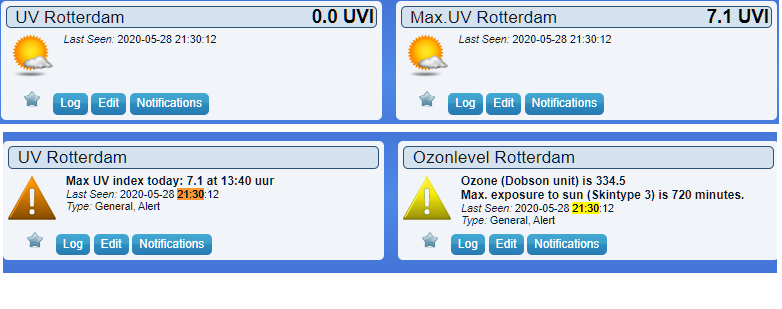
- uv1.png (38.9 KiB) Viewed 4575 times
Re: UV index readings realtime
Posted: Friday 29 May 2020 9:11
by EdwinK
If this works, I will stop with trying to get the data through mqtt, which I still can't get to work.
Re: UV index readings realtime
Posted: Friday 29 May 2020 10:12
by EdwinK
When I use this, I get an error:
2020-05-29 10:00:07.118 Error: Error opening url:
https://api.openuv.io/api/v1/uv?lat=51. ... g=4.412694
2020-05-29 10:00:07.262 Error: dzVents: Error: (3.0.8) openUV: HTTP/1.1 response: 28 ==>> Timeout was reached
2020-05-29 10:00:07.262 Error: dzVents: Error: (3.0.8) openUV: Some values are missing; check it out
2020-05-29 10:00:07.262 Error: dzVents: Error: (3.0.8) openUV: nil
I have put the api key in the settings, but somehow it looks it isn't used.
Re: UV index readings realtime
Posted: Friday 29 May 2020 10:24
by Toulon7559
For me waaren's script works like a breeze
= Quick start to get hold of the values in the JSON-file
[Planned for generation (in RRDTool) of reference curve for my own UV-sensors, and for display of some values at my website]
In that perspective a question for understanding.
With following scriptline would expect to see the indicated JSON-file in the indicated folder
Code: Select all
openUV_Filename = {initial = "scripts/dzVents/data/OpenUV.json" }, -- path relative to domoticz directory
However, nothing visible.
Expecting too much, or wrong understanding?
Re: UV index readings realtime
Posted: Friday 29 May 2020 12:00
by waaren
Toulon7559 wrote: Friday 29 May 2020 10:24
Expecting too much, or wrong understanding?
A bit of both
This line is no longer in use. I used it to test / develop parts of the script because the number of daily allowed calls to openUV are limited. So I stored the JSON there during test / development to be able to test the processing of the JSON without the actual call.
If you need the JSON string in the file you could add below snippet after line 59 " dz.log(openUVResponse,dz.LOG_DEBUG)"
Code: Select all
            local f = io.open(dz.data.openUV_Filename, 'a')
            f:write(trigger.data)
            f:close()
Re: UV index readings realtime
Posted: Friday 29 May 2020 12:05
by waaren
EdwinK wrote: Friday 29 May 2020 10:12
I have put the api key in the settings, but somehow it looks it isn't used.
If the script did not use the API key you would see something different like
Code: Select all
2020-05-29 12:02:35.825  Status: dzVents: Info: Handling httpResponse-events for: "openUV_Response"
2020-05-29 12:02:35.825  Error: dzVents: Error: (3.0.8) openUV: HTTP/1.1 response: 403 ==>> Forbidden
2020-05-29 12:02:35.825  Error: dzVents: Error: (3.0.8) openUV: An error occurred when calling event handler
Can you double check to see if you have any typos and try again. If no luck you can send you script as it is now via PM
Re: UV index readings realtime
Posted: Friday 29 May 2020 14:53
by Toulon7559
@waaren
Exactly same argument (= limited daily free allowance for calls) at my side to have OpenUV called only by one application, and then source-information locally available for all other users, including possibility to directly read the JSON-file.
In lua I would use a scriptline to set the required properties/attributes for the JSON-file, like
Code: Select all
os.execute("chmod a+rw /path/filename.txt")
After check, that construction also seems valid for dzVents.
waaren probably has more clever (=shorter&general) solution, but this line added to the snippet makes the specific JSON-file accessible for all users
Code: Select all
os.execute("chmod a+rw /home/pi/domoticz/scripts/dzVents/data/OpenUV.json")
The JSON-file is the extended source for info available from OpenUV.
By changing the attribute in the scriptline from 'a ' to 'w+' (is 'append-mode' versus 'rewrite'-mode), you get only the latest issue of the JSON-file, not the whole collection.
Code: Select all
local f = io.open(dz.data.openUV_Filename, 'w+')
For getting the 'elementary' UV-info it is much easier to install the plugin (but you have to be aware that each computer-with-plugin needs it's own API-key from OpenUV, because otherwise you are quickly consuming your daily free allowance of calls) ......
Re: UV index readings realtime
Posted: Saturday 30 May 2020 14:13
by Jan Jansen
waaren wrote: Friday 29 May 2020 0:12
Probably some quite old constructs in the script because I have not touched it since a long time but it is still functional.
@ Waaren,
Thank you for sharing your script. I want to customize the script.

- OpenUv.png (45.62 KiB) Viewed 4470 times
I want to get rid of the blank line between "Max UV index today ... and Max exposure ...", no success.
Code: Select all
-- Construct Alertlevel and text and update UV alert device (type = Alert)
            UV_AlertText = "Max UV index today: " .. dz.utils.round(openUVResponse.result.uv_max,1) .. " om " .. openUVMaxUVtime .."\n Max blootstelling aan de zon (huidtype 3) is " ..
                            math.min(openUVResponse.result.safe_exposure_time.st3,720) .. " minuten!"
            dz.log("Current UV index = " .. dz.utils.round(openUVResponse.result.uv,1) .. ", " ..  UV_AlertText,dz.LOG_INFO)
            dz.devices(dz.data.openUV_UV_Alert_device).updateAlertSensor(UV_Index2Alert(openUVResponse.result.uv_max), UV_AlertText)
Is it possible to avoid this blank line, if so how?
Thanks in advance!
Re: UV index readings realtime
Posted: Saturday 30 May 2020 15:00
by waaren
Jan Jansen wrote: Saturday 30 May 2020 14:13
Is it possible to avoid this blank line, if so how?
If you remove the \n before Max blootstelling you wont' have the blank line