Domoticz NanoPi

In this subforum you can show projects you have made, or you are busy with. Please create your own topic.

Moderator: leecollings

Post Reply
User avatar
DewGew
Posts: 582
Joined: Thursday 21 April 2016 12:01
Target OS: Raspberry Pi / ODroid
Domoticz version: V4.10618
Location: Sweden
Contact:

Domoticz NanoPi

Post by DewGew »

Hi All,

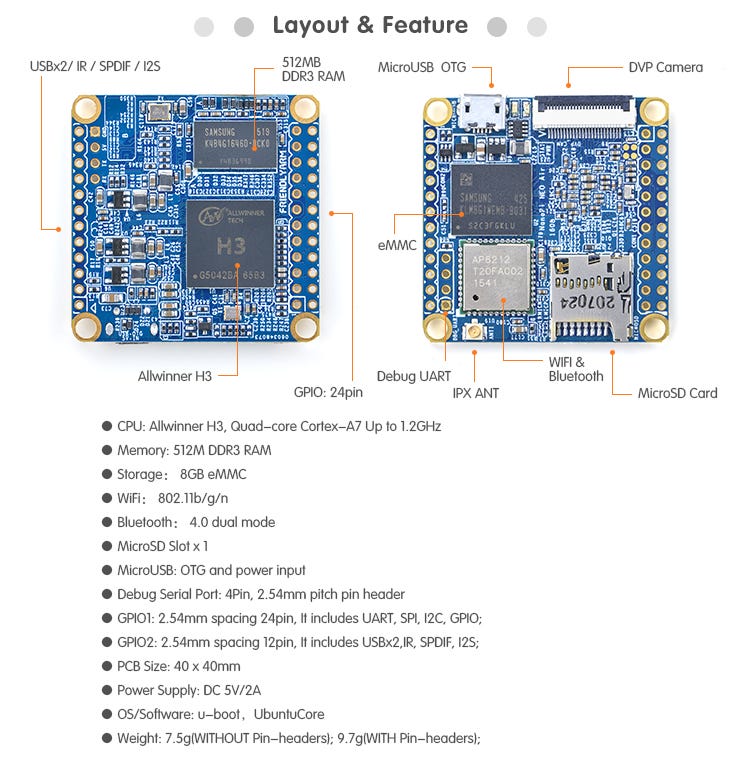
I want to show you my Domoticz setup. I use a NanoPi air Neo running with DietPi. Simple installation with their script you dont even need a keyboard and monitor :shock:. Just follow this guide.

I installed DietPi to the integrated eMMC, now i only use the SD-Card only for storage.
Install DietPi on the eMMC (you must have DietPi up and running on a SDcard prior to this):
Spoiler: show

Code: Select all

#Download image / extract
#There might be a newer version on dietpi.com
wget 'http://dietpi.com/downloads/images/DietPi_NanoPiNEOAir-armv7-(Jessie).7z' -O image.7z
#NanoPi T3 = wget 'http://dietpi.com/downloads/images/DietPi_NanoPiM3T3-armv7-(Jessie).7z' -O image.7z 
7z x -aoa image.7z

#Mount image to set WiFi creds in dietpi.txt:
modprobe loop
losetup -f
losetup /dev/loop2 "$(ls | grep -m1 'DietPi_v'*'.img')"
partprobe /dev/loop2
mkdir -p /mnt/loop2p1
mkdir -p /mnt/loop2p2
mount /dev/loop2p1 /mnt/loop2p1
mount /dev/loop2p2 /mnt/loop2p2

# - Enter Wifi creds and enable wifi, then save and exit
nano  /mnt/loop2p1/dietpi.txt

# Edit boot script to target EMMC for resize
#    replace all instances of /dev/mmcblk0 with /dev/mmcblk2
nano /mnt/loop2p1/dietpi/boot

# Edit FSTAB
#    replace all instances of /dev/mmcblk0 with /dev/mmcblk2
nano /mnt/loop2p2/etc/fstab

sync
umount -f /mnt/loop2p1
umount -f /mnt/loop2p2
losetup -d /dev/loop2

#Write to EMMC
# - Following assumes you have no other files in this directory with name 'DietPi_v*.img' (other than the one we downloaded above)
dd if="$(ls | grep -m1 'DietPi_v'*'.img')" of=/dev/mmcblk2

#Power off, unplug SD card, power on
Then I installed Domoticz as usually with

Code: Select all

sudo curl -L install.domoticz.com | bash
INFO:
Image

I use wifi antenna and USB port from old part I had and I made an enclosure in my ultimaker 3D printer.
Attachments
Domoticz Nano.JPG
Domoticz Nano.JPG (5.76 KiB) Viewed 2229 times
Last edited by DewGew on Wednesday 16 May 2018 12:58, edited 1 time in total.
Raspberry Pi 3 | domoticz | Aeon Labs Z-Stick GEN5 | RFlink gateway
NanoPi NEO-air | REGO6XX interface | Machinon theme | Homebridge | Domoticz Google Assistant | ideAlarm
User avatar
DewGew
Posts: 582
Joined: Thursday 21 April 2016 12:01
Target OS: Raspberry Pi / ODroid
Domoticz version: V4.10618
Location: Sweden
Contact:

Re: Domoticz NanoPi

Post by DewGew »

Results:
IMG_0085.jpg
IMG_0085.jpg (13.01 KiB) Viewed 2228 times
The attachment IMG_0085.jpg is no longer available
Raspberry Pi 3 | domoticz | Aeon Labs Z-Stick GEN5 | RFlink gateway
NanoPi NEO-air | REGO6XX interface | Machinon theme | Homebridge | Domoticz Google Assistant | ideAlarm
User avatar
DewGew
Posts: 582
Joined: Thursday 21 April 2016 12:01
Target OS: Raspberry Pi / ODroid
Domoticz version: V4.10618
Location: Sweden
Contact:

Re: Domoticz NanoPi

Post by DewGew »

IMG_0083.jpg
IMG_0083.jpg (21.07 KiB) Viewed 2227 times
Raspberry Pi 3 | domoticz | Aeon Labs Z-Stick GEN5 | RFlink gateway
NanoPi NEO-air | REGO6XX interface | Machinon theme | Homebridge | Domoticz Google Assistant | ideAlarm
ben53252642
Posts: 543
Joined: Saturday 02 July 2016 5:17
Target OS: Linux
Domoticz version: Beta
Contact:

Re: Domoticz NanoPi

Post by ben53252642 »

Very cool, you will probably want about a 256mb zram config with that much ram though.

It will run Domoticz but definately not my setup (without zram) and maybe only just with it. :)
Unless otherwise stated, all my code is released under GPL 3 license: https://www.gnu.org/licenses/gpl-3.0.en.html
Post Reply