Page 1 of 1
How to dim a light?
Posted: Friday 27 April 2018 22:14
by acaonweb
I would like to fade out a light when I push a button, so the button is the trigger.
I’d like to set the level to 0% in a short but defined amount of time for example 3seconds
How can realize that with dzevents?
My lights are Yeelight so they support .dimTo() and my dzevents is 2.2.0
Thanks in advance
Fabrizio
Re: How to dim a light?
Posted: Saturday 28 April 2018 0:39
by waaren
With current version of dzVents ( 2.4.5 ) you can dim using only native dzVents code with steps of 1 second using the afterSec() method. Look
here for an example. So if you want to do it in 3 seconds then it would not go very smoothly. As far as I understand there is no support yet for user defined smoothness in the domoticz code for the Yeelight hardware
(Yeelight.cpp) . If you could work out what the http string should be, It must be possible to call the Yeelight bulb with dzVents openURL.
Look for a solution with os.execute (described in the wiki)
Here
Or create a Python script using the package described
here and call that from a device's off and/or on action
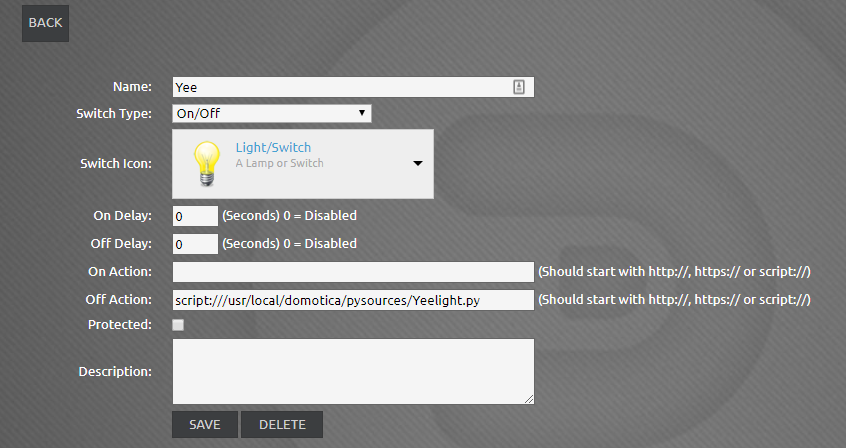
- Calling the Yeelight python script from a virtual device
- Capture.PNG (243.54 KiB) Viewed 1314 times
you could do whatever action is possible with your yeelight bulbs.
python code to dim to zero in 15 seconds.. // Script needs Yeelight module; install with ==>> pip install Yeelight
Code: Select all
#!/usr/bin/python
from yeelight import discover_bulbs
from yeelight import Bulb

bulb = Bulb("nnn.nnn.nnn.nnn", effect="smooth", duration=15000) # 15 seconds
bulb.turn_off()
Re: How to dim a light?
Posted: Saturday 28 April 2018 10:35
by acaonweb
thanx for your answer
cool, very nice the python way

there is a way to execute python script in dzvents?
Re: How to dim a light?
Posted: Saturday 28 April 2018 11:25
by waaren
Yes but you will have to use the os.execute command
Re: How to dim a light?
Posted: Saturday 28 April 2018 12:17
by acaonweb
many thanx!!!
