Page 1 of 2
Help with some scripting with the P1
Posted: Monday 13 November 2017 20:08
by Derik
Dear all..
Is there some one that can make dzvent working for my P1 actual
I try to get a script for my P1, when i deliver back to to the net, with my solar panels.
With blockley i cannot go to minus..
So what i an looking for:
When time is between x and y
when p1 actual is -500 and dummy X is off, switch dummy X on.
when p1 actual is >500 and dummy X is on, switch dummy off
Only i do not understand the dzvents script..
So hope someone help me.
xxx
I get the first reaction from emme:
uhm.. let's try:
:
Code: Select all
return {
	on = {
		timer = {
			'between x and y'
		},
		devices = {
			'P1'
		},
	},
	execute = function(domoticz, devP1)
	    local dummy = domoticz.devices('dummy')
		if tonumber(devP1.rawData[1]) > 500 and dummy.state == 'Off' then
		    dummy.switchOn()
		elseif tonumber(devP1.rawData[1]) < -500 and dummy.state == 'On' then
		    dummy.switchOff()
		end
	end
}
I'm using rawData since I'm unsure what kind of device P1 is

ciao M
P.S.
we can clean the code by not chasing the dummy switch state:
CODE:
Code: Select all
if tonumber(devP1.rawData[1]) > 500 then
		    dummy.switchOn().checkFirst()
		elseif tonumber(devP1.rawData[1]) < -500  then
		    dummy.switchOff().checkFirst()
		end
Re: Help with some scripting with the P1
Posted: Monday 13 November 2017 20:39
by Derik
Do have now:
https://drive.google.com/file/d/1PBCj8P ... sp=sharing
And this my P1:
https://drive.google.com/file/d/1sBuL6o ... sp=sharing
With the data of the P1:
https://drive.google.com/file/d/1i3LG5E ... sp=sharing
And the code i did change: [ Hope did this ok..

]
Code: Select all
return {
	on = {
		timer = {
			'between 08:00 and 22:00'
		},
		devices = {
			'D.M. P1: Stroom'
		},
	},
	execute = function(domoticz, devP1)
	    local dummy = domoticz.devices('Dummy P1')
		if tonumber(devP1.rawData[1]) > 500 and dummy.state == 'Off' then
		    dummy.switchOn()
		elseif tonumber(devP1.rawData[1]) < -500 and dummy.state == 'On' then
		    dummy.switchOff()
		end
	end
}
The code is not working:
https://drive.google.com/file/d/1q4WBKP ... sp=sharing
And the only thing in the log is:
https://drive.google.com/open?id=1X1THa ... AW-kiUM3ah
Hope you will help me.
Re: Help with some scripting with the P1
Posted: Monday 13 November 2017 21:11
by emme
ok.. the code is probably running and since there is no debug, neither error, it could be that the conditions are NOT invoked
that's probably because your D.M. P1: Strom is a combined device and rawData[1] returns ALL values string....
Since it is an Energy device... try to replace the .rawData[1] to .WhActual (that already return a Number value)
I'd also add some debug info....
Code: Select all
 return {
	on = {
		timer = {
			'between 08:00 and 22:00'
		},
		devices = {
			'D.M. P1: Stroom'
		},
	},
	execute = function(domoticz, devP1)
	    local dummy = domoticz.devices('Dummy P1')
	    domoticz.log('Here is a useful info: whActual: '..devP1.WhActual..'W',domoticz.LOG_FORCE)
		if devP1.WhActual > 500 and dummy.state == 'Off' then
		    dummy.switchOn().checkFirst()
		    domoticz.log('Switching ON',domoticz.LOG_FORCE)
		elseif devP1.WhActual < -500 and dummy.state == 'On' then
		    dummy.switchOff().checkFirst()
		    domoticz.log('Switching OFF',domoticz.LOG_FORCE)
		end
	end
}
Re: Help with some scripting with the P1
Posted: Monday 13 November 2017 21:40
by Derik
mmm
Looks it is working: GREAT.
Hope tomorrow when the sun i do his work.
The dummy is going off:
Only did see some errors:
Code: Select all
2017-11-13 21:35:59.170 (D.M.: P1) P1 Smart Meter (D.M. P1: Stroom)
2017-11-13 21:35:59.437 dzVents: Info: Handling events for: "D.M. P1: Stroom", value: "8708725;9639761;2777208;6692124;960;0"
2017-11-13 21:35:59.437 dzVents: Info: ------ Start internal script: DZ: Teruglever: Device: "D.M. P1: Stroom (D.M.: P1)", Index: 3185
2017-11-13 21:35:59.439 dzVents: !Info: Teruglever dummy switch : whActual: 960W
2017-11-13 21:35:59.439 dzVents: Info: ------ Finished DZ: Teruglever
2017-11-13 21:36:00.397 (D.M.: Zwave) Usage (Z: Pellet Actueel)
2017-11-13 21:36:00.419 (D.M.: Zwave) General/kWh (Z: Pellet Totaal)
2017-11-13 21:36:00.457 dzVents: Info: ------ Start internal script: DZ: Teruglever:, trigger: between 08:00 and 22:00
2017-11-13 21:36:00.483 Error: dzVents: Error: An error occured when calling event handler DZ: Teruglever
2017-11-13 21:36:00.483 Error: dzVents: Error: ...icz/scripts/dzVents/generated_scripts/DZ: Teruglever.lua:12: attempt to index local 'devP1' (a nil value)
2017-11-13 21:36:00.483 dzVents: Info: ------ Finished DZ: Teruglever
2017-11-13 21:36:00.556 LUA: Winddelen naar P.V.O.
Nill? @ 21:36:00:483
And do i need set the device or time or variable active ? [ on the right side ]
Re: Help with some scripting with the P1
Posted: Tuesday 14 November 2017 8:09
by emme
mmmh... the timer activation does not provide the devP1 table....
ok.. let's try to redefine it in case of it...
Code: Select all
 return {
	on = {
		timer = {
			'between 08:00 and 22:00'
		},
		devices = {
			'D.M. P1: Stroom'
		},
	},
	execute = function(domoticz, devP1, triggerInfo)
		if triggerInfo.type = domoticz.EVENT_TYPE_TIMER then
			devP1 = domoticz.devices('D.M. P1: Stroom')
		end
	    local dummy = domoticz.devices('Dummy P1')
	    domoticz.log('Here is a useful info: whActual: '..devP1.WhActual..'W',domoticz.LOG_FORCE)
		if devP1.WhActual > 500 and dummy.state == 'Off' then
		    dummy.switchOn().checkFirst()
		    domoticz.log('Switching ON',domoticz.LOG_FORCE)
		elseif devP1.WhActual < -500 and dummy.state == 'On' then
		    dummy.switchOff().checkFirst()
		    domoticz.log('Switching OFF',domoticz.LOG_FORCE)
		end
	end
}
please note that the script will be fired once a minute between 8.00 and 22.00 and in case of value change of D.M. P1: Stroom device
to avoid it you can check time within the code:
Code: Select all
return {
	on = {
		devices = {
			'D.M. P1: Stroom'
		},
	},
	execute = function(domoticz, devP1)
		local Time = require('Time')
		local currentTime = Time()
		local dummy = domoticz.devices('Dummy P1')
		if currentTime.hour >= 8 and currentTime.hour <= 22 then
			domoticz.log('Here is a useful info: whActual: '..devP1.WhActual..'W',domoticz.LOG_FORCE)
			if devP1.WhActual > 500 and dummy.state == 'Off' then
				dummy.switchOn().checkFirst()
				domoticz.log('Switching ON',domoticz.LOG_FORCE)
			elseif devP1.WhActual < -500 and dummy.state == 'On' then
				dummy.switchOff().checkFirst()
				domoticz.log('Switching OFF',domoticz.LOG_FORCE)
			end
		end
	end
}
Re: Help with some scripting with the P1
Posted: Tuesday 14 November 2017 21:31
by Derik
buzzy with work...
When i do have time is est.
THANKS!!!
Re: Help with some scripting with the P1
Posted: Sunday 19 November 2017 13:17
by Derik
Dear Emme,
Did use the latest script...
Only the switch is not going anywhere....
I have this:
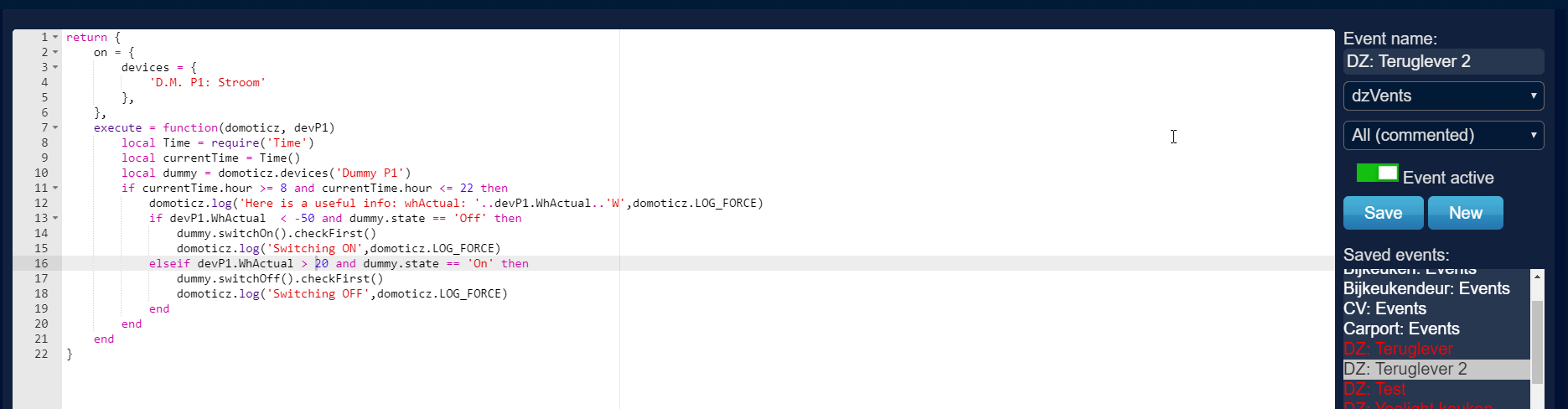
- ScreenShot065.png (71.99 KiB) Viewed 4071 times
And the P1 is in the -
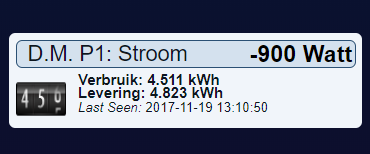
- ScreenShot062.png (10.25 KiB) Viewed 4071 times
only no active dummy
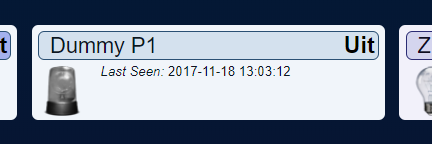
- ScreenShot063.png (11.39 KiB) Viewed 4071 times
There is some error i think:
Code: Select all
2017-11-19 13:15:21.219 dzVents: !Info: Here is a useful info: whActual: 0W
Because the actual value should be -...
Perhaps use the raw data??
Re: Help with some scripting with the P1
Posted: Monday 20 November 2017 8:00
by emme
mmmh... it depends on what kind of device is D.M. P1: Stroom...
I though it was a Electricity device, but the icon looks like a counter....
if so... use .counter instead of WhActual and try again
Re: Help with some scripting with the P1
Posted: Monday 20 November 2017 18:43
by Derik
Sorry i am a noob in scripts...
Did change to:
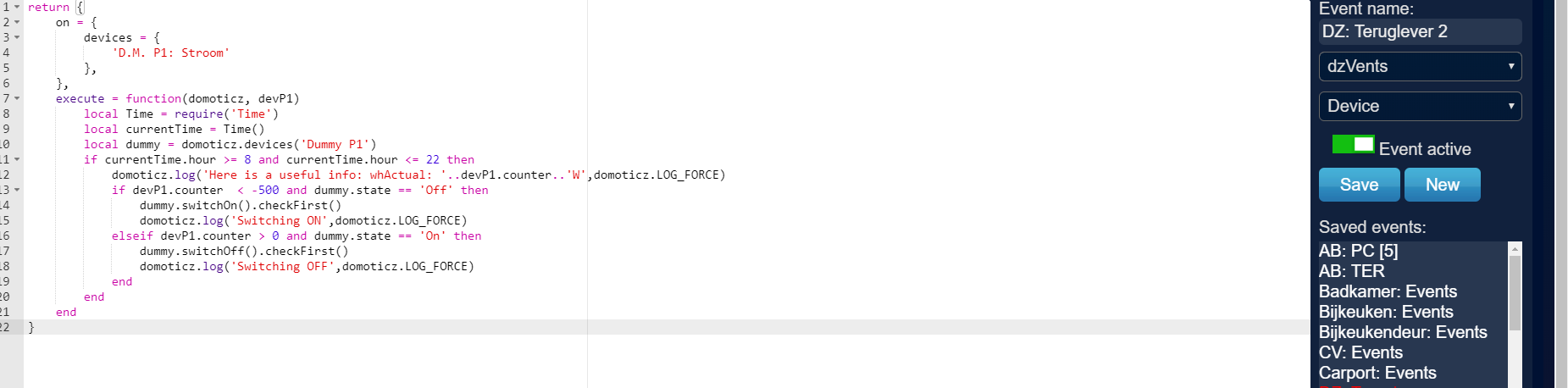
- ScreenShot066.png (71.48 KiB) Viewed 4026 times
Only now i get:
Code: Select all
2017-11-20 18:39:59.199 (D.M.: Zwave) General/kWh (Z: Terras)
2017-11-20 18:39:59.513 dzVents: !Info: Here is a useful info: whActual: 18483.514W
2017-11-20 18:39:59.513 Error: dzVents: Error: An error occured when calling event handler DZ: Teruglever 2
2017-11-20 18:39:59.513 Error: dzVents: Error: ...z/scripts/dzVents/generated_scripts/DZ: Teruglever 2.lua:13: attempt to compare string with number
2017-11-20 18:39:59.665 (D.M.: Zwave) Current (Zter: Verwarming)
2017-11-20 18:40:00.481 LUA: D.M.: IP Port check
Where do i go wrong??
Perhaps was the raw data better?

- ScreenShot067.png (30.39 KiB) Viewed 4026 times
Only i do not how..
Re: Help with some scripting with the P1
Posted: Monday 20 November 2017 20:17
by emme
you change it good, but I cannot figure out what device is that and how dzvents threat it.... and this is my fault, not yours, neither dzVents
Let's try another method...
instead of .counter try .usage (as a P1 Smart Meter)
this should return a number and would not rise the error on line 13, but in case you still have such error....
try to change:
devP1.usage --> tonumber(devP1.usage)
...well... even counter should return a number...
Re: Help with some scripting with the P1
Posted: Tuesday 21 November 2017 7:28
by dannybloe
you can try to dump the device info to the logs using devP1.dump(). It shows you all its properties but also which device adapters are in place for that device. The adapters decide what properties and methods are available for that device and they are based on props like deviceType, subType etc.
Re: Help with some scripting with the P1
Posted: Wednesday 22 November 2017 7:12
by Derik
mmm Cannot test....
There is no sun to try the switch...
xx
Re: Help with some scripting with the P1
Posted: Wednesday 17 January 2018 14:20
by Derik
Guys...
Thanks for all..
This script is not working well:
Code: Select all
return {
	on = {
		devices = {
			'D.M. P1: Stroom'
		},
	},
	execute = function(domoticz, devP1)
		local Time = require('Time')
		local currentTime = Time()
		local dummy = domoticz.devices('Dummy P1')
		if currentTime.hour >= 8 and currentTime.hour <= 22 then
			domoticz.log('P1 Actuele status: '..devP1.WhActual..'W',domoticz.LOG_FORCE)
			if devP1.WhActual > -10 and dummy.state == 'Off' then
				dummy.switchOn().checkFirst()
				domoticz.log('Switching ON',domoticz.LOG_FORCE)
			elseif devP1.WhActual < -10 and dummy.state == 'On' then
				dummy.switchOff().checkFirst()
				domoticz.log('Switching OFF',domoticz.LOG_FORCE)
			end
		end
	end
}
It looks that : wHctual is not counting under 0:

- ScreenShot121.png (11.84 KiB) Viewed 3556 times

- ScreenShot120.png (12.78 KiB) Viewed 3556 times
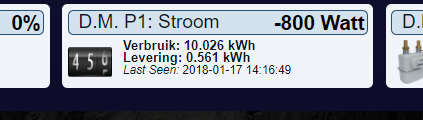
- ScreenShot119.png (18.93 KiB) Viewed 3556 times
Perhaps other rawdata
I can test again with this weather:-)
Solar panels are working
Re: Help with some scripting with the P1
Posted: Thursday 18 January 2018 21:45
by waaren
Based on the information I see in the switches tab, dump of the P1 device and domoticz/dzVents/runtime/p1_smartmeter_device.lua , I assume that you have to look at usageDelivered which is >= 0
change
Code: Select all
if devP1.WhActual > -10 and dummy.state == 'Off' then
to
Code: Select all
if devP1.usageDelivered > 10 and dummy.state == 'Off' then
Re: Help with some scripting with the P1
Posted: Sunday 21 January 2018 13:35
by Derik
waaren wrote: Thursday 18 January 2018 21:45
Based on the information I see in the switches tab, dump of the P1 device and domoticz/dzVents/runtime/p1_smartmeter_device.lua , I assume that you have to look at usageDelivered which is >= 0
change
Code: Select all
if devP1.WhActual > -10 and dummy.state == 'Off' then
to
Code: Select all
if devP1.usageDelivered > 10 and dummy.state == 'Off' then
MMM
What i am looking for is a script that is switching between -1000 and -2000
So when the panels deliver back, i can set some devices on
when i do >10 then all my devices are flickering on and off when the panels are not deliver enough back.
edit:
Perhaps simpler when P1 is <-500 dummy on.
Otherwise dummy off
That should do the trick for me 2 :-0)
Is that perhaps a option??
I do not now how to change the script..

Please
Re: Help with some scripting with the P1
Posted: Sunday 21 January 2018 16:29
by waaren
I don't understand what you want to achieve here. P1 meter returns 6 values. 4 counters (KWh), usage (Watt) and delivery (Watt).
Either Watt usage or Watt delivery is 0 and the other one is positive (or both are 0).
Re: Help with some scripting with the P1
Posted: Tuesday 27 February 2018 17:32
by Derik
What i try to get is a script that i can use for the Kwh that i deliver back to powernet.
When my Solar panels are working my smartmeter is going to -xxx
Only whe i use a blockley i can only set a blockley to -1 and not to -500
When i set the blockley to -1 and i use 500 watt the system is not working,
What i need is a script that is going much lower then -1 more to -1000
when i use 500, the dummy switch still says that i have power left...
And then i can use the dummy in a lot of my power using devices like my heatpump and heatwaterboiler etc etc
Only that is not working with this DZvents script:
Code: Select all
return {
	on = {
		timer = {
			'between 08:00 and 22:00'
		},
		devices = {
			'D.M. P1: Stroom'
		},
	},
	execute = function(domoticz, devP1)
	    local dummy = domoticz.devices('Dummy P1')
		if tonumber(devP1.rawData[1]) > -200 and dummy.state == 'Off' then
		    dummy.switchOn()
		elseif tonumber(devP1.rawData[1]) < -200 and dummy.state == 'On' then
		    dummy.switchOff()
		end
	end
}
Perhaps there is some one that have a other option to do the job.
Sorry i am a noob with DZ and scripts.
So thanks!!!
Re: Help with some scripting with the P1
Posted: Tuesday 27 February 2018 20:39
by McMelloW
Hi Derik,
I have studied the output of the P1 smart meter for some time in order to understand it and to create a script to parse the 6 values from the P1 sensor.
Your receive 6 values from your P1. Usage1 (low); Usage2 (high); Return1 (low); Return2 (high) These are Energy counters in kWh. You can compare these values on your smartmeter display. Last 2 values are the actual usage (W) or the actual delivery (W)
The delivery and the returns are measured at your P1 smart meter. Your solar panels may produce more energy and some of that energy is used in your house at that moment. Therefor it is not measured at the meter. At my home, my solarpanels producer 40% more then what is measured at the meter. In order to know the exact production of your so. larpanels you have to measure this at your inverter.
Your sensor D.M. P1: Stroom shows 5 values. Top bar the actual usage (+) or the actual delivery (-)
The second line the sum of usage1 and usage2 in 1 figure followed by the today usage.
The third line shows the sum of return1 and return 2 in 1 figure followed by today delivery.
To my amazement, the order of the figures on my sensor are different compared to your sensor. On the second line is today usage and total usage and the third also today delevery an total delivery. My hardware is "P1 smart meter USB" See picture below and compare it to yours.

I hope this information helps you bit with your question. You can find my dzVents script in the code. Perhaps this helps you also.
Code: Select all
--[[  dzVents script to Parse P1 Smart Meter Electricity value into seperated Meter Readings.

]]--  The following need updated for your environment get the 'Idx' or 'Name' of the Device tab.

local fetchIntervalMins = 1                 -- (Integer) (Minutes, Range 5-60) How often SE file is fetched
local P1data = 33                           -- Electra, P1 Smart Meter device
local idxu1 = 42                            -- Meter Usage low, Virtual device, counter incremental
local idxu2 = 43                            -- Meter Usage High, Virtual device, counter incremental
local idxr1 = 44                            -- Meter Return Low, Virtual device, counter incremental
local idxr2 = 45                            -- Meter Return High, Virtual device, counter incremental
local idxcons = 74                          -- Meter Actual Usage, Virtual device, counter incremental
local idxprod = 75                          -- Meter Actual Production, Virtual device, counter incremental

local ScriptVersion = '0.1.6'

return {
    active = true,
	logging = {
	    -- level = domoticz.LOG_DEBUG,    -- Uncomment this line to override the dzVents global logging setting
		marker = 'SME '.. ScriptVersion
	},
	on = {
		devices = { P1data }
	},

	execute = function(domoticz, triggerItem)
	    if (triggerItem.isDevice) then

        -- Get values from device P1Data of the Smart Meter
	    local SMdata = domoticz.devices(P1data).rawData

	    -- Update the device and Debug meassages with the accessory values from table SMdata
        domoticz.devices(idxu1).updateCounter(SMdata[1])
        domoticz.log('Gebruik laag  = '.. SMdata[1], domoticz.LOG_DEBUG)
        domoticz.devices(idxu2).updateCounter(SMdata[2])
	    domoticz.log('Gebruik hoog  = '.. SMdata[2], domoticz.LOG_DEBUG)
        domoticz.devices(idxr1).updateCounter(SMdata[3])
	    domoticz.log('Levering laag = '.. SMdata[3], domoticz.LOG_DEBUG)
        domoticz.devices(idxr2).updateCounter(SMdata[4])
        domoticz.log('Levering hoog = '.. SMdata[4], domoticz.LOG_DEBUG)
        domoticz.devices(idxcons).updateCounter(SMdata[5])
	    domoticz.log('Actuele Gebruik = '.. SMdata[5], domoticz.LOG_DEBUG)
	    domoticz.devices(idxprod).updateCounter(SMdata[6])
        domoticz.log('Actuele Levering = '.. SMdata[6], domoticz.LOG_DEBUG)
        end
    end -- execute
}
Succes
Re: Help with some scripting with the P1
Posted: Tuesday 27 February 2018 21:10
by Derik
Dear McMellow....
Looks GREAT and promising...[ thanks so far!! xxx from my wife
]
The script is running is think:
:
Code: Select all
2018-02-27 21:10:09.056 (D.M.: Zwave) General/kWh (Z: Scherm Totaal)
2018-02-27 21:10:09.254 dzVents: Info: SME 0.1.6: ------ Start internal script: DZ: P1 reader: Device: "D.M. P1: Stroom (D.M.: P1)", Index: 3185
2018-02-27 21:10:09.259 (D.M.: Zwave) Usage (Z: Jongens)
2018-02-27 21:10:09.263 (D.M.: Zwave) General/kWh (Z: Jongens)
2018-02-27 21:10:09.264 dzVents: Info: SME 0.1.6: ------ Finished DZ: P1 reader
2018-02-27 21:10:09.370 EventSystem: Script event triggered: /home/root/domoticz/dzVents/runtime/dzVents.lua
2018-02-27 21:10:09.493 (ESP-1xx: Dummy) General/Custom Sensor (ESP: Terrarium)
Only some times i do have no data:

- ScreenShot149.png (13.72 KiB) Viewed 3293 times
And sometimes there is [ and sync with the P1:
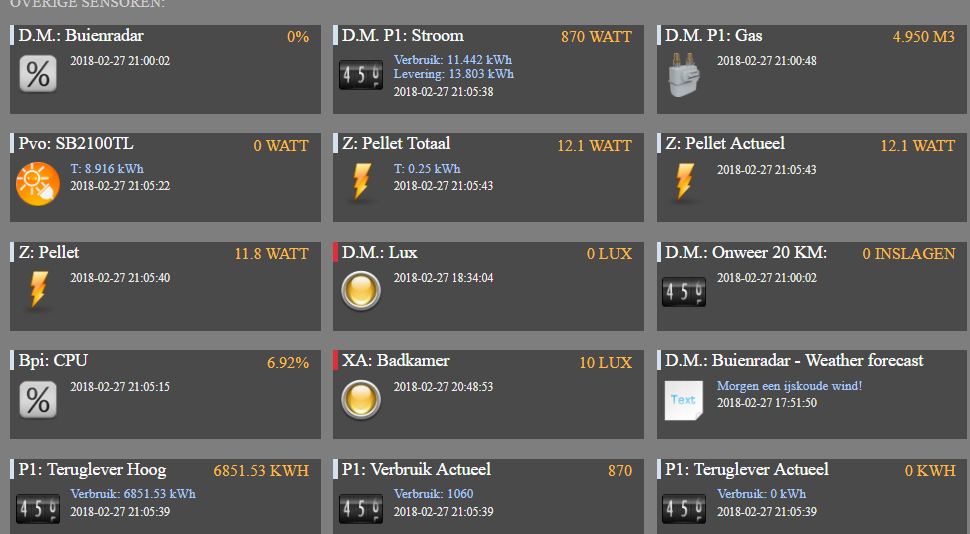
- ScreenShot150.png (89.61 KiB) Viewed 3293 times
What type i need to set the Dz vents?
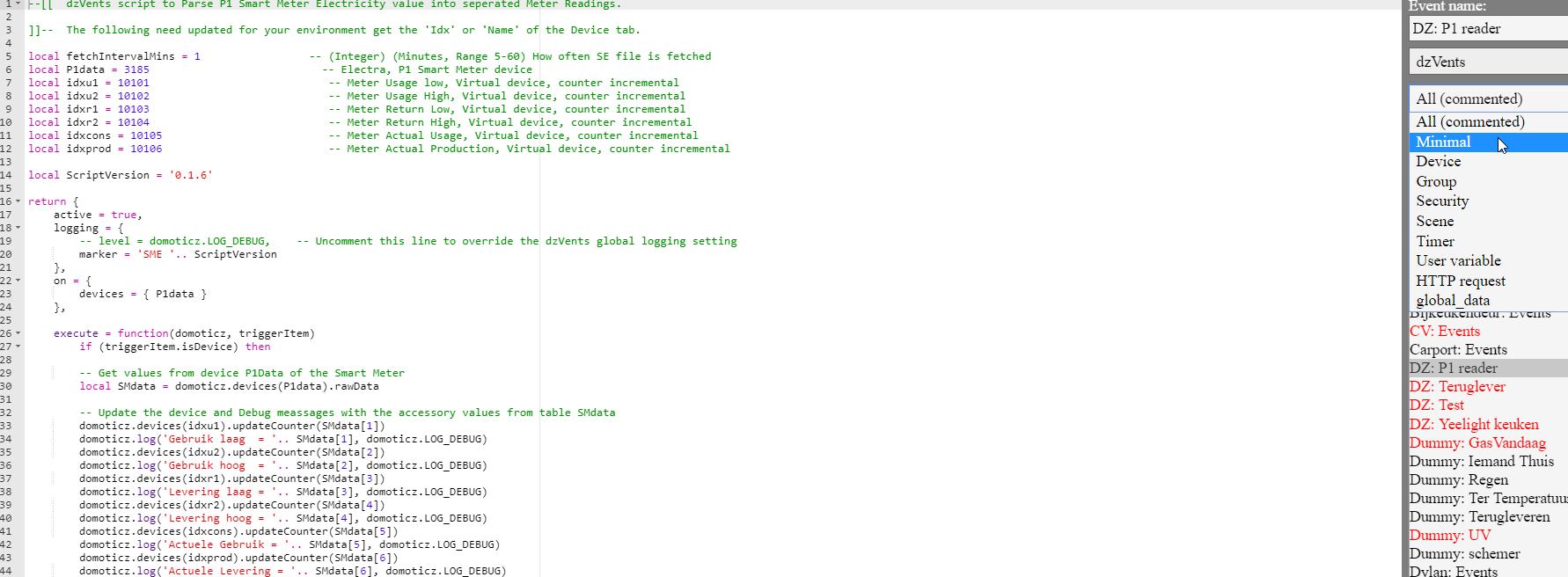
- ScreenShot151.png (122.54 KiB) Viewed 3293 times
Re: Help with some scripting with the P1
Posted: Tuesday 27 February 2018 21:22
by Derik
Did turn on the debug:
- Spoiler: show
Code: Select all
018-02-27 21:21:01.716 dzVents: Debug: dzVents version: 2.4.1
2018-02-27 21:21:01.716 dzVents: Debug: Event triggers:
2018-02-27 21:21:01.716 dzVents: Debug: • Device: Z: Screen Totaal
2018-02-27 21:21:01.716 dzVents: Debug: • Device: Bpi: CPU
2018-02-27 21:21:01.875 (D.M.: Zwave) Usage (Z: Screen)
2018-02-27 21:21:01.878 (D.M.: Zwave) General/kWh (Z: Screen Totaal)
2018-02-27 21:21:01.901 dzVents: Debug: Dumping domoticz data to /home/root/domoticz/scripts/dzVents/domoticzData.lua
2018-02-27 21:21:02.107 (D.M.: Zwave) Usage (Z: Scherm)
2018-02-27 21:21:02.110 (D.M.: Zwave) General/kWh (Z: Scherm Totaal)
2018-02-27 21:21:02.111 dzVents: Debug: Processing device-adapter for Z: Screen Totaal: kWh device adapter
2018-02-27 21:21:02.112 dzVents: Debug: Processing device-adapter for Ter: IR Paneel: Temperature device adapter
2018-02-27 21:21:02.113 dzVents: Debug: dzVents version: 2.4.1
2018-02-27 21:21:02.113 dzVents: Debug: Event triggers:
2018-02-27 21:21:02.113 dzVents: Debug: • Device: Z: Screen Totaal
2018-02-27 21:21:02.113 dzVents: Debug: • Device: Ter: IR Paneel
2018-02-27 21:21:02.162 (D.M.: Zwave) Usage (Z: Jongens)
2018-02-27 21:21:02.166 (D.M.: Zwave) General/kWh (Z: Jongens)
2018-02-27 21:21:02.298 (D.M.: Zwave) General/kWh (Z: Scherm Totaal)
2018-02-27 21:21:02.359 dzVents: Debug: Dumping domoticz data to /home/root/domoticz/scripts/dzVents/domoticzData.lua
2018-02-27 21:21:02.402 (D.M.: Zwave) Usage (Z: Slaapkamer)
2018-02-27 21:21:02.405 (D.M.: Zwave) General/kWh (Z: Slaapkamer)
2018-02-27 21:21:02.492 (D.M.: Zwave) Usage (Z: Jongens)
2018-02-27 21:21:02.495 (D.M.: Zwave) General/kWh (Z: Jongens)
2018-02-27 21:21:02.498 (D.M.: Zwave) Usage (Z: Slaapkamer)
2018-02-27 21:21:02.501 (D.M.: Zwave) General/kWh (Z: Slaapkamer)
2018-02-27 21:21:02.560 dzVents: Debug: Processing device-adapter for Z: Screen Totaal: kWh device adapter
2018-02-27 21:21:02.560 dzVents: Debug: Processing device-adapter for Z: Scherm: Electric usage device adapter
2018-02-27 21:21:02.561 dzVents: Debug: Processing device-adapter for Z: Scherm Totaal: kWh device adapter
2018-02-27 21:21:02.562 dzVents: Debug: Processing device-adapter for Z: Slaapkamer: kWh device adapter
2018-02-27 21:21:02.562 dzVents: Debug: Processing device-adapter for Z: Slaapkamer: Electric usage device adapter
2018-02-27 21:21:02.563 dzVents: Debug: dzVents version: 2.4.1
2018-02-27 21:21:02.563 dzVents: Debug: Event triggers:
2018-02-27 21:21:02.563 dzVents: Debug: • Device: Z: Screen Totaal
2018-02-27 21:21:02.563 dzVents: Debug: • Device: Z: Scherm
2018-02-27 21:21:02.563 dzVents: Debug: • Device: Z: Scherm Totaal
2018-02-27 21:21:02.563 dzVents: Debug: • Device: Z: Slaapkamer
2018-02-27 21:21:02.563 dzVents: Debug: • Device: Z: Slaapkamer
2018-02-27 21:21:02.625 (D.M.: Zwave) Usage (Z: Jongens)
2018-02-27 21:21:02.628 (D.M.: Zwave) General/kWh (Z: Jongens)
2018-02-27 21:21:02.678 (D.M.: Zwave) Usage (Z: Pellet Actueel)
2018-02-27 21:21:02.682 (D.M.: Zwave) General/kWh (Z: Pellet Totaal)
2018-02-27 21:21:02.773 dzVents: Debug: Dumping domoticz data to /home/root/domoticz/scripts/dzVents/domoticzData.lua
2018-02-27 21:21:02.806 (D.M.: Zwave) Usage (Z: Jongens)
2018-02-27 21:21:02.809 (D.M.: Zwave) General/kWh (Z: Jongens)
2018-02-27 21:21:06.144 dzVents: Debug: • Device: Z: Pellet Totaal
2018-02-27 21:21:06.144 dzVents: Debug: • Device: Z: Pellet Actueel
2018-02-27 21:21:06.144 dzVents: Debug: • Device: Z: Scherm Totaal
2018-02-27 21:21:06.144 dzVents: Debug: • Device: ESP: Terrarium
2018-02-27 21:21:06.144 dzVents: Debug: • Device: Z: Jongens
2018-02-27 21:21:06.144 dzVents: Debug: • Device: Z: Jongens
2018-02-27 21:21:06.144 dzVents: Debug: • Device: ESP: Tuin rechts
2018-02-27 21:21:06.144 dzVents: Debug: • Device: Z: Slaapkamer
2018-02-27 21:21:06.144 dzVents: Debug: • Device: Z: Slaapkamer
2018-02-27 21:21:06.199 (ESP-1xx: Dummy) General/Custom Sensor (ESP: Terrarium)
2018-02-27 21:21:06.219 (D.M.: Zwave) General/kWh (Z: Scherm Totaal)
2018-02-27 21:21:06.313 (D.M.: Zwave) Usage (Z: Jongens)
2018-02-27 21:21:06.316 (D.M.: Zwave) General/kWh (Z: Jongens)
2018-02-27 21:21:06.319 (D.M.: RFXcomE) Temp + Humidity (D.M.: Zboiler In)
2018-02-27 21:21:06.339 dzVents: Debug: Dumping domoticz data to /home/root/domoticz/scripts/dzVents/domoticzData.lua
2018-02-27 21:21:06.477 (D.M.: Zwave) Usage (Z: Slaapkamer)
2018-02-27 21:21:06.479 (D.M.: Zwave) General/kWh (Z: Slaapkamer)
2018-02-27 21:21:06.528 dzVents: Debug: Processing device-adapter for Z: Pellet Totaal: kWh device adapter
2018-02-27 21:21:06.529 dzVents: Debug: Processing device-adapter for Z: Screen: Electric usage device adapter
2018-02-27 21:21:06.529 dzVents: Debug: Processing device-adapter for Z: Screen Totaal: kWh device adapter
2018-02-27 21:21:06.530 dzVents: Debug: Processing device-adapter for Z: Scherm: Electric usage device adapter
2018-02-27 21:21:06.530 dzVents: Debug: Processing device-adapter for Z: Scherm Totaal: kWh device adapter
2018-02-27 21:21:06.531 dzVents: Debug: Processing device-adapter for Z: Jongens: kWh device adapter
2018-02-27 21:21:06.531 dzVents: Debug: Processing device-adapter for Z: Jongens: Electric usage device adapter
2018-02-27 21:21:06.532 dzVents: Debug: Processing device-adapter for Z: Jongens: kWh device adapter
2018-02-27 21:21:06.533 dzVents: Debug: Processing device-adapter for Z: Jongens: Electric usage device adapter
2018-02-27 21:21:06.534 dzVents: Debug: dzVents version: 2.4.1
2018-02-27 21:21:06.534 dzVents: Debug: Event triggers:
2018-02-27 21:21:06.534 dzVents: Debug: • Device: Z: Pellet Totaal
2018-02-27 21:21:06.534 dzVents: Debug: • Device: Z: Screen
2018-02-27 21:21:06.534 dzVents: Debug: • Device: Z: Screen Totaal
2018-02-27 21:21:06.534 dzVents: Debug: • Device: Z: Scherm
2018-02-27 21:21:06.534 dzVents: Debug: • Device: Z: Scherm Totaal
2018-02-27 21:21:06.534 dzVents: Debug: • Device: Z: Jongens
2018-02-27 21:21:06.534 dzVents: Debug: • Device: Z: Jongens
2018-02-27 21:21:06.534 dzVents: Debug: • Device: Z: Jongens
2018-02-27 21:21:06.534 dzVents: Debug: • Device: Z: Jongens
2018-02-27 21:21:06.618 (D.M.: Zwave) Usage (Z: Pellet Actueel)
2018-02-27 21:21:06.622 (D.M.: Zwave) General/kWh (Z: Pellet Totaal)
2018-02-27 21:21:06.724 dzVents: Debug: Dumping domoticz data to /home/root/domoticz/scripts/dzVents/domoticzData.lua
2018-02-27 21:21:06.806 (D.M.: Zwave) Usage (Z: Jongens)
2018-02-27 21:21:06.809 (D.M.: Zwave) General/kWh (Z: Jongens)
2018-02-27 21:21:06.891 (D.M.: Zwave) Usage (Z: Jongens)
2018-02-27 21:21:06.894 (D.M.: Zwave) General/kWh (Z: Jongens)
2018-02-27 21:21:06.917 dzVents: Debug: Processing device-adapter for Ter: Bovenrand: Temperature+humidity device adapter
2018-02-27 21:21:06.917 dzVents: Debug: Processing device-adapter for Z: Scherm Totaal: kWh device adapter
2018-02-27 21:21:06.918 dzVents: Debug: Processing device-adapter for Z: Jongens: kWh device adapter
2018-02-27 21:21:06.918 dzVents: Debug: Processing device-adapter for Z: Jongens: Electric usage device adapter
2018-02-27 21:21:06.919 dzVents: Debug: Processing device-adapter for Z: Slaapkamer: kWh device adapter
2018-02-27 21:21:06.919 dzVents: Debug: Processing device-adapter for Z: Slaapkamer: Electric usage device adapter
2018-02-27 21:21:06.920 dzVents: Debug: dzVents version: 2.4.1
2018-02-27 21:21:06.920 dzVents: Debug: Event triggers:
2018-02-27 21:21:06.920 dzVents: Debug: • Device: Ter: Bovenrand
2018-02-27 21:21:06.920 dzVents: Debug: • Device: Z: Scherm Totaal
2018-02-27 21:21:06.920 dzVents: Debug: • Device: Z: Jongens
2018-02-27 21:21:06.921 dzVents: Debug: • Device: Z: Jongens
2018-02-27 21:21:06.921 dzVents: Debug: • Device: Z: Slaapkamer
2018-02-27 21:21:06.921 dzVents: Debug: • Device: Z: Slaapkamer
2018-02-27 21:21:07.004 (D.M.: Zwave) Usage (Z: Jongens)
2018-02-27 21:21:07.008 (D.M.: Zwave) General/kWh (Z: Jongens)
2018-02-27 21:21:07.088 (D.M.: Zwave) Usage (Z: Scherm)
2018-02-27 21:21:07.091 (D.M.: Zwave) General/kWh (Z: Scherm Totaal)
2018-02-27 21:21:07.097 (D.M.: Zwave) General/kWh (Z: Scherm Totaal)
2018-02-27 21:21:07.114 dzVents: Debug: Dumping domoticz data to /home/root/domoticz/scripts/dzVents/domoticzData.lua
2018-02-27 21:21:07.251 (D.M.: RFXcomE) Temp + Humidity (Buiten: Terras)
2018-02-27 21:21:07.305 dzVents: Debug: Processing device-adapter for Z: Jongens: kWh device adapter
2018-02-27 21:21:07.305 dzVents: Debug: Processing device-adapter for Z: Jongens: Electric usage device adapter
2018-02-27 21:21:07.306 dzVents: Debug: dzVents version: 2.4.1
2018-02-27 21:21:07.306 dzVents: Debug: Event triggers:
2018-02-27 21:21:07.306 dzVents: Debug: • Device: Z: Jongens
2018-02-27 21:21:07.306 dzVents: Debug: • Device: Z: Jongens
2018-02-27 21:21:07.331 (D.M.: Zwave) Usage (Z: Jongens)
2018-02-27 21:21:07.334 (D.M.: Zwave) General/kWh (Z: Jongens)
2018-02-27 21:21:07.366 (ESP-1xx: Dummy) General/Custom Sensor (ESP: Dakrand)
2018-02-27 21:21:07.385 (D.M.: Zwave) Usage (Z: Jongens)
2018-02-27 21:21:07.388 (D.M.: Zwave) General/kWh (Z: Jongens)
2018-02-27 21:21:07.463 InfluxLink: value Temperature,idx=9448,name=Buiten:-Terras value=-4.3
2018-02-27 21:21:07.495 dzVents: Debug: Dumping domoticz data to /home/root/domoticz/scripts/dzVents/domoticzData.lua
2018-02-27 21:21:07.518 (D.M.: Zwave) General/kWh (Z: Pellet Totaal)
2018-02-27 21:21:07.566 (D.M.: Zwave) Usage (Z: Pellet Actueel)
2018-02-27 21:21:07.568 (D.M.: Zwave) General/kWh (Z: Pellet Totaal)
2018-02-27 21:21:07.688 dzVents: Debug: Processing device-adapter for Z: Scherm: Electric usage device adapter
2018-02-27 21:21:07.689 dzVents: Debug: Processing device-adapter for Z: Scherm Totaal: kWh device adapter
2018-02-27 21:21:07.690 dzVents: Debug: Processing device-adapter for Z: Jongens: kWh device adapter
2018-02-27 21:21:07.690 dzVents: Debug: Processing device-adapter for Z: Jongens: Electric usage device adapter
2018-02-27 21:21:07.690 dzVents: Debug: Processing device-adapter for Z: Jongens: kWh device adapter
2018-02-27 21:21:07.691 dzVents: Debug: Processing device-adapter for Z: Jongens: Electric usage device adapter
2018-02-27 21:21:07.692 dzVents: Debug: dzVents version: 2.4.1
2018-02-27 21:21:07.692 dzVents: Debug: Event triggers:
2018-02-27 21:21:07.692 dzVents: Debug: • Device: Z: Scherm
2018-02-27 21:21:07.692 dzVents: Debug: • Device: Z: Scherm Totaal
2018-02-27 21:21:07.692 dzVents: Debug: • Device: Z: Jongens
2018-02-27 21:21:07.692 dzVents: Debug: • Device: Z: Jongens
2018-02-27 21:21:07.692 dzVents: Debug: • Device: Z: Jongens
2018-02-27 21:21:07.692 dzVents: Debug: • Device: Z: Jongens
2018-02-27 21:21:07.798 (D.M.: Zwave) Usage (Z: Slaapkamer)
2018-02-27 21:21:07.801 (D.M.: Zwave) General/kWh (Z: Slaapkamer)
2018-02-27 21:21:07.883 dzVents: Debug: Dumping domoticz data to /home/root/domoticz/scripts/dzVents/domoticzData.lua
2018-02-27 21:21:07.886 (D.M.: Zwave) Usage (Z: Jongens)
2018-02-27 21:21:07.889 (D.M.: Zwave) General/kWh (Z: Jongens)
Is this a normal debug from Dzvents??
Reading everything?
I did not set the script there : /home/root/domoticz/scripts/dzVents/domoticzData.lua