Page 1 of 2
How can I remove a non-existing Z-wave Node/Device (Success)
Posted: Wednesday 10 May 2017 9:59
by mjdb
I moved my Z-wave Controller (Aeotec ZW090 Z-Stick Gen5) from a NAS to Raspberry Pi (fresh install).
The Z-wave configuration was maintained. I just had to rename the Nodes and Devices. So far so good.
Four Aeotec ZW112 Door Window Sensor 6 were not revivable. I had to delete them and add them again (delete, restart, add). That worked.
But, after a new restart one of them re-appeared again (Node 29). I tried all delete-variations. Sometiomes the Node is removed, but after a restart it re-appears.
I stopped Domoticz, deleted the complete Node from the zwcfg_xxxxx.xml and restarted Domoticz. And, there it was again:
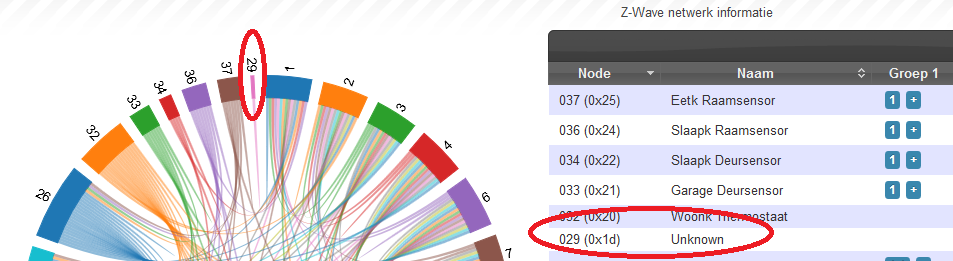
- NonExistingNode29.png (121.5 KiB) Viewed 40972 times
It also is in the Z-wave console-panel.

- NonExistingNode29-2.png (12.96 KiB) Viewed 40972 times
It seams to me that the Node is somewhere in the controller and not in Domoticz.
How to remove it (I want to avoid a complete re-installation of all nodes)?
Re: How can I remove a non-existing Z-wave Node/Device
Posted: Wednesday 10 May 2017 10:14
by emme
you have to wait the device is marked dead by the controller, then in the OZWCP you can delete it (REMOVE DEAD NODES)
to speedup the operation you can try:
- heal the network
- in the OZWCP select the device and choose the operation "HAS NODE FAILED"...
another way is to use the Aeotec ZenSys Utility to manuall remove the device
...Pay attention: the utility is quite strong and you cannot undelete your actions!!

uh... did you know that Aeotec suggests Domoticz as first choice OpenSource controllers?!
 https://aeotec.freshdesk.com/support/so ... t-software
Re: How can I remove a non-existing Z-wave Node/Device
Posted: Wednesday 10 May 2017 11:08
by mjdb
Thank you.
I tried "Heal" multiple times. After each restart the Node reappears.
In OZWCP I tried "HAS NODE FAILED" several times. It doesn't change anything, presumably while the Node has not failed yet. The status is now "Probe (sleeping)". Before I removed the Node from the xml-file It used to be "cacheload".
I suppose I have to wait a few days to see if the status changes to 'dead'.
Re: How can I remove a non-existing Z-wave Node/Device
Posted: Friday 12 May 2017 12:01
by Egregius
"Has node failed" will try to revive the node, not marking it as dead.
Once the node is marked as dead you can use "Remove Failed Node".
Problem is that it probably never will show up as dead. There was something in the ZWCFGxxx.XML that needed to be changed for that. The info is somewhere on this forum, can't find it right now.
Edit: found it
 http://www.domoticz.com/forum/viewtopic ... ead#p91335
Re: How can I remove a non-existing Z-wave Node/Device
Posted: Monday 15 May 2017 12:17
by mjdb
Thank you Egregius.
@Emme: After five days the status of de ghost node was still "Probe (sleeping)". So, no automatic detection of the dead node.
@Egregius: After reading your suggested topic
http://www.domoticz.com/forum/viewtopic ... ead#p91335
and the topic
https://groups.google.com/forum/#!topic ... yvofYlUMwU
I removed the <CommandClass id="132" name="COMMAND_CLASS_WAKE_UP" node for the specific Device-Node from the zwcfg_xxxx.xml file.
I restarted the computer.
And the Device-Node still was there: Status = Probe (Sleeping).
@Anyone: Does someone has another option?
Re: How can I remove a non-existing Z-wave Node/Device
Posted: Monday 15 May 2017 15:30
by Egregius
You removed everything from <CommandClass till </CommandClass>?
I did the same the moment I wrote my previous reply on 2 fibaro smoke detectors that failed once, I resetted them and included them again. The old IDX's were still in the list.
After removing that commandclass and waiting until all nodes are queried they were marked as dead. Then I could remove them in OZWCP (after multiple tries and restarts).
Re: How can I remove a non-existing Z-wave Node/Device (Success)
Posted: Monday 15 May 2017 17:42
by mjdb
Yes! Success at last. (I suppose I previously forgot to stop Domoticz before the editing).
I tried again... as careful as I could (for anyone who comes here, this is my walk-through...):
- Stop Domoticz (sudo service domoticz.sh stop)
- Modify zwcfg_xxxx.xml (sudo nano /home/pi/domoticz/Config/zwcfg_xxxx.xml)
- Find the ghost device-node (<Ctrl> W, id="nn" where nn is the node-number)
- Remove the sub-node with COMMAND_CLASS_WAKE_UP (Remove from <CommandClass... to - and including - ...</CommandClass>, including the two sub-nodes <Instance> and <Value>. Total 4 lines.)
- Save zwcfg_xxxx.xml (<Ctrl> S) and stop nano (<Ctrl> X)
- Restart Domoticz (sudo service domoticz.sh start)
- In the OZW console select the (now dead) Node and choose option Controller --> Remove failed Node --> GO (wait a few minutes)
- Restart Domoticz again. The Node will be there with status "Probe (Awake)". After a few minutes, the Node-state should be... DEAD.
- Stop Domoticz and power down the Raspberry Pi.
After restart the Node should be gone.
Thanks all for helping.
Re: How can I remove a non-existing Z-wave Node/Device (Success)
Posted: Thursday 30 November 2017 17:53
by magnusb
I have a similar problem, but there's no COMMAND_CLASS_WAKE_UP in my faulty node, only in the controller.
Should I remove that!?
Any other ideas...?
Re: How can I remove a non-existing Z-wave Node/Device (Success)
Posted: Tuesday 05 December 2017 18:19
by tequila
Thanks, this helped!
Re: How can I remove a non-existing Z-wave Node/Device (Success)
Posted: Monday 17 December 2018 10:27
by vervoto1
@mjdb, worked like a charm.. looking for this for months already, thanks!
Re: How can I remove a non-existing Z-wave Node/Device (Success)
Posted: Thursday 31 January 2019 20:10
by multinet
mjdb wrote: Monday 15 May 2017 17:42
Yes! Success at last. (I suppose I previously forgot to stop Domoticz before the editing).
I tried again... as careful as I could (for anyone who comes here, this is my walk-through...):
- Stop Domoticz (sudo service domoticz.sh stop)
- Modify zwcfg_xxxx.xml (sudo nano /home/pi/domoticz/Config/zwcfg_xxxx.xml)
- Find the ghost device-node (<Ctrl> W, id="nn" where nn is the node-number)
- Remove the sub-node with COMMAND_CLASS_WAKE_UP (Remove from <CommandClass... to - and including - ...</CommandClass>, including the two sub-nodes <Instance> and <Value>. Total 4 lines.)
- Save zwcfg_xxxx.xml (<Ctrl> S) and stop nano (<Ctrl> X)
- Restart Domoticz (sudo service domoticz.sh start)
- In the OZW console select the (now dead) Node and choose option Controller --> Remove failed Node --> GO (wait a few minutes)
- Restart Domoticz again. The Node will be there with status "Probe (Awake)". After a few minutes, the Node-state should be... DEAD.
- Stop Domoticz and power down the Raspberry Pi.
After restart the Node should be gone.
Thanks all for helping.
Hello
I've the same unknown node in my zwave config
i do the step by step tuto but after deleting the lines in the xml, my node is "Awake"
Do you know why ?
Thank you
Multinet
Re: How can I remove a non-existing Z-wave Node/Device (Success)
Posted: Saturday 02 February 2019 11:43
by multinet
... and in my zwcfg_xxxx.xml i've that for the node :
<Node id="31" name="" location="" basic="4" generic="7" specific="1" type="Notification Sensor" listening="false" frequentListening="false" beaming="true" routing="true" max_baud_rate="40000" version="4" query_stage="Complete">
<Manufacturer id="0" name="">
<Product type="0" id="0" name="" />
</Manufacturer>
<CommandClasses>
<CommandClass id="32" name="COMMAND_CLASS_BASIC" version="1">
<Instance index="1" />
<Value type="byte" genre="basic" instance="1" index="0" label="Basic" units="" read_only="false" write_only="false" verify_changes="false" poll_intensity="0" min="0" max="255" value="0" />
</CommandClass>
</CommandClasses>
</Node>
How can I remove a non-existing Z-wave Node/Device (Success)
Posted: Tuesday 14 April 2020 14:05
by astrapowerrr
and what about devices without a number? can i fix this?
just only a small bar with no numbers attached.


solved itself after some days..
Re: How can I remove a non-existing Z-wave Node/Device (Success)
Posted: Friday 22 May 2020 16:06
by JuanUil
I cannot find the zwcfg_xxxx.xml
Re: How can I remove a non-existing Z-wave Node/Device (Success)
Posted: Tuesday 26 May 2020 11:16
by sidepipe
I've got a similar problem with a phantom node that's "sleeping," so OZW never tries to send messages to it, it just queues them. It's been an issue for a very long time as far as I can tell. Also, it seems the zwcfg_xxxx.xml file no longer exists? Is there an equivalent workaround that can be used?
Re: How can I remove a non-existing Z-wave Node/Device (Success)
Posted: Monday 01 June 2020 9:50
by Ptje
Hello,
Can somebody make a workaround ? I also don't have a zwfg_xxxx.xml. We can't be the only one with this problem. I think that I have more then 30 new installations in several years and in 90% from the installations I did get this problem after 2-3 weeks.
You can remove it in the controller, but after a reboot they are back. This makes that the z-wave network is very slow. This because Domoticz does think that that nodes are alive and keeps searching for then.
Anyone ?
Greetings,
Peter
Re: How can I remove a non-existing Z-wave Node/Device (Success)
Posted: Friday 04 September 2020 17:12
by Yann
Hi,
I got exactly the same issue, tried averything mentioned before (including editing the xml file), and never worked.
I was successful by using Zensys tool and the following procedure:
Launch Zensys
Connect to zwave network:
- Select "categories" settings and select your main controller
For each node :
- Select the node you want to erase
Toggle "Queue overided" (a check should appear)
Click NOP (!) - you should see a message stating that it failed
Click "is node failed" - you should see again a message stating that it failed
Click "Remove failed" - The line should turn to red, the node is deleted
I found this solution from the 2 posts bellow:
http://docs.incontrolha.com/home/remove-a-failed-device
https://community.openhab.org/t/remove- ... nsys/64151
I hope it helps
Yann
Re: How can I remove a non-existing Z-wave Node/Device (Success)
Posted: Saturday 17 October 2020 15:48
by Janco
Thanks! You saved my day. I had the same problem after trying to delete and re-include a faulty device.
Ended up with several of these 'ghost' nodes.
Had to borrow a Windows computer in order to run the Zensys Tools, but it worked!
I wonder, however, what's the use of a z-wave control panel, if it cannot even perform the simple task of deleting a faulty node?
One is not always able to exclude the node according to the manual (maybe it's broken, stolen, missing, etc.)
I've been using Domoticz for a couple of years now, probably because I'm too lazy to switch to something else.
Domoticz is powerful, but it strikes me as extremely vulnerable. Backups are very difficult to restore and most of the time useless.
Everything (configuration, scripts, preferences and data) is saved in a single database.
If something happens to this database, well, you better pray that an older backup works.
I don't remember how often I had to restore the whole system, more or less from scratch.
Once it"s up and running again, you're probably safe.... for some time.
Re: How can I remove a non-existing Z-wave Node/Device (Success)
Posted: Saturday 24 October 2020 15:35
by Yann
I agree, the z-wave control panel is unfortunately useless ! I was hoping it could perform the same as Zensys, but it is not the case.
Re: How can I remove a non-existing Z-wave Node/Device (Success)
Posted: Friday 06 November 2020 6:37
by Plantje
Yann wrote: Friday 04 September 2020 17:12
Hi,
I got exactly the same issue, tried averything mentioned before (including editing the xml file), and never worked.
I was successful by using Zensys tool and the following procedure:
Launch Zensys
Connect to zwave network:
- Select "categories" settings and select your main controller
For each node :
- Select the node you want to erase
Toggle "Queue overided" (a check should appear)
Click NOP (!) - you should see a message stating that it failed
Click "is node failed" - you should see again a message stating that it failed
Click "Remove failed" - The line should turn to red, the node is deleted
I found this solution from the 2 posts bellow:
http://docs.incontrolha.com/home/remove-a-failed-device
https://community.openhab.org/t/remove- ... nsys/64151
I hope it helps
Yann
Thanks for this. I want to try it, but the Zensys tool doesn't exist anymore. Can you confirm that the tool found here is the same?
http://www.axialcontrol.com/

