Page 1 of 1

Cameras thumbnail in floorplan?

Posted: Thursday 24 November 2016 11:14
by emme
Ciao,

Is it possible to have a camera thumbs in floorplan?

Without pretending to have a fully tvcc system working... it would be useful to have it on the map :P

(or at least... would it be easy to add it changing the code... in a way that it would be not overwritten during the upgrades? :P)

ciao
M

Re: Cameras thumbnail in floorplan?

Posted: Saturday 17 April 2021 22:55
by marktn
It is an old post, is this possible?

Re: Cameras thumbnail in floorplan?

Posted: Sunday 18 April 2021 12:18
by FireWizard
Hello @marktn

You wrote:
Cameras thumbnail in floorplan? is this possible?
Sure, that is possible.
At least, if you mean, what is shown in the screenshot below.

Screenshot_plattegrond_camera1.png
Screenshot_plattegrond_camera1.png (31.82 KiB) Viewed 580 times
This is just a part of the floorplan, with a Camera in the middle.
If you hoover with your mouse over the icon, you will get a pop-up widget and if you click the camera icon in the widget, you will even see the stream.

Regards

Re: Cameras thumbnail in floorplan?

Posted: Sunday 18 April 2021 19:20
by grecof973
And sorry!! Can you explain how it's done ??

Re: Cameras thumbnail in floorplan?

Posted: Sunday 18 April 2021 21:53
by FireWizard
Hi all,

This is already an old thread (viewtopic.php?t=7553), but I will explain it once more.

There are a few prerequisites

1. The camera, you want to show on the Dashboard is an IP Camera.

2. This IP camera is properly configured and working.
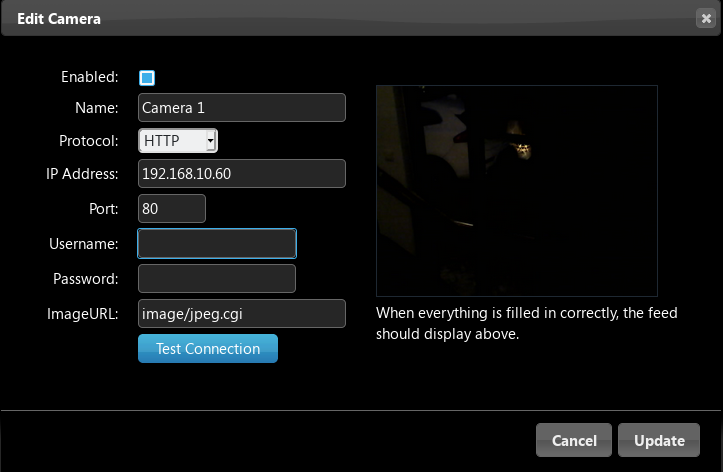
Screenshot_camera1_setup.png
Screenshot_camera1_setup.png (62.07 KiB) Viewed 559 times

In this example we will use the IP Address and Name, as shown in the picture above.

3. Go to "Setup" ===> "Hardware" and create a new hardware device, called "System Alive Checker (Ping)" and give it a name e.g. "Equipment Alive".

4. For this device press "Setup" and Configure the "Ping" settings.

5. Fill in the required field in order to "Ping" your Camera 1 IP Address.
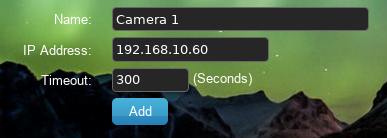
Screenshot_camera1_setup2.png
Screenshot_camera1_setup2.png (55.4 KiB) Viewed 559 times
Press "Add"
This device will now appear under the "Switch" tab.
Of course you would like to use a nice camera icon.
The icon is to your choice, but I used this one:
viewtopic.php?t=12321
On and Off is currently the same. You can change that of course.

6 Go back to your Camera configuration under "Setup" ===> "More Options" ===> "Cameras".
Select Camera 1 and add for this camera "Active Devices/Scenes"
Open the "drop down" menu and select: "[Light/Switches] Camera 1". Press "Add".
This is actually you previously created "Ping" device.
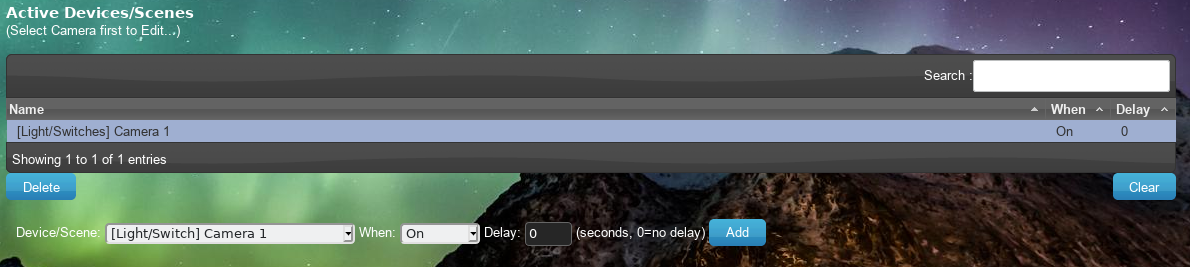
Screenshot_camera1_setup3.png
Screenshot_camera1_setup3.png (208.32 KiB) Viewed 559 times
[ To be continued in the next post]

Re: Cameras thumbnail in floorplan?

Posted: Sunday 18 April 2021 22:05
by FireWizard
If you have configured everything correct you will find the following widget under the "Switches" tab:

Screenshot_camera1_setup4.png
Screenshot_camera1_setup4.png (20.66 KiB) Viewed 557 times
To avoid accidental switching of this device, tou can set it to "Protected"

I use the ON/Off setting, as this allows me to use the "Custom" icon.

Screenshot_camera1_setup5.png
Screenshot_camera1_setup5.png (221.96 KiB) Viewed 557 times
If you click on the small "webcam" icon in the right top corner of the widget, a window, showing your camera stream, will open.

The method to create a floor-plan and to add the various widgets is clearly described in the Wiki: https://www.domoticz.com/wiki/Floorplans.

If you hoover with your mouse over the camera widget, you will see the small "webcam" icon. Click on it and it will show your camera stream.

Best regards