Page 1 of 1
Blocky script need help
Posted: Tuesday 14 June 2016 22:05
by Kerneldomoticz
Hello all,
I'm facing an issue here with my fibaro FGMS001 and my fibaro dimmer using blocky script for simple dummy script :
what i want to do is :

- blocky1.JPG (37.56 KiB) Viewed 2981 times
but i get this error message that i don't understand :
Code: Select all
2016-06-14 22:03:00.253 Error: EventSystem: Lua script error (Blockly), Name: Dressing light day time_1 => [string "result = 0; weekday = os.date('*t')['wday']; ..."]:1: unexpected symbol near ']'
also here is my group and network :
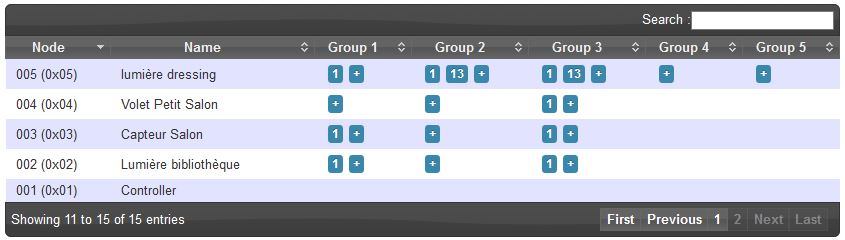
- group&net1.JPG (42.6 KiB) Viewed 2981 times
can you polease guys help ... i don't know why it is not working.
PS : Lumière = light & capteur = sensor/PIR (

let me know if you needs translation)
Cheers,
FLo
Re: Blocky script need help
Posted: Wednesday 15 June 2016 16:20
by Kerneldomoticz
any idea ?
did someone succeed in using Fibaro FGMS 001 motion sensor to turn light ?
Cheers,
Flo
Re: Blocky script need help
Posted: Wednesday 15 June 2016 21:03
by StanHD
Hi,
The below Blockley uses FGMS001 to switch my Hall Lights using both the motion detection and the light level information. (I also have a dummy "Auto" switch to disable the automation when needed.)
Note:- The off delay settings etc. are set in the Z-Wave Hardware settings for the FGMS001
This all works very well for a year now.

Re: Blocky script need help
Posted: Wednesday 15 June 2016 21:27
by Kerneldomoticz
Thank you StanHD

can you post your FGMS 001 settings maybe i've somoething wrong or forgotten in mine ....
Re: Blocky script need help
Posted: Thursday 16 June 2016 8:36
by StanHD
Here you go:-
1. Motion sensor's sensitivity:
10
(actual: 10)
2. Motion sensor's blind time (insensitivity):
15
(actual: 15)
3. PIR sensor's pulse counter:
Default setting: 1 (2 pulses)
4. PIR sensor's window time:
Default setting: 2 (12 seconds)
6. Motion alarm cancellation delay:
30
(actual: 30)
8. PIR sensor operating Mode:
Default setting: 0 (always active)
9. Night / day:
200
(actual: 200)
12. Basic command class frames configuration:
Default setting: 0 (ON and OFF)
14. BASIC ON command frame value:
255
(actual: 255)
16. BASIC OFF command frame value:
0
(actual: 0)
20. Tamper sensitivity:
15
(actual: 15)
22. Tamper alarm cancellation delay:
30
(actual: 30)
24. Tamper operating modes:
Default setting: 0 (Tamper)
26. Tamper alarm broadcast mode:
0
(actual: 0)
40. Illumination report threshold:
200
(actual: 200)
42. Illumination reports interval:
0
(actual: 0)
60. Temperature report threshold:
10
(actual: 10)
62. Interval of temperature measuring:
900
(actual: 900)
64. Temperature reports interval:
0
(actual: 0)
66. Temperature offset:
0
(actual: 0)
80. LED signaling mode:
Default setting: 10 (flashlight)
81. LED brightness:
50
(actual: 50)
82. Ambient illumination level below which LED brightness is set to 1%:
100
(actual: 100)
83. Ambient illumination level above which LED brightness is set to 100%:
1000
(actual: 1000)
86. Minimum temperature resulting in blue LED illumination:
18
(actual: 18)
87. Maximum temperature resulting in red LED illumination:
28
(actual: 28)
89. LED indicating tamper Alarm.
Default setting: 1 (on)
2000. Wake-up Interval:
1800
(Seconds) (actual: 1800)
Re: Blocky script need help
Posted: Thursday 16 June 2016 15:44
by Kerneldomoticz
Thx for you fast answers !!! much appreciated.
i have the exact same config !!! and it doesn't work... even a simple if sensor is ON turn on light doesn't work ...
this is realyl weird.
ps: how do you get the blocky script to show like this .. mine has horizontal layout ...
FLo
Re: Blocky script need help
Posted: Thursday 16 June 2016 20:18
by StanHD
Right click the "and" block and set "external inputs". I find the logic much easier to follow like that.
Just a thought, assume as you are using "level%" that your switch is a dimmer type?
Re: Blocky script need help
Posted: Thursday 16 June 2016 21:45
by Kerneldomoticz
Thx
yes my switch is a dimmer type
Re: Blocky script need help
Posted: Monday 20 June 2016 7:42
by Kerneldomoticz
StanHD i don't know why but i think the main problem was a cache issue with firefox .... as soon as i started using chrome (clean cache) it worked right away !!! the script colours are now corret caus eif you ceck my first post time switches were not blue but green etc etc ...
well now everything is working like a charm ! and also Thx for the AND "external inputs" way better to work on Blocky scripts
Re: Blocky script need help
Posted: Monday 20 June 2016 8:20
by StanHD
Glad you got it sorted

Re: Blocky script need help
Posted: Friday 24 February 2017 17:39
by EddieT
Hi stan,
How long do your light's activate for once triggered,
also which line is it in the fibaro config setting's that alters the on time.
Many thanks,
Eddie.
StanHD wrote:Hi,
The below Blockley uses FGMS001 to switch my Hall Lights using both the motion detection and the light level information. (I also have a dummy "Auto" switch to disable the automation when needed.)
Note:- The off delay settings etc. are set in the Z-Wave Hardware settings for the FGMS001
This all works very well for a year now.
Re: Blocky script need help
Posted: Friday 24 February 2017 17:55
by StanHD
Hi Eddie,
In my hallway I use the default 30 seconds, in other rooms 3 or 5 minutes. Set from parameter 6:-
6. Motion alarm cancellation delay:
Motion alarm will be cancelled in the main controller and the associated devices after the period of time set in this parameter. Any motion detected during the cancellation delay time countdown will result in the countdown being restarted. In case of small values, below 10 seconds, the value of parameter 2 must be modified (PIR sensor's "Blind Time"). Available settings: 1 - 65535 Default setting: 30 (30 seconds)
Hope that helps.
Stan
Re: Blocky script need help
Posted: Friday 24 February 2017 18:13
by EddieT
Hi Stan,
Blocky works great but when i change the setting in the sensor it reverts back to 30, i tried to change it
to 600, Then click the apply configuration to this device.
Also do you have to create a dummy switch for each blocky script, or can you use the same one for each.
Thanks,
Eddie.
Re: Blocky script need help
Posted: Friday 24 February 2017 19:28
by StanHD
Eddie,
After you apply the setting the sensor needs to wake up before the value is applied. I have my wake up set to 1/2 hour, so that changes don't take too long to update. As an alternative you can wake the node up by pressing the button inside 3-4 times and applying the new setting then.
You can reference a single dummy auto/manual switch to as many scripts/blockly as you like, but I have one for each of mine just for versatility. For example you can use the built in timers to turn on and off the Auto function which is pretty handy for say a bedroom when you don't want the light coming on when you turn over in the middle of the night.

Stan.