Page 1 of 1
Send Z-Wave command in script?
Posted: Sunday 31 January 2016 21:31
by Ben0it
Hello,
Is it possible to send a Z-Wave command to a device in LUA?
For instance, I would like to change the ring color of a Fibaro wall plug (FGWPE). Using the OpenZWave control panel (as shown in the picture below) I can do this, but using a LUA script, is it possible also?
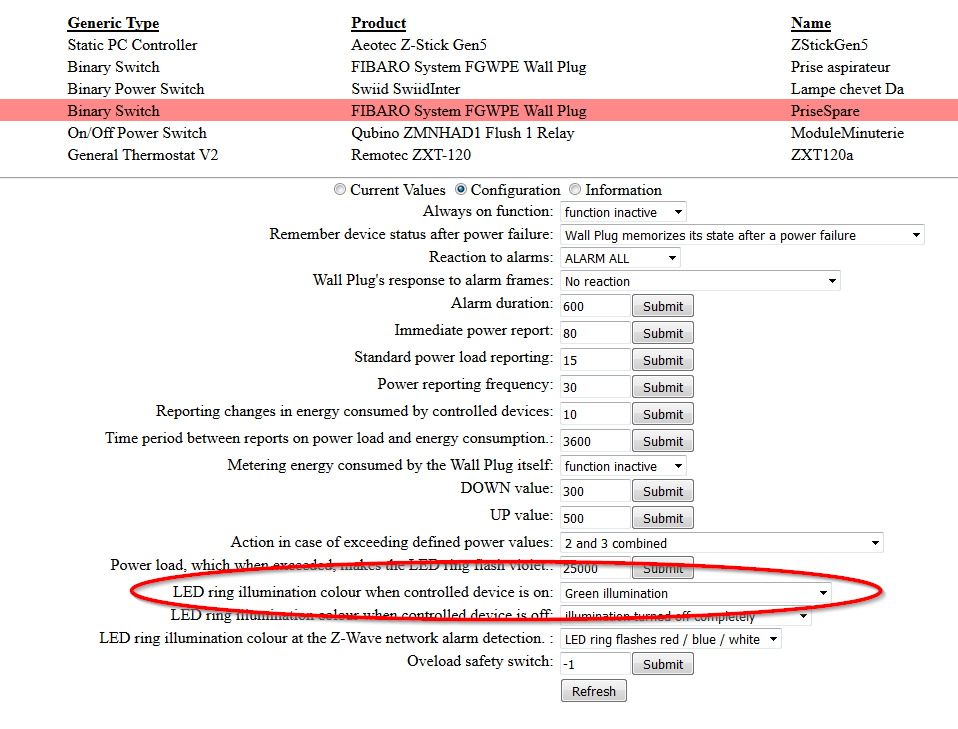
- fgwperingcolor.jpg (182.16 KiB) Viewed 7794 times
Best Regards,
Re: Send Z-Wave command in script?
Posted: Sunday 31 January 2016 22:53
by Egregius
Don't know about lua, but possible in PHP:
Code: Select all
<?php
$domoticzurl='http://127.0.0.1:8080/';
$zwaveidx=7;
file_get_contents($domoticzurl.'json.htm?type=openzwavenodes&idx='.$zwaveidx);

function ValuePost($command) {
	global $domoticzurl;
	$zwaveurl=$domoticzurl.'ozwcp/valuepost.html';
	$zwaveoptions = array('http'=>array('header'=>'Content-Type: application/x-www-form-urlencoded\r\n','method'=>'POST','content'=>$command,),);
	$zwavecontext=stream_context_create($zwaveoptions);
	$result=file_get_contents($zwaveurl,false,$zwavecontext);
	return $result;
}

echo ValuePost('85-CONFIGURATION-config-list-1-62=Green illumination');
What to post can be looked up in developer view of your browser. The example above sets the illumination to green of node 85.
The first file_get_contents is just for authentication.
Re: Send Z-Wave command in script?
Posted: Monday 01 February 2016 7:07
by Ben0it
Thanks for the code, I will try it and report about the result here.
Re: Send Z-Wave command in script?
Posted: Friday 11 March 2016 19:55
by Ben0it
Good evening,
Finally, I could find some spare time to play with these commands...it works!
Thanks a lot for the hint.
Best Regards,
Re: Send Z-Wave command in script?
Posted: Saturday 26 March 2016 21:48
by Egregius
You're sure the 3th line is still in the code?
Code: Select all
file_get_contents($domoticzurl.'json.htm?type=openzwavenodes&idx='.$zwaveidx);
Without that line the second url fails after some time.
Re: Send Z-Wave command in script?
Posted: Sunday 27 March 2016 11:29
by Ben0it
Hi,
Here is my code, I invoque from BASH interpreter with arguments:
Code: Select all
$domoticzURL = 'http://127.0.0.1:8080/';

if (count($argv) != 4)
{
    $command = basename($argv[0]);
    echo "Usage: {$command} node function value\n";
    exit(0);
}

$zwaveNodeID = $argv[1];
$nodeFunction = $argv[2];
$nodeFunctionValue = $argv[3];

function Authenticate($domoticzURL, $zwaveIDX)
{
   $result = json_decode(file_get_contents($domoticzURL.'json.htm?type=openzwavenodes&idx='.$zwaveIDX, false, NULL), true);

   if (strtoupper($result['status']) == "OK")
   {
       return true;
   }
   return $result;
}

function SetNodeValue($domoticzURL, $zwaveNodeID, $functionNumber, $functionValue)
{
    $zwaveURL = $domoticzURL.'ozwcp/valuepost.html';
    $zwaveCommand = "{$zwaveNodeID}-CONFIGURATION-config-list-1-{$functionNumber}={$functionValue}";
    $zwaveOptions = array('http'=>array('header'=>'Content-Type: application/x-www-form-urlencoded\r\n','method'=>'POST','content'=>$zwaveCommand,),);
    $zwaveContext = stream_context_create($zwaveOptions);

    $result = file_get_contents($zwaveURL, false, $zwaveContext);

    if (strtoupper($result) == "OK")
    {
       return true;
    }
    return $result;
}

$result = Authenticate($domoticzURL, $zwaveNodeID);
if ($result != true)
{
    echo "Failed to authenticate: {$result}";
    return 1;
}

$result = SetNodeValue($domoticzURL, $zwaveNodeID, $nodeFunction, "{$nodeFunctionValue}");
if ($result != true)
{
    echo "Failed to set parameter: {$result}";
    return 2;
}

return 0;
Invocation from shell is performed as follows:
Code: Select all
php -f bin/ozwcmd.php 3 62 "Red illumination"
- Actually, it seems to fail after a while. Once it fails, if I manually change a parameter from Domoticz' web interface in the OZW control panel, my script works again.
Best Regards,
Re: Send Z-Wave command in script?
Posted: Monday 08 August 2016 19:33
by leoncornelissen
If I look at the PHP code, I would say that one should be able to convert this to a curl command.
I don't know how I should use the PHP code. I don't have the file: 'ozwcp/valuepost.html';
I want to have a simple curl command to switch the alarm sound of the zwave aeotec siren dependend of the situation.
Re: Send Z-Wave command in script?
Posted: Tuesday 24 January 2017 20:20
by juankar
Curl command equivalent:
curl --data "85-CONFIGURATION-config-list-1-62=Green illumination"
http://127.0.0.1:8080/ozwcp/valuepost.html
valuepost.html does not exist as webpage, it's a page "inside http Domoticz server"
Re: Send Z-Wave command in script?
Posted: Thursday 04 May 2017 16:47
by rgvandenbosch
Hi there,
I was wondering. When invoking the script with nodeID, Function and Value, how does one know the id of the function and the possible values. In the examples the function '62' is called. What is function 62 and what are the other functions?
Hope someone can help.
Thanx in advance.
Re: Send Z-Wave command in script?
Posted: Tuesday 06 June 2017 6:01
by sundansx
I have the same question. How did you come up with the "85-CONFIGURATION-config-list-1-62=Green illumination" string? Thanks.
Re: Send Z-Wave command in script?
Posted: Tuesday 06 June 2017 7:27
by Egregius