Page 42 of 76
Re: Pass2PHP
Posted: Friday 03 May 2019 11:35
by Trigun
poudenes wrote: Friday 03 May 2019 11:02
from SSH:
Code: Select all
root@raspberrypi:/var/www/html/secure# php _fetchdomoticz.php
PHP Warning:  require(/var/www/html/config.php): failed to open stream: No such file or directory in /var/www/html/secure/_fetchdomoticz.php on line 12
PHP Fatal error:  require(): Failed opening required '/var/www/html/config.php' (include_path='.:/usr/share/php') in /var/www/html/secure/_fetchdomoticz.php on line 12
(A white screen)
ah ok, so you still get the same error?
just put the following files in the following folders and make no changes to the files at all:
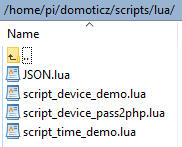
- 2019-05-03 11_33_36-lua - Domoticz-NEW! - WinSCP.png (3.79 KiB) Viewed 1240 times
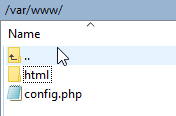
- 2019-05-03 11_33_13-www - Domoticz-NEW! - WinSCP.png (2.73 KiB) Viewed 1240 times
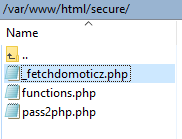
- 2019-05-03 11_32_52-secure - Domoticz-NEW! - WinSCP.png (3.5 KiB) Viewed 1240 times
after that, please test again.
when you put the files in the folders and made no changes to the files(not even your own domoticz IP) it should work
Re: Pass2PHP
Posted: Friday 03 May 2019 11:40
by poudenes
Trigun wrote: Friday 03 May 2019 11:35
poudenes wrote: Friday 03 May 2019 11:02
from SSH:
Code: Select all
root@raspberrypi:/var/www/html/secure# php _fetchdomoticz.php
PHP Warning:  require(/var/www/html/config.php): failed to open stream: No such file or directory in /var/www/html/secure/_fetchdomoticz.php on line 12
PHP Fatal error:  require(): Failed opening required '/var/www/html/config.php' (include_path='.:/usr/share/php') in /var/www/html/secure/_fetchdomoticz.php on line 12
(A white screen)
ah ok, so you still get the same error?
just put the following files in the following folders and make no changes to the files at all:
2019-05-03 11_33_36-lua - Domoticz-NEW! - WinSCP.png
2019-05-03 11_33_13-www - Domoticz-NEW! - WinSCP.png
2019-05-03 11_32_52-secure - Domoticz-NEW! - WinSCP.png
after that, please test again.
when you put the files in the folders and made no changes to the files(not even your own domoticz IP) it should work
Moved config.php to /var/www/ and also change the path in the other files back to /var/www
then php _fetchdomoticz.php now I don't see any notices or errors

Re: Pass2PHP
Posted: Friday 03 May 2019 11:46
by Trigun
poudenes wrote: Friday 03 May 2019 11:40
Trigun wrote: Friday 03 May 2019 11:35
poudenes wrote: Friday 03 May 2019 11:02
from SSH:
Code: Select all
root@raspberrypi:/var/www/html/secure# php _fetchdomoticz.php
PHP Warning:  require(/var/www/html/config.php): failed to open stream: No such file or directory in /var/www/html/secure/_fetchdomoticz.php on line 12
PHP Fatal error:  require(): Failed opening required '/var/www/html/config.php' (include_path='.:/usr/share/php') in /var/www/html/secure/_fetchdomoticz.php on line 12
(A white screen)
ah ok, so you still get the same error?
just put the following files in the following folders and make no changes to the files at all:
2019-05-03 11_33_36-lua - Domoticz-NEW! - WinSCP.png
2019-05-03 11_33_13-www - Domoticz-NEW! - WinSCP.png
2019-05-03 11_32_52-secure - Domoticz-NEW! - WinSCP.png
after that, please test again.
when you put the files in the folders and made no changes to the files(not even your own domoticz IP) it should work
Moved config.php to /var/www/ and also change the path in the other files back to /var/www
then php _fetchdomoticz.php now I don't see any notices or errors
GREAT! now put the "echo"comment after the store line in de _fetch... file.
in the browser you can see the output when you enter
http://domoticzip/secure/_fetchdomoticz.php
Re: Pass2PHP
Posted: Friday 03 May 2019 11:47
by poudenes
With all the support this is how you install pass2php.
if im archived the way correct haha.
This is what I did now:
Code: Select all
sudo apt-get update
sudo apt-get upgrade
sudo apt-get install apache
sudo apt-get install mysql-server
sudo apt-get install phpmyadmin
sudo mysql_secure_installation

mysql -u root -p

GRANT ALL PRIVILEGES ON *.* TO 'domotica'@'localhost' IDENTIFIED BY 'domotica';
CREATE DATABASE domotica;
Download the GitHub package zip file. In this zip file you have ‘Create-Update SQL Database.txt'
Code: Select all
mysql -u domotica -p domotica < 'Create-Update SQL Database.txt'
mysql -u root -p

MariaDB [(none)]> show databases;
+--------------------+
| Database           |
+--------------------+
| domotica           |
| information_schema |
| mysql              |
| performance_schema |
+--------------------+
4 rows in set (0.00 sec)

sudo ln -s /usr/share/phpmyadmin /var/www/html
Copy all files from the ZIP to:
So lots of files are in /var/www/html/
And lots of files are in /var/www/html/secure
move config.php to /var/www/
Edit _fetchdomoticz.php and add 2 lines:
Code: Select all
require '/var/www/config.php';
require 'functions.php';
copy from /var/www/html/secure/lua the file
to
Edit _fetchdomoticz.php and add follow line direct below: store($name, $status, $idx, false);
Code: Select all
echo $idx.' '.$name.' = '.$status.'<br>';
so it looks like
Code: Select all
store($name, $status, $idx, false);
echo $idx.' '.$name.' = '.$status.'<br>';
to fetch all devices in dB:
If everything is correct what I post now, then all devices will be now in database.
open
Login and in database: domotica > devices you can see all the devices
Re: Pass2PHP
Posted: Friday 03 May 2019 12:05
by Egregius
Could be that the spaces causes issues, I don't use them in my devicenames. Maybe Sincze can confirm or deny that.
Will look into it a bit later, just accidentally deleted all my devices

Re: Pass2PHP
Posted: Friday 03 May 2019 12:09
by poudenes
Egregius wrote: Friday 03 May 2019 12:05
Could be that the spaces causes issues, I don't use them in my devicenames. Maybe Sincze can confirm or deny that.
Will look into it a bit later, just accidentally deleted all my devices
Since I updated the path of config I can fetch without any errors... Everything is now in dB
Re: Pass2PHP
Posted: Friday 03 May 2019 12:17
by Egregius
Great, next step would be create a device script on a motion sensor to switch the light on.
And after that a cron script to switch it back off.
If that is working you're started to use pass2php

Re: Pass2PHP
Posted: Friday 03 May 2019 12:37
by poudenes
Egregius wrote: Friday 03 May 2019 12:17
Great, next step would be create a device script on a motion sensor to switch the light on.
And after that a cron script to switch it back off.
If that is working you're started to use pass2php
have a virtual switch "Switch-Hall-MEEK"
created a PHP file Switch-Hall-MEEK.php
add:
Code: Select all
if ($['status']['s']=='On') {
    sw('Dressoir-All', 'On');
}
is this correct?
Re: Pass2PHP
Posted: Friday 03 May 2019 12:51
by Egregius
Nope, it should be:
Code: Select all
if ($status=='On') {
    sw('Dressoir-All', 'On');
}
$status holds the new status of the changed device.
$d array holds all the previous statusses.
Re: Pass2PHP
Posted: Friday 03 May 2019 12:54
by poudenes
Egregius wrote: Friday 03 May 2019 12:51
Nope, it should be:
Code: Select all
if ($status=='On') {
    sw('Dressoir-All', 'On');
}
$status holds the new status of the changed device.
$d array holds all the previous statusses.
Changed it and there is nothing happen. Can I check a log to see what happend?
switch name is correct in dB, also the IDX is correct.
php filename is exact same as device name stored in dB, include case sensitive parts.
Re: Pass2PHP
Posted: Friday 03 May 2019 13:39
by Trigun
poudenes wrote: Friday 03 May 2019 12:54
Egregius wrote: Friday 03 May 2019 12:51
Nope, it should be:
Code: Select all
if ($status=='On') {
    sw('Dressoir-All', 'On');
}
$status holds the new status of the changed device.
$d array holds all the previous statusses.
Changed it and there is nothing happen. Can I check a log to see what happend?
switch name is correct in dB, also the IDX is correct.
php filename is exact same as device name stored in dB, include case sensitive parts.
Sorry, I really don't understand this.
does it mean that for everything I want to switch I also have to make a new dummy switch?
That means I am going to have a whole lot of extra switches.
also, what do I need to do when I just want to switch a light on/off?
thnx guys!
Re: Pass2PHP
Posted: Friday 03 May 2019 13:54
by Egregius
poudenes wrote: Friday 03 May 2019 12:54
Changed it and there is nothing happen. Can I check a log to see what happend?
switch name is correct in dB, also the IDX is correct.
php filename is exact same as device name stored in dB, include case sensitive parts.
If your domoticz log is at /var/log/domoticz.log it should have extra lines in it. These aren't shown by the domoticz GUI log viewer.
You can use this to view the log in realtime thru SSH:
Every switch line from pass2php starts with "(SWITCH)".
Re: Pass2PHP
Posted: Friday 03 May 2019 13:55
by Egregius
Trigun wrote: Friday 03 May 2019 13:39
Sorry, I really don't understand this.
does it mean that for everything I want to switch I also have to make a new dummy switch?
That means I am going to have a whole lot of extra switches.
also, what do I need to do when I just want to switch a light on/off?
thnx guys!
You don't need any dummy switch.
How do you want to switch of the light? From the floorplan or from a schedule?
Re: Pass2PHP
Posted: Friday 03 May 2019 14:14
by Trigun
Egregius wrote: Friday 03 May 2019 13:55
Trigun wrote: Friday 03 May 2019 13:39
Sorry, I really don't understand this.
does it mean that for everything I want to switch I also have to make a new dummy switch?
That means I am going to have a whole lot of extra switches.
also, what do I need to do when I just want to switch a light on/off?
thnx guys!
You don't need any dummy switch.
How do you want to switch of the light? From the floorplan or from a schedule?
I was wondering if I switch a light on/off via the domoticz dashboard if I also could use pass2php
Re: Pass2PHP
Posted: Friday 03 May 2019 14:44
by sincze
This issue is now solved for Pass2php in latest Domoticz release. Tnx @Gizmocuz
https://github.com/domoticz/domoticz/is ... -489075040
Sent from my ONEPLUS A6003 using Tapatalk
Re: Pass2PHP
Posted: Friday 03 May 2019 15:45
by poudenes
Egregius wrote: Friday 03 May 2019 13:54
poudenes wrote: Friday 03 May 2019 12:54
Changed it and there is nothing happen. Can I check a log to see what happend?
switch name is correct in dB, also the IDX is correct.
php filename is exact same as device name stored in dB, include case sensitive parts.
If your domoticz log is at /var/log/domoticz.log it should have extra lines in it. These aren't shown by the domoticz GUI log viewer.
You can use this to view the log in realtime thru SSH:
Every switch line from pass2php starts with "(SWITCH)".
hmm I don't see anything happen ...
Re: Pass2PHP
Posted: Friday 03 May 2019 16:57
by Egregius
Are the new statusses automatically available in the devices MySQL table?
If not, is the lua script in place?
Re: Pass2PHP
Posted: Friday 03 May 2019 16:58
by Egregius
Trigun wrote: Friday 03 May 2019 14:14
I was wondering if I switch a light on/off via the domoticz dashboard if I also could use pass2php
Yes, of course. All statusses are sent with the lua script to pass2php. So you can do everything with them.
Re: Pass2PHP
Posted: Friday 03 May 2019 17:03
by Trigun
Egregius wrote: Friday 03 May 2019 16:58
Trigun wrote: Friday 03 May 2019 14:14
I was wondering if I switch a light on/off via the domoticz dashboard if I also could use pass2php
Yes, of course. All statusses are sent with the lua script to pass2php. So you can do everything with them.
GREAT!!! I am getting closer and closer to the final result where I can go completely haywire with scripts

Ok, if i press a light to go On in domoticz what do I need to write in the php file?
Re: Pass2PHP
Posted: Friday 03 May 2019 17:12
by Egregius
I'm afraid I don't really understand what you're trying to achive.
Do you want to use the floorplan to control everything, or do you just want to use pass2php for scripting?