Page 21 of 26
Re: Python Plugin: MqttMapper
Posted: Tuesday 07 October 2025 12:56
by FlyingDomotic
Starting with 25.10.7-1 (online), you may add
on a device to restrict updates only when device value changes.
For example:
Code: Select all
{
	"Living": {
		"topic": "shelly132/status/switch:0",
		"type": "244",
		"subtype": "73",
		"switchtype": "0",
		"restrictupdate": true,
		"mapping": {
			"item": "output",
			"default": "0",
			"values": {
				"False": "0",
				"True": "100"
			}
		},
		"set": {
			"topic": "shelly132/rpc",
			"payload": "{ \"id\":0, \"src\": \"domoticz\", \"method\": \"Switch.Set\", \"params\":{\"id\":0,\"on\":#}}",
			"mapping": {
				"values": {
					"false": "0",
					"true": "100"
				}
			}
		}
	}
}
You just have to "git putt" into plugin folder and either restart Domoticz or restart plugin (go to "Hardware" tab, click on MqttMapper plugin line, and then on "Modify" button, without changing anything else).
Re: Python Plugin: MqttMapper
Posted: Tuesday 07 October 2025 17:44
by TiXav
Hi, I have just "git pull" the plugin, add "restrictupdate" to all the switch setup and restart the plugin in domoticz, Super ! It seems ok all lastupdate of all switches (or % for dimmer) are not updated if the state does not change.
Thank you a lot !
If I could I would take you to the pub and buy you a good beer

Re: Python Plugin: MqttMapper
Posted: Tuesday 07 October 2025 19:32
by FlyingDomotic
TiXav wrote: Tuesday 07 October 2025 17:44
If I could I would take you to the pub and buy you a good beer
May be possible if you're in South West of France

Re: Python Plugin: MqttMapper
Posted: Tuesday 07 October 2025 20:37
by TiXav
no, sorry, I am living in the center close to Blois, so, not so far
Re: Python Plugin: MqttMapper
Posted: Tuesday 21 October 2025 23:31
by oli80330
Hello everyone,
I'm testing this plugin and would like to integrate my Shelly devices via MQTT because it's much faster than ShellyTeacher. I was able to integrate my "General, Kwh" meters into Domoticz without any problems, and the consumption is displayed instantly, which is perfect!
However, my shutters are all controlled by Shelly 2.5 devices in Roller mode, and I'm having trouble configuring the JSON correctly. Here's the Shelly thread with the tree structure of a "Buro Volet" shutter:
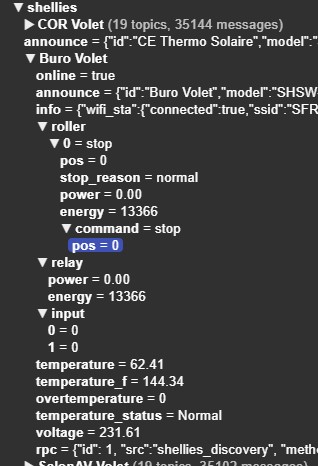
I'd like to retrieve the Shelly status from the Domoticz "Roller Mapper" device and send commands directly via HTTP.
Using the "Blind Test" wiki as a guide, I tried to tinker with it without success:
"Buro Volet": {
"topic": "shellies/Buro Volet/roller",
"type": "244", "subtype": "73", "switchtype": "21",
"mapping": {"item": "value"},
"commands": {"Open": {"command": "
http://192.168.1.75/roller/0?go=open"}},
"Close": {"command": "
http://192.168.1.75/roller/0?go=close"}}}
There are also direct commands to integrate:
tp://192.168.xxx.xxx/roller/0?go=to_pos&roller_pos=x
tp://192.168.xxx.xxx/roller/0?go=stop
The device is generated correctly in Domoticz but doesn't allow for reception or feedback.
I'm not at all familiar with coding and therefore need help.
Re: Python Plugin: MqttMapper
Posted: Wednesday 22 October 2025 0:27
by waltervl
oli80330 wrote: Tuesday 21 October 2025 23:31
Bonjour à tous,
Je découvre ce plugin.
...
Please translate your post in French asap as this is an English written forum. There is also a French written forum around if you want to discuss about Domoticz in French. Thank you for your cooperation!
Re: Python Plugin: MqttMapper
Posted: Wednesday 22 October 2025 22:15
by oli80330
Hello,
I was able to rewrite json.
> domoticz commands work (open/close/stop and level)
> Mapping don't work

"Volet_Volet": {
"topic": "shellies/buro_volet/roller/0",
"type": "244",
"subtype": "73",
"switchtype": "21",
"mapping": {
"state": { "topic": "shellies/buro_volet/roller/0", "value_template": "{{ value_json.roller.pos }}" },
"position": { "topic": "shellies/buro_volet/roller/0/pos", "value_template": "{{ value_json.roller.pos }}" },
"power": { "topic": "shellies/buro_volet/roller/0/power","value_template": "{{ value_json.power }}" },
"energy": { "topic": "shellies/buro_volet/roller/0/energy","value_template": "{{ value_json.energy }}" }
},
"commands": {
"Open": {"topic": "shellies/buro_volet/roller/0/command", "payload": "open"},
"Close": {"topic": "shellies/buro_volet/roller/0/command", "payload": "close"},
"Stop": {"topic": "shellies/buro_volet/roller/0/command", "payload": "stop"},
"Set Level":{"topic": "shellies/buro_volet/roller/0/command/pos", "payload": "<level>", "retain": true},"direction": "both"}
Re: Python Plugin: MqttMapper
Posted: Thursday 23 October 2025 1:50
by FlyingDomotic
I should have a problem, as I wrote a message twice this morning, and none of them have been published, while I saw them... I hope this one will stay...
I updated readme with some advice on how to find right topic and values. You can find it at
https://github.com/FlyingDomotic/domoti ... ttexplorer
In your case, definition file should be something like:
Code: Select all
{
	"Buro Volet": {
		"topic": "shellies/Buro Volet/roller/0",
		"type": "244", "subtype": "73", "switchtype": "21",
		"mapping": {"item": ""},
		"commands": {
			"Open": {"command": "http://192.168.1.75/roller/0?go=open"},
			"Stop": {"command": "http://192.168.1.75/roller/0?go=stop"},
			"Close": {"command": "http://192.168.1.75/roller/0?go=close"}
		}
	}
}
FYI, syntax you're using in your previous message is a mix between MqttMapper and HomeAssistant. You won't get an error, as JSON is valid, but noway to get something working
However, command syntax may work, if Shellies are reading these topics.
Re: Python Plugin: MqttMapper
Posted: Thursday 23 October 2025 21:43
by oli80330
Hello,
Always a problem of mapping (commands it's ok).
Device Shelly MQTT Name : buro
Device Domoticz created by SHellyMpper : ShellyMapper - buro
Device : Shelly 2.5 Gen 1
Mapping : "mapping": {"item": ""}, > not functionnal in Domoticz, no back state Device but update time is OK
So, I use Mapping with state and position (chatGPT)
Log domoticz error :
2025-10-23 21:37:11.526 ShellyMapper: Pushing 'ReadEvent' on to queue
2025-10-23 21:37:11.553 ShellyMapper: Processing 'ReadEvent' message
2025-10-23 21:37:11.553 ShellyMapper: Received 30 bytes of data
2025-10-23 21:37:11.553 ShellyMapper: 30 1c 00 16 73 68 65 6c 6c 69 65 73 2f 62 75 72 6f 2f 72 6f 0...shellies/buro/ro
2025-10-23 21:37:11.553 ShellyMapper: 6c 6c 65 72 2f 30 73 74 6f 70 .. .. .. .. .. .. .. .. .. .. ller/0stop
2025-10-23 21:37:11.554 ShellyMapper: Pushing 'onMessageCallback' on to queue
2025-10-23 21:37:11.554 ShellyMapper: Processing 'onMessageCallback' message
2025-10-23 21:37:11.554 ShellyMapper: Calling message handler 'onMessage' on 'module' type object.
2025-10-23 21:37:11.554 ShellyMapper: onMQTTPublish found shellies/buro/roller/0, Device 'ShellyMapper - buro', message 'stop'
2025-10-23 21:37:11.554 Error: ShellyMapper: No mapping for ShellyMapper - buro
JSON :
{
"ShellyMapper - buro": {
"type": "244",
"subtype": "73",
"switchtype": "21",
"topic": "shellies/buro/roller/0",
"mapping": {
"state": {
"topic": "shellies/buro/roller/0",
"value": {
"open": 100,
"close": 0,
"stop": 50
}
},
"position": {
"topic": "shellies/buro/roller/0/pos",
"value_template": "{value}"
}
},
"commands": {
"Open": {
"topic": "shellies/buro/roller/0/command",
"payload": "open"
},
"Close": {
"topic": "shellies/buro/roller/0/command",
"payload": "close"
},
"Stop": {
"topic": "shellies/buro/roller/0/command",
"payload": "stop"
},
"Set Level": {
"topic": "shellies/buro/roller/0/command/pos",
"payload": "<level>",
"retain": false }
}
}
}
Have you an idea ?
If I use dumpMqttMapper :
ShellyMapper - buro
MqttMapper: {'type': '244', 'subtype': '73', 'switchtype': '21', 'topic': 'shellies/buro/roller/0', 'mapping': {'item': ''}, 'commands': {'Open': {'topic': 'shellies/buro/roller/0/command', 'payload': 'open'}, 'Close': {'topic': 'shellies/buro/roller/0/command', 'payload': 'close'}, 'Stop': {'topic': 'shellies/buro/roller/0/command', 'payload': 'stop'}, 'Set Level': {'topic': 'shellies/buro/roller/0/command/pos', 'payload': '<level>', 'retain': False}}}
API: Name='ShellyMapper - buro', Idx='11377', Type='Light/Switch||', Data='Closed', Color='', Level='0'
Database: Name='ShellyMapper - buro', Idx='11377', Type='244|73|21', nValue='0', sValue='stop', Color='', LastLevel='0'
Reading shelly.json
Have you an idea ?
Re: Python Plugin: MqttMapper
Posted: Thursday 23 October 2025 22:31
by FlyingDomotic
I have an idea: don't trust what ChatGPT may tell you!
It's merging syntax of different systems (MqttMapper and Home Assistant), making configuration file illegal for MqttMapper. This won't crash MqttMapper, but just nothing will work, as you can see...
If you want to check a MqttMapper configuration file, just go to MqttMapper folder and run checkJsonFile
Code: Select all
cd
cd domoticz/plugins/MqttMapper/
./checkJsonFiles.py
You probably will see something like:
Code: Select all
   Error: item is mandatory in >ShellyMapper - buro:mapping<
   Error: state is unknown in >ShellyMapper - buro:mapping<
   Error: position is unknown in >ShellyMapper - buro:mapping<
You may have a look to documentation at
https://github.com/FlyingDomotic/domoti ... r-pluginto see legal syntax.
Now, if proposed configuration file don't work, let's try with this one:
Code: Select all
{
	"Buro Volet": {
		"topic": "shellies/Buro Volet/roller/0/command/pos",
		"type": "244", "subtype": "73", "switchtype": "21",
		"mapping": {"item": ""},
		"commands": {
			"Open": {"command": "http://192.168.1.75/roller/0?go=open"},
			"Stop": {"command": "http://192.168.1.75/roller/0?go=stop"},
			"Close": {"command": "http://192.168.1.75/roller/0?go=close"}
		}
	}
}
Re: Python Plugin: MqttMapper
Posted: Friday 24 October 2025 0:25
by oli80330
Hello
Thanks for your help
Command and Update DZ device work for my shelly 2.5 Gen1 (mode roller)
JSON :
For Update : Topic is : /roller/0/pos
For Command : Topic is /roller/0/command
"ShellyMapper - buro": {
"topic": "shellies/buro/roller/0/pos",
"type": "244",
"subtype": "73",
"switchtype": "21",
"mapping": {"item": ""},
"commands": {
"Open": { "topic": "shellies/buro/roller/0/command", "payload": "open" },
"Close": { "topic": "shellies/buro/roller/0/command", "payload": "close" },
"Stop": { "topic": "shellies/buro/roller/0/command", "payload": "stop" },
"Set Level": { "topic": "shellies/buro/roller/0/command/pos", "payload": "<level>", "retain": false }
}
}
Re: Python Plugin: MqttMapper
Posted: Friday 24 October 2025 21:29
by oli80330
Hello,
A NEW JSON for :
- Shelly1 (Gen 1)
- Domoticz device : Lignt/Switch, Switch, On/Off :
XXXXX : MQTT name shelly device
> but it's not work...
{
"SDB Ventil": {
"topic": "shellies/XXXXX/relay/0",
"type": "244", "subtype": "73", "switchtype": "0",
"mapping": { "item": "", "default": "0", "values": { "off": "0", "on": "100", "False": "0", "True": "100" } },
"set": {
"topic": "shellies/XXXXX/relay/0/command", "payload": "#",
"mapping": { "values": { "Off": "off", "On": "on", "0": "off", "100": "on" } }
}
}
}
Re: Python Plugin: MqttMapper
Posted: Friday 24 October 2025 22:04
by FlyingDomotic
Does this works, or do you need help?
Re: Python Plugin: MqttMapper
Posted: Friday 24 October 2025 23:46
by oli80330
Hello,
For this Shelly 1, update work fine but command not work
Re: Python Plugin: MqttMapper
Posted: Saturday 25 October 2025 1:37
by FlyingDomotic
Again, syntax is not valid (you may check it with checkJsonFiles before trying it). and again, reading doc first may help.
Syntax of set if something like:
Code: Select all
"set": {"topic": "<put here topic to set>", "payload": {<put here payload>}, "retain": <true or false>}
Variable content could be put in payload with "#".
MqttMapper will automatically revert mapping.
Instead of "set", you may also use "command" (removing "set"), like this:
Code: Select all
"commands": {
	"Open": {"topic": "shellies/XXXXX/relay/0/command"", "payload": "<put here value you want to send for open command>"},
	"Close": {"topic": "shellies/XXXXX/relay/0/command"", "payload": "<put here value you want to send for close command>"},
}
Is there any reason not using "command", which is working as per your previous posts?
Re: Python Plugin: MqttMapper
Posted: Saturday 25 October 2025 2:33
by oli80330
Json for sdhelly 2.5 roller works fine.
several JSON examples for shelly (1/2.5/EM Gen1) :
1 - For a Shelly 1 (GEN1) / domoticz device on/off :
"SDB Ventil": {
"topic": "shellies/SDB Ventil/relay/0",
"type": "244", "subtype": "73",
"switchtype": "0",
"mapping": {"item": "", "default": "0", "values": { "off": "0", "on": "100", "false": "0", "true": "100" }},
"commands": {
"On": {"topic": "shellies/SDB Ventil/relay/0/command", "payload": "on"},
"Off": {"topic": "shellies/SDB Ventil/relay/0/command", "payload": "off"}
}
2- For a Shelly 2.5 mode relay (not roller mode) (GEN1) / domoticz on/off :
"CE Mode PAC": {
"topic": "shellies/CE Thermo Solaire/relay/0",
"type": "244", "subtype": "73",
"switchtype": "0",
"mapping": {"item": "", "default": "0", "values": { "off": "0", "on": "100", "false": "0", "true": "100" }},
"commands": {
"On": {"topic": "shellies/CE Thermo Solaire/relay/0", "payload": "on"},
"Off": {"topic": "shellies/CE Thermo Solaire/relay/0", "payload": "off"}
}
}
3 -For a Shelly 2.5 mode roller (not relay mode) (GEN1) / domoticz blinds on/off/stop/position :
"ShellyMapper - Buro Volet": {
"topic": "shellies/Buro Volet/roller/0/pos",
"type": "244",
"subtype": "73",
"switchtype": "21",
"mapping": {"item": ""},
"commands": {
"Open": { "topic": "shellies/Buro Volet/roller/0/command", "payload": "open" },
"Close": { "topic": "shellies/Buro Volet/roller/0/command", "payload": "close" },
"Stop": { "topic": "shellies/Buro Volet/roller/0/command", "payload": "stop" },
"Set Level": { "topic": "shellies/Buro Volet/roller/0/command/pos", "payload": "<level>", "retain": false }
}
}
4 - For a Shelly EM or Shelly 2.5 (Gen1 conso) / domoticz General, kWh :
"Clim Salon": {
"topic": "shellies/Clim Salon/relay/0/power",
"type": "243", "subtype": "29", "switchtype": "0",
"options": {"EnergyMeterMode":"0"},
"mapping": {"item":"~*;~0"}
}
Thank you very much for your plugin, very fast for feedback in MQTT !
The CPU consumption of the RPi is very low.
A good plugin for shelly device, better than shellyteacher or AutoDiscovery, very slow in feedback.
Re: Python Plugin: MqttMapper
Posted: Saturday 25 October 2025 10:35
by FlyingDomotic
Ok!
If it's an on/off, you probably should adapt roller example to it, like:
Code: Select all
{
	"SDB Ventil": {
		"topic": "shellies/XXXXX/relay/0",
		"type": "244", "subtype": "73","switchtype": "0",
		"mapping": {"item": "", "default": "0", "values": {"off": "0", "on": "100"}},
		"commands": {
			"On": {"topic": "shellies/XXXXX/relay/0/command", "payload": "on"},
			"Off": {"topic": "shellies/XXXXX/relay/0/command", "payload": "off"}
		}
	}
}
Re: Python Plugin: MqttMapper
Posted: Tuesday 28 October 2025 17:28
by hjzwiers
I have a script running MqttMapper. It has been running for ages, but all of a sudden I cannot get the compressor speed from the MQTT file
In MQTT the line I'm trying to read is (it is a percentage of 0-100% )
ebusd
hmu
RunDataCompressorSpeed = {"value":{"value": 30.0}}
What has changed?
{
"T_Outside_Text": {
"topic": "ebusd/Broadcast/Outsidetemp",
"type": "243", "subtype": "19", "switchtype": "0",
"mapping": {"item": ""}
},
"T_Living_Text": {
"topic": "ebusd/ctlv2/Z1RoomTemp",
"type": "243", "subtype": "19", "switchtype": "0",
"mapping": {"item": ""}
},
"MQTTrunning": {
"topic": "ebusd/global/running",
"type": "244", "subtype": "73", "switchtype": "0",
"mapping": {"item": "", "default": "0", "values": {"False": "0", "True" : "100"}}
},
"MQTTsignal": {
"topic": "ebusd/global/signal",
"type": "244", "subtype": "73", "switchtype": "0",
"mapping": {"item": "", "default": "0", "values": {"False": "0", "True": "100"}}
},
"Compressor": {
"topic": "ebusd/hmu/RunDataCompressorSpeed",
"type": "243", "subtype": "6", "switchtype": "0",
"mapping": {"item": ""}
},
"Car_Charger": {
"topic": "homeassistant/easee/power",
"type": "243", "subtype": "29", "switchtype": "0",
"options": {"EnergyMeterMode": "1"},
"mapping": {"item": "~*;~0","multiplier": 1000}
}
}
Re: Python Plugin: MqttMapper
Posted: Tuesday 28 October 2025 18:47
by waltervl
@hjzwiers What did you change?
Did you update the plugin (git pull)?
Did you update Domoticz?
Did the application that sends the compressor speed MQTT message change?
What does the Domoticz/plugin log file say when this message is being sent?
Re: Python Plugin: MqttMapper
Posted: Tuesday 28 October 2025 18:54
by FlyingDomotic
If received data is
then "item" should be