Page 18 of 19
Re: [90] MQTT Support
Posted: Saturday 29 December 2018 19:57
by pat054
My problem is solved somehow. Because at the beginning of the problem my idx 178 virtual sensor had a value that did not move so inevitably an undefined result in the debug screen. In addition, domoticz only transmit parameters that move.
Thank you again mrf68, I learned a lot today.
Have a good Christmas Eve, thank you again for having accompanied me. Cordially.
Patric
Re: [90] MQTT Support
Posted: Saturday 29 December 2018 21:14
by mrf68
I’m glad It worked out.
Regards,
Martin
Re: [90] MQTT Support
Posted: Monday 13 May 2019 20:19
by sincze
@mrf68 you saved me a lot of time with the nice guide! tnx so much
Re: [90] MQTT Support
Posted: Monday 13 May 2019 21:27
by mrf68
@sincze you’re welcome.
Re: [90] MQTT Support
Posted: Monday 13 May 2019 21:31
by sincze
mrf68 wrote:@sincze you’re welcome.
Hehehe but now I want to achieve the same results via tasmota rules. But that seems difficult.

Sent from my ONEPLUS A6003 using Tapatalk
Re: [90] MQTT Support
Posted: Monday 13 May 2019 22:52
by mrf68
I’m sorry, but I don’t understand the question.

What info comes from where (looks indeed from a tasmotized device) and what info needs to go in what sensor? What d you expect to see and why is it different from what it is showing?
Re: [90] MQTT Support
Posted: Tuesday 14 May 2019 9:32
by sincze
mrf68 wrote: Monday 13 May 2019 22:52
I’m sorry, but I don’t understand the question.
What info comes from where (looks indeed from a tasmotized device) and what info needs to go in what sensor? What d you expect to see and why is it different from what it is showing?
At the moment with your manual I was able to extract RSSI value using Node Red. tnx for that. As at the moment I don't want to use Node Red I was trying to figure out if I could use native Tasmota rules to achieve the same goal.
Command:
Code: Select all
mosquitto_pub -h localhost -t <topic>/cmnd/status -m 11
Or via the console
Gives me:
Code: Select all
19:10:24 MQT: basic/stat/STATUS11 = {"StatusSTS":{"Time":"2019-05 12T19:10:24","Uptime":"0T06:20:15","Vcc":3.206,"SleepMode":"Dynamic","Sleep":50,"LoadAvg":19,"POWER":"ON","Wifi":{"AP":1,"SSId":"******","BSSId":"**:**:**:**:**:**","Channel":**,"RSSI":98,"LinkCount":1,"Downtime":"0T00:00:04"}}}
19:10:25 MQT: basic/tele/HASS_STATE = {"Version":"6.5.0(release-sonoff)","BuildDateTime":"2019-03-1}
I am interested in this part "RSSI":98,
So what I am looking for is a TASMOTA rule that is able to extract the 98 just as your node-red advise did.

ESP Easy supports this natively.
If the value is extracted it should be send to domoticz, something like:
Code: Select all
rule1 on basic/stat/STATUS#RSSI do publish domoticz/in {"idx":120,"nvalue":0,"svalue":"%value%"} endon"}
This will avoid having me to use Node Red
Re: [90] MQTT Support
Posted: Tuesday 14 May 2019 12:57
by mrf68
sincze wrote: Tuesday 14 May 2019 9:32
....
This will avoid having me to use Node Red
Ah, now I understand it a bit better. Unfortunately, I'm a big fan of Node Red. I let Node Red do more and more the thinking instead of having Domoticz taking care of it. I do have Tasmotized devices and some have a Domoticz idx, but Domoticz transforms only to be the bridge between 433MHz and other devices. And the GUI is a big WAF, so I will keep that.
So, I'm sorry for not being able to help you with your quest.

Re: [90] MQTT Support
Posted: Tuesday 14 May 2019 13:25
by sincze
No worries.
I use Pass2PHP to do everything (not Node-Red). Don't use the interface as everything is automated
That was the biggest WAF. Not to touch any buttons at all. Not even on the toilet.
Re: [90] MQTT Support
Posted: Thursday 22 October 2020 0:21
by MeAlbert
Hi I have tried to use the solution you describe below but it does not work for me.
I have a heat-pump with a ESP8266 sending all kind of date to domoticz using mqtt. That works very nice. The Pi i am using is a Pi zero so when I use also influx, influxDB and grafana it is getting quite slow. I installed domoticz on my synology 218+ but I can't get it working correctly. The data of the heat-pump is being send to synology in the right matter. I also managed to get influxDB working there. Now as a first step I want to send data from my Pi to my synology using node-red which I also use for the heat pump. I have an exact copy of my Pi domoticz on my synology domoticz.
I used :
- MQTT node domoticz/out
server 127-0-0-1:1883
topic : domoticz out/#
- JSON node to covert between JSON & object
property: msg.payload
- switch mode to filter out a few devices
property: msg.payload.idx
== 0/9 64
- Node owith the function :
msg.payload = "{\"command\": \"udevice\", \"idx\": 178, \"svalue\": \"" + (msg.payload.svalue1) + "\"}";
return msg;
- MQTT node domoticz/in
server 192.168.xxx.xx:1883 (the synology address)
The debug screen gives : "{"command": "udevice", "idx": 64, "svalue": "757.0"}" which is correct but nothing happens in the domoticz device 64 on synology.
What do I do wrong??
Re: [90] MQTT Support
Posted: Thursday 22 October 2020 8:26
by waaren
MeAlbert wrote: Thursday 22 October 2020 0:21
- MQTT node domoticz/in
server 192.168.xxx.xx:1883 (the synology address)
Have you installed MQTT (in domoticz) and mosquito on on your Synology?
Re: [90] MQTT Support
Posted: Thursday 22 October 2020 19:08
by FireWizard
HI, @MeAlbert,
You wrote:
- MQTT node domoticz/out
server 127-0-0-1:1883
topic : domoticz out/#
- JSON node to covert between JSON & object
property: msg.payload
- switch mode to filter out a few devices
property: msg.payload.idx
== 0/9 64
- Node owith the function :
msg.payload = "{\"command\": \"udevice\", \"idx\": 178, \"svalue\": \"" + (msg.payload.svalue1) + "\"}";
return msg;
- MQTT node domoticz/in
server 192.168.xxx.xx:1883 (the synology address)
The debug screen gives : "{"command": "udevice", "idx": 64, "svalue": "757.0"}" which is correct but nothing happens in the domoticz device 64 on synology.
What do I do wrong??
As I can see you have 2 MQTT servers (brokers) installed.
1. Address 127.0.0.1:1883, which is your localhost. So obviously also Node Red is installed on this RPi
Your topic on this localhost MQTT node domoticz out/#. Unless it is a type , this topic is wrong and should be domoticz/out.
And nothing more, like # or +. Also your address is written as 127-0-01, and this should be 127.0.0.1. So I assume a typo.
2. Address 192.168.xxx.xxx is the MQTT on your Synology NAS
As @waaren says. It is important to configure in the Domoticz hardware MQTT over LAN.
On the NAS the IP address should be 127.0.0.1 or 192.168.xxx.xxx. Also locoalhost can be used.
This all on the condition that the 2nd MQTT server is installed on the NAS and is accessible by Donoticz.
Also in the RPi you should configure the same, if the other MQTT server runs on this RPI, together with Domoticz and Node Red.
As you have 2 MQTT servers running in your network, a common mistake is that you communicate with the wrong server.
So check that the MQTT Input node is subscribing to the MQTT server on the localhost and that the MQTT Output node is publishing to the Remote MQTT server on the NAS.
Having said this and if you have checked the above, we should look to the data you send.
If you look to your data you see that you send a string (between " "). This is something Domoticz cannot understand.
Domoticz needs a JSON Oject.
See the difference below:
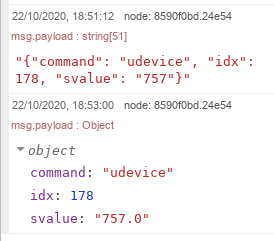
- Screenshot_string versus JSON object.png (15.72 KiB) Viewed 2434 times
You have 2 options:
1. Insert a JSON node between the output of the "Function" node and the input of the MQTT output node to Domoticz.
2. Change your code in the "Function" node to:
Code: Select all
msg.payload = {"command": "udevice", "idx": 178, "svalue": (msg.payload.svalue1)};
return msg;
There is one thing, which I do not understand:
You have a payload of "idx": 178 and your debug screen gives "idx": 64. This cannot be the samemessage sent.
Regards
Re: [90] MQTT Support
Posted: Thursday 22 October 2020 21:49
by MeAlbert
Hi FireWizard.
Thanks for the quick reply. There are some typo's in my text. To make it simple I have a node-red flow running that sends data from my heat-pump to domoticz and influxDB. That works fineboth influx and domoticz. When I installed domoticz on my synology And I had problems getting to work I added an extra MQTT output node. In stead of 127.0.0.1 I used the ip address of the synology server and that works fine. All heat-pump data comes in as well as my smart meter data via youless. I will delet the # but when I debug it it works fine with the #. The address is a typo. I get all data on the MQTT that is listening on 127.0.0.1 . So the settings are correct and working. The MQTT ouput node is subscribing to synology and connected.
I changed thee code in the function block and now I get
22-10-2020 21:43:01node: 5627d816.529848
domoticz/out : msg.payload : Object
{ command: "udevice", idx: 64, svalue: "2348.0" }
The domoticz device on the synology server is now updated but without value. I think the "2348.0" should be without quotes. And I do not know how to get rid of them. So there is progress but not there yet.
The 178 was a wrong copy paste I already had 64 there.
Any ideas?
Re: [90] MQTT Support
Posted: Thursday 22 October 2020 22:26
by FireWizard
Hi @MeAlbert
What you have to send to Domoticz depends on the type of sensor.
For a good overview, you can look to the wiki:
https://www.domoticz.com/wiki/Domoticz_API/JSON_URL%27s
I recommend also always:
https://piandmore.wordpress.com/tag/domoticz/
You don't tell which type of virtual sensor you have created in Domoticz, which you want to update.
Also keep in mind that values after nvalue are numerical and values after svalue are string values.
The majority needs a svalue, but some sensors need a nvalue and some others need both.
Your value "2348.0" is a string value and perfect for svalue.
Some do not allow a figure after the decimal point. Yours?
Regards
Re: [90] MQTT Support
Posted: Thursday 22 October 2020 22:35
by MeAlbert
When I changed to other IDX it sometimes works. Genaral kWh don.t work and general custom works.
If I send the json data is the problem the solved?
I will study the links you mention Thanks so far.
Re: [90] MQTT Support
Posted: Thursday 22 October 2020 22:50
by FireWizard
@MeAlbert,
What is the type of sensor, you want to send this data to?
Regards
Re: [90] MQTT Support
Posted: Thursday 22 October 2020 23:23
by MeAlbert
IDX 64 is type usage with energy read from device. When I change it in computed I get the right value
IDX 73 is type general custom sensor and gets updated correctly.
Re: [90] MQTT Support
Posted: Friday 23 October 2020 19:37
by FireWizard
Hi @MeAlbert,
DX 64 is type usage with energy read from device. When I change it in computed I get the right value
If you look in:
https://piandmore.wordpress.com/2019/02 ... -domoticz/
And look for: Electric
You will see:
The electric sensor will show the current usage of electricity in Watt and the cumulative usage in kWh. You can add digits after the decimal if needed.
Code: Select all
{"command":"udevice", "idx":1234, "svalue":"us;cu"}
where us is usage in Watt and cu is cumulative usage in Wh (even though it is displayed in kWh)
So what you see, you have to supply 2 values (us and cu)
How to send the data?
You have to supply the data as follows:
Code: Select all
msg.payload = {"command":"udevice","idx":279,"nvalue":0,"svalue":(msg.payload.watts.toString()) + ";" + (msg.payload.watt_cumulative_usage.toString())}
Regards
Re: [90] MQTT Support
Posted: Friday 23 October 2020 21:32
by MeAlbert
Hi FireWizard
I did see the us;cu part but did not know how to implement is.
I would have never come to the solution you present here.
When I implement it I get the following error message:
function : (error)
"TypeError: Cannot read property 'toString' of undefined"
Should there not be ; after the code and before return msg;
The input for the function is the following:
Code: Select all
{
	"Battery" : 255,
	"EnergyMeterMode" : "0",
	"RSSI" : 12,
	"description" : "",
	"dtype" : "General",
	"hwid" : "7",
	"id" : "00082064",
	"idx" : 64,
	"name" : "WP Opgewekt",
	"nvalue" : 0,
	"stype" : "kWh",
	"svalue1" : "706.0",
	"svalue2" : "5399890.3171969",
	"unit" : 1
}
When I change the function as following I get an output.
msg.payload = {"command":"udevice","idx":64,"nvalue":0,"svalue":(msg.payload.svalue1) + ";" + (msg.payload.svalue2)};
return msg;
Re: [90] MQTT Support
Posted: Friday 23 October 2020 22:35
by FireWizard
Hi, @MeAlbert
You found the correct solution.
The function toString() creates a string in case the presented value is a numerical value.
However your svalue1 and svalue2 were already strings (between " ") and so you have to omit these toString() function.
The semicolon (;) is not that important in this case.
Regards
