Page 14 of 26
Re: Python Plugin: Shelly MQTT
Posted: Thursday 14 January 2021 22:05
by poeschel
Thank you very much for your donation poeschel!
Thank you to, you gave me the plugin. It helps me very much. You gave me support. I think I can donate this and give you a little bit back.
Re: Python Plugin: Shelly MQTT
Posted: Saturday 23 January 2021 18:05
by darrepac
Hello
I have an issue with my shelly colorbulb. When I change the color into domoticz, no color is changing with my bulb (on and off works well).
I have subscribed to shelly colorbulb topic and here is what I see when I change the color in domoticz interface:
Code: Select all
shellies/shellycolorbulb-483FDA928411/color/0 on
shellies/shellycolorbulb-483FDA928411/color/0/status {"ison":true,"source":"mqtt","has_timer":false,"timer_started":0,"timer_duration":0,"timer_remaining":0,"mode":"color","red":33,"green":82,"blue":255,"white":224,"gain":100,"temp":4750,"brightness":100,"effect":0}
shellies/shellycolorbulb-483FDA928411/light/0/power 10.60
shellies/shellycolorbulb-483FDA928411/light/0/energy 76
I guess there should be something like: shellies/shellycolorbulb-483FDA928411/color/0/set ?
Re: Python Plugin: Shelly MQTT
Posted: Thursday 28 January 2021 18:44
by lwolf
darrepac wrote: Saturday 23 January 2021 18:05
I guess there should be something like: shellies/shellycolorbulb-483FDA928411/color/0/set ?
According to the documentation it has to be:
shellies/shellybulb-<deviceid>/color/0/set
which firmware do you use? Are we talking about the same device? This is what currently supported in the plugin:
https://shelly-api-docs.shelly.cloud/#shelly-bulb
update: I've found out that you are trying to use the "Duo RGBW G10" device which is not supported by this plugin and there are no public information about how its MQTT works. Allterco promised that MQTT API documentations will be updated at the same time when 1.10 firmware will be released.
Re: Python Plugin: Shelly MQTT
Posted: Thursday 28 January 2021 22:32
by darrepac
Yes, correct it is that device.
It is well recognized by the plugin, but may-be it should not??
I agree the MQTT doc is lacking but it is not so much different than other RGB devices.
I have the latest firmware which seems to be 1.9.0 but I don't think the 1.10 will change anything (MQTT messages are already working well)
If you want anything to help to support it, I really think it is similar to some others except "shellycolorbulb" in the path
After many trials, I got a reply on FB support page saying that doc update "will be done very soon"...
Re: Python Plugin: Shelly MQTT
Posted: Saturday 30 January 2021 20:49
by lwolf
darrepac wrote: Thursday 28 January 2021 22:32
Yes, correct it is that device.
It is well recognized by the plugin, but may-be it should not??
If there are matching MQTT paths, they may work on other devices. At least partially. For example if a device sends /light/ paths it will be recognized, but if it is not accepting /set command or awaiting different parameters, controlling will not work.
Full documentation or a device is needed to verify that all paths is the same.
darrepac wrote: Thursday 28 January 2021 22:32
I agree the MQTT doc is lacking but it is not so much different than other RGB devices.
If it were the same, it would work. Apparently its not fully compatible.
darrepac wrote: Thursday 28 January 2021 22:32
After many trials, I got a reply on FB support page saying that doc update "will be done very soon"...
I've got the same answer.
Re: Python Plugin: Shelly MQTT
Posted: Thursday 11 February 2021 18:25
by ProjektC
I have now bought 4 Selly Plug S and thought I can easily integrate them into Domoticz.
I have installed SellyMQQt according to these instructions
https://github.com/enesbcs/Shelly_MQTT
My Domoticz on the Raspi has the IP address 192.168.0.184.
Go to Hardware and make IP 172.0.0.1 port 2567 and give it a user name and password.
2021-02-11 18:19:09.616 Status: Python Plugin System: (WLAN socket) Stop directive received.
2021-02-11 18:19:09.616 Status: Python Plugin System: (WLAN socket) Exiting work loop.
2021-02-11 18:19:09.917 Status: Python Plugin System: (WLANSocket) Stopping threads.
2021-02-11 18:19:09.917 Status: Python Plugin System: (WLANSocket) Stopped.
2021-02-11 18:19:09.917 Status: Python Plugin System: (WLANSocket) Started.
2021-02-11 18:19:10.081 Status: Python Plugin System: (WLANSocket) Entering work loop.
2021-02-11 18:19:10.082 Status: Python Plugin System: (WLANSocket) Initialized version 0.5.6
For Selly Blug S I do
Enable action execution via MQTT
Server 192.168.0.184:2567
User and password from SellyMQTT
The whole thing is saved without errors.
Under Domoticz I find only always as error
2021-02-11 18:21:37.326 Error: Plugins Update hardware (14) thread seems to have ended unexpectedly
Why don't the Selly Plug S appear under Devices ?
Translated with
www.DeepL.com/Translator (free version)
Re: Python Plugin: Shelly MQTT
Posted: Thursday 11 February 2021 19:30
by lwolf
ProjektC wrote: Thursday 11 February 2021 18:25
Under Domoticz I find only always as error
2021-02-11 18:21:37.326 Error: Plugins Update hardware (14) thread seems to have ended unexpectedly
What is your Domoticz version?
Make sure that :
- you've removed every other Python version, just install exactly ONE python version for example 3.7 and its libpython3.7 package.
- you are only using exactly ONE shelly_mqtt plugin instance under hardwares
This error may mean that your Python Plugin system did not work properly. Try to install any other python plugin for testing reasons, for example "Domoticz Plugins Manager"
https://github.com/stas-demydiuk/domoti ... ns-manager and try to install Shelly_MQTT with plugins manager.
ProjektC wrote: Thursday 11 February 2021 18:25
Why don't the Selly Plug S appear under Devices ?
Because the plugin did not started.
There are a good youtube video about installing the plugin:
https://www.youtube.com/watch?v=VvErOFB_fKI
Re: Python Plugin: Shelly MQTT
Posted: Thursday 11 February 2021 20:37
by ProjektC
Hi
pi@raspberrypi:~ $ python --version
Python 2.7.16
Version: 2020.2 (build 12898)
Build Hash: f784e2637-modified
Compile Date: 2021-01-31 15:35:58
dzVents Version: 3.1.4
Python Version: 3.7.3 (default,
I think I misunderstood.
Is it necessary to install a MQTT server besides the SellyMQTT ?
I thought you only need Domoticz, the SellyMQTT plugin and the Selly Plug S.
I thought SellyMQTT also does the server.
How to install a MQTT broker in Domoticz ?
https://www.youtube.com/watch?v=w7QhsFq ... R8dMA&t=0s
Re: Python Plugin: Shelly MQTT
Posted: Thursday 11 February 2021 21:19
by ProjektC
Re: Python Plugin: Shelly MQTT
Posted: Friday 12 February 2021 16:44
by darrepac
@lwolf
How do you deal with MQTT frequency messages?
MQTT message frequency can be change with the following command http://IP_OF_SHELLY/settings?mqtt_update_period=0-65535 (period in second)
If we set 1sec (can be useful for other devices outside domoticz) domoticz would not be able to manage such amount of messages.
How do you manage? cannot be interesting to have a setting stating the maximum message per minute?
Re: Python Plugin: Shelly MQTT
Posted: Wednesday 17 February 2021 19:47
by ProjektC
Hi
Have a Door Contact
I would like that at a time after 60 seconds a lamp turns on.
When the freezer is open for 60 seconds, I want a lamp to turn on in the living room.
Unfortunately I do not get that.
Selly recognizes correctly open and closed.
I can also connect a lamp to it, but not only after a certain time.
If only briefly the door is opened and closed, no message should come, hence the 60 seconds.
Re: Python Plugin: Shelly MQTT
Posted: Wednesday 17 February 2021 20:07
by salopette
Try this:
Re: Python Plugin: Shelly MQTT
Posted: Wednesday 17 February 2021 20:10
by ProjektC
I had the same idea.
But you can't make a Group or Scene with it.
Re: Python Plugin: Shelly MQTT
Posted: Wednesday 17 February 2021 20:16
by salopette
Try to make a virtual switch with the Timer PlugIn, maybe it will work. Otherwise you have to ask the guys with Dzvents!
https://github.com/skarab22/Domoticz-sy ... ree/master
Re: Python Plugin: Shelly MQTT
Posted: Thursday 18 February 2021 21:50
by lwolf
darrepac wrote: Friday 12 February 2021 16:44
@lwolf
How do you deal with MQTT frequency messages?
MQTT message frequency can be change with the following command http://IP_OF_SHELLY/settings?mqtt_update_period=0-65535 (period in second)
How should i deal with MQTT messages?
Shelly default interval works fine. If anyone alter default settings, will return to working settings in case of error.
Spamming mosquitto server and Domoticz server with frequent messages was never a good idea and never will be.
Shelly Motion MQTT
Posted: Friday 19 February 2021 14:38
by marmachine
Hi,
I got my hands on a Shelly Motion

now trying to connect it to Domoticz.
As with all my other Shelly's, i've setup MQTT, but i'm afraid it's not showing up under devices.
My guess is that it's not recognized and someone still has to do something in order to get the same integration like the other Shelly's.
Am i right? Is this on someones roadmap? Anything i can do to help?
Thx
Re: Shelly Motion MQTT
Posted: Friday 19 February 2021 19:51
by lwolf
marmachine wrote: Friday 19 February 2021 14:38
Am i right? Is this on someones roadmap? Anything i can do to help?
Shelly Motion supported since v 0.5.6.
marmachine wrote: Friday 19 February 2021 14:38
My guess is that it's not recognized and someone still has to do something in order to get the same integration like the other Shelly's.
Update plugin first.
https://github.com/enesbcs/Shelly_MQTT/issues/82
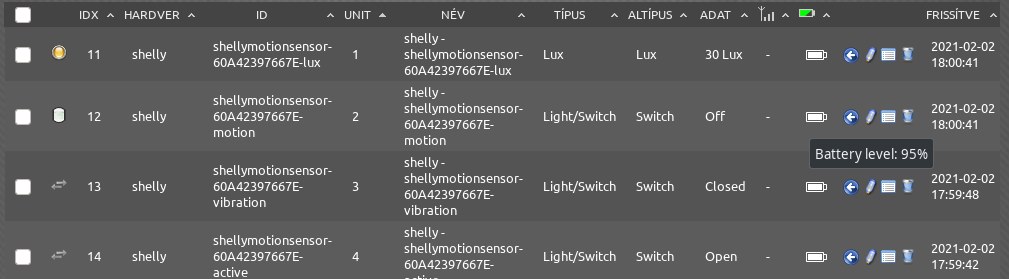 https://translate.google.com/translate? ... aserzekelo
Re: Python Plugin: Shelly MQTT
Posted: Friday 19 February 2021 19:56
by lwolf
ProjektC wrote: Thursday 11 February 2021 20:37
Is it necessary to install a MQTT server besides the SellyMQTT ?
Yes, as it is written on the README.
https://github.com/enesbcs/Shelly_MQTT
Re: Shelly Motion MQTT
Posted: Friday 19 February 2021 21:02
by marmachine
Excellent! Thank you very much, great job! This is why i love Domoticz!
Re: Python Plugin: Shelly MQTT
Posted: Friday 26 February 2021 22:48
by darrepac
Could be a nice new feature to be able to update all shelly with the plugin as is doing the HA plugin:
https://community.home-assistant.io/t/m ... are/284474
In the hw settings we could which day/hour of the week, we want to update