Page 2 of 3
Re: custom icons
Posted: Thursday 09 June 2022 21:36
by QNTL
Somebody found anything about this issue?
Save to say I experience the same thing.
I've asked the developer of the custom icon tool as well...
https://github.com/AurelienLoyer/domoti ... /issues/13
Re: custom icons
Posted: Friday 10 June 2022 10:35
by waltervl
Did you update Domoticz? Did you clear your browser cache? As that normally solves a lot of Issues.....
See also Wiki:
https://www.domoticz.com/wiki/Browser_Cache
Re: custom icons
Posted: Friday 10 June 2022 20:34
by QNTL
Hi,
I did. Tried it in several browsers, several computers and incognito widows as well..sadly
Re: custom icons
Posted: Tuesday 09 August 2022 17:00
by JuanUil
somebody found a solution for the problem allready?
Re: custom icons
Posted: Saturday 29 April 2023 17:56
by QNTL
JuanUil wrote: Tuesday 09 August 2022 17:00
somebody found a solution for the problem allready?
Since you had issues with this as well, I'm asking you the same question. I still haven't found a solution for this, months later. Maybe you or someone else?
Re: custom icons
Posted: Saturday 29 April 2023 23:29
by waltervl
What is exactly the problem you have on what version of Domoticz? I can upload custom icons without issues on latest stable and beta.
Re: custom icons
Posted: Saturday 29 April 2023 23:41
by QNTL
waltervl wrote: Saturday 29 April 2023 23:29
What is exactly the problem you have on what version of Domoticz? I can upload custom icons without issues on latest stable and beta.
The problem is that the upload button doesn't do anything. There is so icon being uploaded.
I can use custom icons by adding them manually, but with every update of domoticz I've to update the switch_icons file manually as well.
This is my version:
Version: 2023.1 (build 15218)
Build Hash: 2d4900a44
Compile Date: 2023-04-29 15:01:10
dzVents Version: 3.1.8
Python Version: 3.7.3 (default, Oct 31 2022, 14:04:00) [GCC 8.3.0]
Re: custom icons
Posted: Sunday 30 April 2023 13:34
by gizmocuz
Seems to me your zip file content is not correct.
Try uploading attached custom icon file.
Re: custom icons
Posted: Sunday 30 April 2023 14:23
by QNTL
gizmocuz wrote: Sunday 30 April 2023 13:34
Seems to me your zip file content is not correct.
Try uploading attached custom icon file.
I downloaded your .zip. same result.
I've always used this site
https://domoticz-icon.aurelien-loyer.fr/.
I have a couple of custom icons, but new ones just don't get added.
And if i delete the custom icons i have already there is no magic space that gets freed up for this.
Like others on this post, I've given all rw rights to www/images, because I thought that is where they are stored. Someone suggested the temporary folder domoticz uses to unzip the icons, but I don't know what directory it is.
Re: custom icons
Posted: Monday 01 May 2023 11:21
by gizmocuz
No, the custom icons are added into the database. This way you keep them in your backup. (And the images folder should be writable but thats default)
Did you try another browser?
I just tried with the edge browser, no issues
Also try in a private mode to ensure it is not a caching issue
Re: custom icons
Posted: Monday 01 May 2023 20:06
by QNTL
gizmocuz wrote: Monday 01 May 2023 11:21
No, the custom icons are added into the database. This way you keep them in your backup. (And the images folder should be writable but thats default)
Did you try another browser?
I just tried with the edge browser, no issues
Also try in a private mode to ensure it is not a caching issue
I did try:
- Incognito browsing
- Clearing cache
- Different browsers (chrome, opera, edge, Firefox)
- On windows
- On android
- From my pi
Re: custom icons
Posted: Monday 01 May 2023 22:53
by waltervl
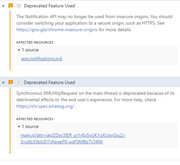
Do you see errors in the console when enabling the browser development tool (F12 in most browsers)?
Do you see any related errors in the Domoticz log file?
Re: custom icons
Posted: Monday 01 May 2023 23:23
by waltervl
To add, I just uploaded 8 different icon zip files, after a couple (4 or 5) I got the same error but refreshing the interface (switching to dashboard and switching back to custom icon page) I had no issues to upload the rest.
Re: custom icons
Posted: Tuesday 02 May 2023 7:30
by QNTL
waltervl wrote: Monday 01 May 2023 22:53
Do you see errors in the console when enabling the browser development tool (F12 in most browsers)?
Do you see any related errors in the Domoticz log file?
Hello,
I see two errors when getting to my domoticz page, but I'm unable to link this to the specific function. Maybe someone can tell something from this.
Re: custom icons
Posted: Friday 26 January 2024 12:20
by McMelloW
Anybody know what is wrong with the link for the Icon-generator?
https://domoticz-icon.aurelien-loyer.fr/
The site is not reachable
Re: custom icons
Posted: Friday 26 January 2024 14:11
by madpatrick
it is offline for a long period.
If you have a webserver (apache) you can copy the files from github and do it yourself
https://github.com/AurelienLoyer/domoti ... _generator
Re: custom icons
Posted: Friday 26 January 2024 14:20
by waltervl
I made an issue on that repository. Lets see if it gets enabled again.
https://github.com/AurelienLoyer/domoti ... /issues/14
Re: custom icons
Posted: Friday 26 January 2024 15:37
by McMelloW
@madpatrick. Thanks for the link. Yes I have apache2 running, but I cannot find how to setup my own icon generator.
@waltervl Thanks for opening an issue. Wait and see what will happen.
Re: custom icons
Posted: Friday 26 January 2024 16:18
by madpatrick
McMelloW wrote: Friday 26 January 2024 15:37
@madpatrick. Thanks for the link. Yes I have apache2 running, but I cannot find how to setup my own icon generator.
Just copy the files in a sub-directory in the web directory (/var/www/html/icon)
The go with your browser to the subdir and it will open the index.html file
For example :
http://192.168.1.1/icon
Re: custom icons
Posted: Friday 26 January 2024 19:32
by McMelloW
madpatrick wrote: Friday 26 January 2024 16:18
Just copy the files in a sub-directory in the web directory (/var/www/html/icon)
The go with your browser to the subdir and it will open the index.html file
For example :
http://192.168.1.1/icon
As simple as that. Thanks very much for your help. It works perfect.