Hi FireWizard, sorry for my extreme late reply. I was not aware of your reactions. I've found the errors in the node reading the fireplace status. As marked in the picture below. The IDX numbers are customized to my own system, the error I was referring to was the name of the payload which was msg.payload_status and should be msg.payload.modbus_statusFireWizard wrote: Monday 15 March 2021 22:53 hello @riko
You wrote March 10, 20:45
I have been searching for this "bug", but I cannot find it.
I haven't that high IDX number of 262 in my flows.
Can you indicate the origin of your flow and the nodes it concerns?
That would help me.
Regards
honeywell brdg-03em01 with dru fireplace
Moderators: leecollings, remb0
-
riko
- Posts: 90
- Joined: Saturday 22 August 2020 13:36
- Target OS: Raspberry Pi / ODroid
- Domoticz version:
- Contact:
Re: honeywell brdg-03em01 with dru fireplace
Last edited by riko on Tuesday 21 December 2021 20:58, edited 1 time in total.
-
riko
- Posts: 90
- Joined: Saturday 22 August 2020 13:36
- Target OS: Raspberry Pi / ODroid
- Domoticz version:
- Contact:
Re: honeywell brdg-03em01 with dru fireplace
I like the solution. The thing is that it is currently searching in all nodes where and whether IDX values are used. By having them all together at one place will definately help. It might feel like an overkill as we are only talking about +-10 devices in Domoticz. But it is hard to find where to configure them. Let alone what happens if I change IDX's in the futureFireWizard wrote: Wednesday 17 March 2021 22:54 Hello @riko,
You came up with the suggestion:
I implemented a Configuration node, in order to configure the Domoticz IDX's outside the main flow.And then one suggestion for improvement of the script. Might it be possible to use parameters to configure the IDX numbers? As each implementation will have different numbers. I have found them all in the flow and changed them. But it is a bit hard for a beginner I quess.
I tested it with an example in another application.
You can find that at:viewtopic.php?f=38&t=26549&p=271164#p271164
See the post of: 16 Mar 2021, 22:59
What is your idea? I think it is a bit of overkill if you do not have that many IDX's to send to Domoticz. But I believe it is much simpler in the case you have a lot of IDX's.The right "Configuration" node is used to configure the Domoticz IDX numbers.
All 39 possible sensors are pre-configured. If someone want to reduce the number of received sensors, that will be sent to Domoticz, you can simple delete the environment variable. Delete also the corresponding block of code in the last "Function" node.
The Confiuration node sets an environment variable composed by IDX and the topic (so example: IDXaverageFuelConsumption)
The topic is set in the last Function node that parses the array, received from Volvo.
What is your opinion?
Regards
-
riko
- Posts: 90
- Joined: Saturday 22 August 2020 13:36
- Target OS: Raspberry Pi / ODroid
- Domoticz version:
- Contact:
Re: honeywell brdg-03em01 with dru fireplace
I have a new issue with regard to setting the Wave pattern.
When I update the Wave pattern starting in register 40421 (using the 10 subsequent registers), using the code as proposed by you I see an error in the debug message: "Error: Modbus exception 3: Illegal data value (value cannot be written to this register)". This error is also described here: https://www.simplymodbus.ca/exceptions.htm
Till today I was always under the impression that updating the Wave worked. But now I found out that actually nothing happens in my fireplace
Anybody experience with this script and aware of a solution?
When I update the Wave pattern starting in register 40421 (using the 10 subsequent registers), using the code as proposed by you I see an error in the debug message: "Error: Modbus exception 3: Illegal data value (value cannot be written to this register)". This error is also described here: https://www.simplymodbus.ca/exceptions.htm
Till today I was always under the impression that updating the Wave worked. But now I found out that actually nothing happens in my fireplace
Anybody experience with this script and aware of a solution?
- FireWizard
- Posts: 1968
- Joined: Tuesday 25 December 2018 12:11
- Target OS: Raspberry Pi / ODroid
- Domoticz version: Beta
- Location: Voorthuizen (NL)
- Contact:
Re: honeywell brdg-03em01 with dru fireplace
Hi,
I will take a look and will report back.
Regards
I will take a look and will report back.
Regards
-
riko
- Posts: 90
- Joined: Saturday 22 August 2020 13:36
- Target OS: Raspberry Pi / ODroid
- Domoticz version:
- Contact:
Re: honeywell brdg-03em01 with dru fireplace
Thanks, looking forward to learn about your insights!
- FireWizard
- Posts: 1968
- Joined: Tuesday 25 December 2018 12:11
- Target OS: Raspberry Pi / ODroid
- Domoticz version: Beta
- Location: Voorthuizen (NL)
- Contact:
Re: honeywell brdg-03em01 with dru fireplace
@riko,
As you might know, I do not own a DRU Burner. I try to test against a simulator and that needs to work first.
It is a long time ago that I made that and I try to remember how it should work.
As I insert that pattern I do not see that error. I have no idea which node gives that error
Can you send the flow.
Regards
As you might know, I do not own a DRU Burner. I try to test against a simulator and that needs to work first.
It is a long time ago that I made that and I try to remember how it should work.
As I insert that pattern I do not see that error. I have no idea which node gives that error
Can you send the flow.
Regards
- FireWizard
- Posts: 1968
- Joined: Tuesday 25 December 2018 12:11
- Target OS: Raspberry Pi / ODroid
- Domoticz version: Beta
- Location: Voorthuizen (NL)
- Contact:
Re: honeywell brdg-03em01 with dru fireplace
Hello @riko
I tested the flow against the simulator. However I do not see that error.
I used the "Custom" flame pattern.
The Wave pattern consists of values between 1 – 15. Totally 20 values
20 values together make the pattern of the wave.
These twenty values are written into 10 16 bit Modbus registers. The odd bits into the 8 LSB bits and the even bits are written into the MSB bits.
The Inject node injects by default 1 for each bit. And 20 ones result in an array of 10 elements with the value 257.
As you showed me and that means that all twenty flames get the value 1 and that is actually not a changing pattern.
So t0 get a kind of pattern, you should play with the values in the Inject node. Only values between 1 and 15 are allowed
Do you have access to the Modbus manual for the burner?
Note: This settings are only stored once a day in none volatile memory,
therefor the setting might be lost after a (rare) power interruption
Another thing to mention is that the numbering of Modbus registers is shifted sometimes.
The Node RED node acts as a master, starting with address 40421 and then 10 registers.
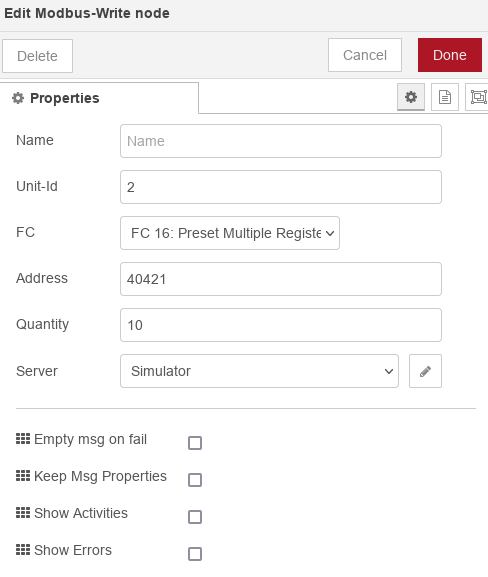
If I inject the following data into the Modbus Write register:
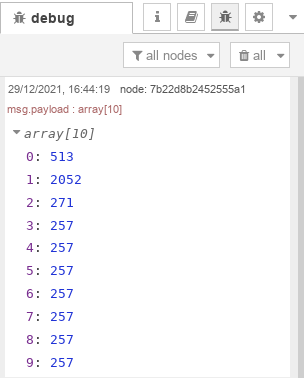
In my ModBus simulater it is shown as:
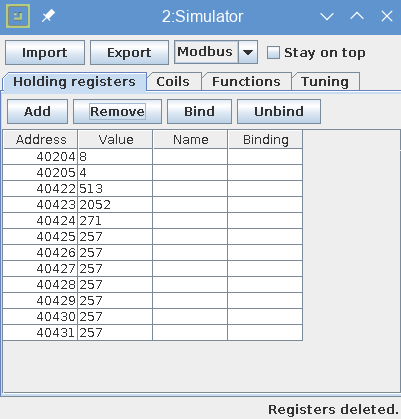
So the value of register 40421 is shown in register 40422.
I do not know where your error message comes from, but if this is also your problem, you might want to change the address in the ModBus write node
from 40421 to 40420 or 40422.
But even with faulty addresses in my simulator I do not get the error.
So I have to know where it comes from (which node).
Regards
I tested the flow against the simulator. However I do not see that error.
I used the "Custom" flame pattern.
The Wave pattern consists of values between 1 – 15. Totally 20 values
20 values together make the pattern of the wave.
These twenty values are written into 10 16 bit Modbus registers. The odd bits into the 8 LSB bits and the even bits are written into the MSB bits.
The Inject node injects by default 1 for each bit. And 20 ones result in an array of 10 elements with the value 257.
As you showed me and that means that all twenty flames get the value 1 and that is actually not a changing pattern.
So t0 get a kind of pattern, you should play with the values in the Inject node. Only values between 1 and 15 are allowed
Do you have access to the Modbus manual for the burner?
Note: This settings are only stored once a day in none volatile memory,
therefor the setting might be lost after a (rare) power interruption
Another thing to mention is that the numbering of Modbus registers is shifted sometimes.
The Node RED node acts as a master, starting with address 40421 and then 10 registers.
If I inject the following data into the Modbus Write register:
In my ModBus simulater it is shown as:
So the value of register 40421 is shown in register 40422.
I do not know where your error message comes from, but if this is also your problem, you might want to change the address in the ModBus write node
from 40421 to 40420 or 40422.
But even with faulty addresses in my simulator I do not get the error.
So I have to know where it comes from (which node).
Regards
-
riko
- Posts: 90
- Joined: Saturday 22 August 2020 13:36
- Target OS: Raspberry Pi / ODroid
- Domoticz version:
- Contact:
Re: honeywell brdg-03em01 with dru fireplace
Thanks for your reply and research. I was running the tests with injecting a value of 1 to the full array, creating the value of 257. That was just for testing, for other values I inject I get the same error.
I also tested to send it to 40420 and 40422, resulting in the same error. I also tested to reduce the quantity to 2, which also gave an error (see the last one in the printscreen below)
It is the Modbus Write node that produces the error:
I also tried another method, using the test flex write node and send the following startup values to that one:
Unfortunately with the same results 
Attached you find the Modbus documentation for the fireplace here: https://github.com/snoekieboe/HABpanel/ ... db3523.pdf
BTW: I could recommend you to buy this fireplace because it works very nice in my domotica system
I also tested to send it to 40420 and 40422, resulting in the same error. I also tested to reduce the quantity to 2, which also gave an error (see the last one in the printscreen below)
It is the Modbus Write node that produces the error:
I also tried another method, using the test flex write node and send the following startup values to that one:
Code: Select all
msg.payload = { value:[2569,3340,3854,3342,2572,1801,773,514,1027,2054],
'fc': 16,
'unitid': 2,
'address': 40421,
'quantity': 10 }
return msgAttached you find the Modbus documentation for the fireplace here: https://github.com/snoekieboe/HABpanel/ ... db3523.pdf
BTW: I could recommend you to buy this fireplace because it works very nice in my domotica system
- FireWizard
- Posts: 1968
- Joined: Tuesday 25 December 2018 12:11
- Target OS: Raspberry Pi / ODroid
- Domoticz version: Beta
- Location: Voorthuizen (NL)
- Contact:
Re: honeywell brdg-03em01 with dru fireplace
Hello @riko,
I did some other tests in order to create your error message, but that failed. Simply, I do not get that.
You wrote:
I see what you did with the test flex write node, but as it results in the same error, I start to believe there is something else in your setup.
I do not see any significant differences between the configuration of your setup and mine, except that you did not fill in the Unit Id. However this is recommended to leave empty, otherwise it overwrites your configuration.
I did now also tick the check boxes for "Show Activities" and "Show errors". But that did not produce an error.
So, at least, last year it was the most recent document.
I think another DRU user might help, but you can also try to use a simulator as well.
Do the other functions work for you? Like On/Off etc.?
Regards
I did some other tests in order to create your error message, but that failed. Simply, I do not get that.
You wrote:
I have also been able to create that error by modifying to quantity of registers, but that does not surprise me.I also tested to reduce the quantity to 2, which also gave an error (see the last one in the printscreen below)
I do understand.I was running the tests with injecting a value of 1 to the full array, creating the value of 257. That was just for testing, for other values I inject I get the same error.
I see what you did with the test flex write node, but as it results in the same error, I start to believe there is something else in your setup.
I do not see any significant differences between the configuration of your setup and mine, except that you did not fill in the Unit Id. However this is recommended to leave empty, otherwise it overwrites your configuration.
I did now also tick the check boxes for "Show Activities" and "Show errors". But that did not produce an error.
I did already found that link last year and in addition DRU mailed this document, when I had contact with them last year.Attached you find the Modbus documentation for the fireplace here: https://github.com/snoekieboe/HABpanel/ ... db3523.pdf
So, at least, last year it was the most recent document.
I need another reason than that it only plays nice with Domoticz. E.g. having space for itBTW: I could recommend you to buy this fireplace because it works very nice in my domotica system
I think another DRU user might help, but you can also try to use a simulator as well.
Do the other functions work for you? Like On/Off etc.?
Regards
Who is online
Users browsing this forum: Bing [Bot] and 1 guest