Page 2 of 2
Re: Help with some scripting with the P1
Posted: Tuesday 27 February 2018 21:33
by McMelloW
Use device type for my script it is triggered by the P! Smart meter device.
Where did you switched on the debug? It does not look strange
Re: Help with some scripting with the P1
Posted: Tuesday 27 February 2018 21:44
by Derik
did set it to device..
Only stil have empty counters:
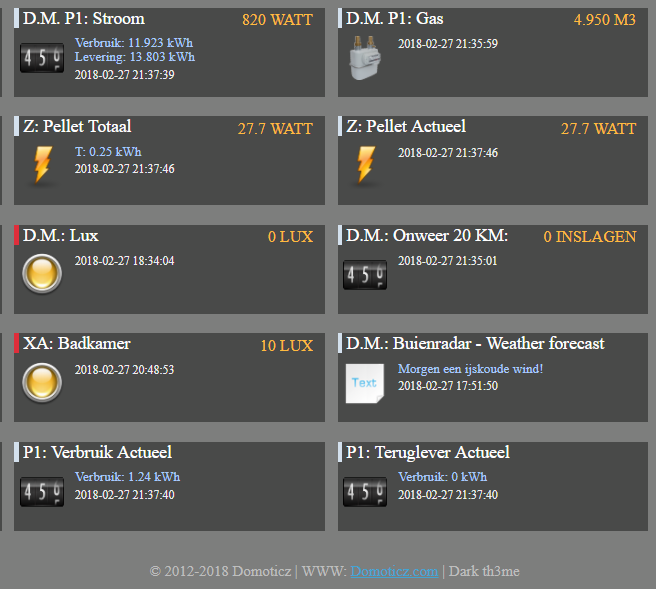
- ScreenShot152.png (63.58 KiB) Viewed 1392 times
Or wrong data:
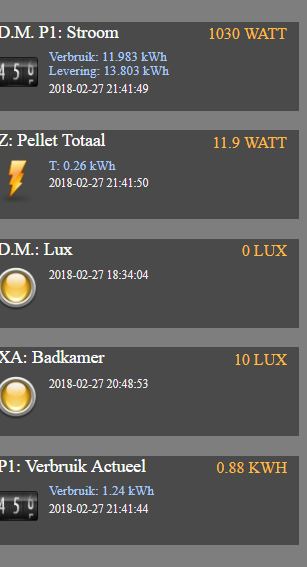
- ScreenShot153.png (33.45 KiB) Viewed 1392 times
Hope you can set this to actual or something

I changed this in the settings page:
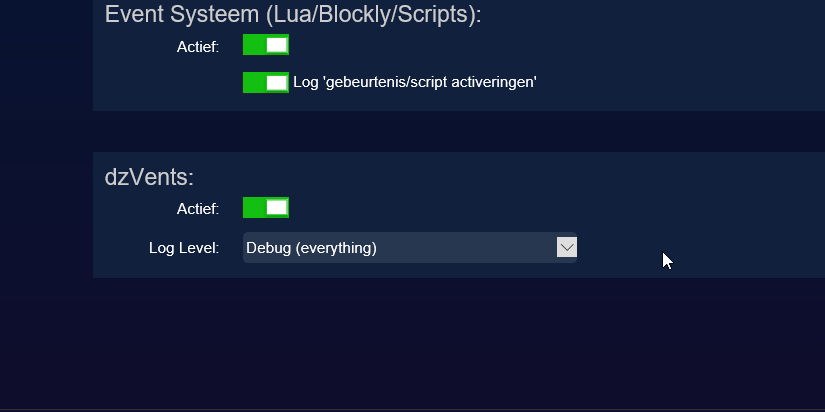
- ScreenShot154.png (13.02 KiB) Viewed 1392 times
Re: Help with some scripting with the P1
Posted: Tuesday 27 February 2018 22:55
by Derik
mmm
Looks there is some strange data change:
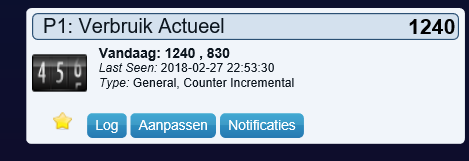
- ScreenShot157.png (13.69 KiB) Viewed 1385 times
Actual is not in the upper right corner
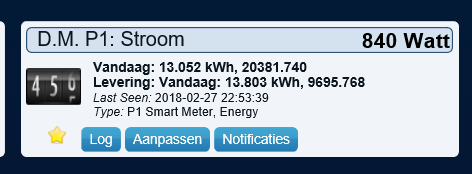
- ScreenShot158.png (14.62 KiB) Viewed 1385 times
Ps: The 10watt different is the time between the screendump
Perhaps a other counter??
Re: Help with some scripting with the P1
Posted: Tuesday 27 February 2018 22:57
by McMelloW
leave the settings in setup for dzVents to errors + minimal execution errors
In the script remove the 2 dashes -- of line 19 for the logging.
In the log set the filter to SME
Re: Help with some scripting with the P1
Posted: Tuesday 27 February 2018 22:59
by McMelloW
Derik wrote: Tuesday 27 February 2018 22:55
mmm
Looks there is some strange data change:
ScreenShot157.png
Actual is not in the upper right corner
ScreenShot158.png
Ps: The 10watt different is the time between the screendump
Perhaps a other counter??
There is also 9 sec. difference in the updates. In that case 10 Watts is not strange.
Re: Help with some scripting with the P1
Posted: Tuesday 27 February 2018 23:03
by Derik
Code: Select all
2018-02-27 23:01:50.004 InfluxLink: value Usage-1,idx=3185,name=D.M.-P1:-Stroom value=9645350
2018-02-27 23:01:50.004 InfluxLink: value Usage-current,idx=3185,name=D.M.-P1:-Stroom value=800.0
2018-02-27 23:01:50.008 dzVents: Info: SME 0.1.6: ------ Start internal script: DZ: P1 reader: Device: "D.M. P1: Stroom (D.M.: P1)", Index: 3185
2018-02-27 23:01:50.010 dzVents: Debug: SME 0.1.6: Processing device-adapter for P1: Verbruik Laag: Counter device adapter
2018-02-27 23:01:50.011 dzVents: Debug: SME 0.1.6: Gebruik laag = 9645350
2018-02-27 23:01:50.012 dzVents: Debug: SME 0.1.6: Processing device-adapter for P1: Verbruik Hoog: Counter device adapter
2018-02-27 23:01:50.013 dzVents: Debug: SME 0.1.6: Gebruik hoog = 10736511
2018-02-27 23:01:50.014 dzVents: Debug: SME 0.1.6: Processing device-adapter for P1: Teruglever Laag: Counter device adapter
2018-02-27 23:01:50.014 dzVents: Debug: SME 0.1.6: Levering laag = 2844236
2018-02-27 23:01:50.015 dzVents: Debug: SME 0.1.6: Processing device-adapter for P1: Teruglever Hoog: Counter device adapter
2018-02-27 23:01:50.015 dzVents: Debug: SME 0.1.6: Levering hoog = 6851532
2018-02-27 23:01:50.015 dzVents: Debug: SME 0.1.6: Processing device-adapter for P1: Teruglever Actueel : Counter device adapter
2018-02-27 23:01:50.015 dzVents: Debug: SME 0.1.6: Actuele Gebruik = 800
2018-02-27 23:01:50.016 dzVents: Debug: SME 0.1.6: Processing device-adapter for P1: Teruglever Actueel : Counter device adapter
2018-02-27 23:01:50.016 dzVents: Debug: SME 0.1.6: Actuele Levering = 0
2018-02-27 23:01:50.016 dzVents: Info: SME 0.1.6: ------ Finished DZ: P1 reader
2018-02-27 23:01:50.130 EventSystem: Script event triggered: /home/root/domoticz/dzVents/runtime/dzVents.lua
This is what you are looking for?
Re: Help with some scripting with the P1
Posted: Tuesday 27 February 2018 23:17
by McMelloW
It looks all OK to me. But you can compare the values with the P! sensor.
Comment line 19 again with two dashes -- will stop the debug output again.
Re: Help with some scripting with the P1
Posted: Tuesday 27 February 2018 23:22
by Derik
McMelloW wrote: Tuesday 27 February 2018 23:17
It looks all OK to me. But you can compare the values with the P! sensor.
Comment line 19 again with two dashes -- will stop the debug output again.
Stop the debug ...
Only you think it is ok now?
Only the actual use in the upper right of your script device. is not the same as actual use in the upper right of the P1
Or is there by me something wrong?
Re: Help with some scripting with the P1
Posted: Wednesday 28 February 2018 10:37
by McMelloW
I can not compare all actual figure from your P1 and the output from the script on your system. you have do that yourself. There are run errors in the log. Just the switched on debug output. So the script runs OK.
Re: Help with some scripting with the P1
Posted: Wednesday 28 February 2018 10:37
by Derik
Dear McMellow,
Can you please make the ths script for switching the dummy also working?
So i can test or the script is working with you P1 reader.
Re: Help with some scripting with the P1
Posted: Wednesday 28 February 2018 11:45
by McMelloW
Check for the value nr 6 of your P1 Smartmeter. In my script this SMdata[6] for idxprod and sensor Actuele Levering. When this figure is > 0 you are producing more power then you are using at that moment. As you can see on that sensor Actuele Levering. Use that figure as a trigger for your switch. Still, I can not understand the use of this switch
Re: Help with some scripting with the P1
Posted: Wednesday 28 February 2018 22:05
by Derik
MM
I think the switch is now working with rawdata 6 [ when i try usage....]
When sun is shining i give the deliver back a try,,
Still, I can not understand the use of this switch
I will try to use my solarpower @ home.
In the NL there is something like "salderen" [ 1 kwh delivering back same price when i need in the night 1 Kwh ] only in the next year the government will stop this great option...
When the "salderen" is changed i get perhaps for a delevering back Kwh 5-9 cent.[ cost 22 cent ]
So i go for all electric
I stop using gas.
Go to Elektric bolier
And in the summer i am going to place a Heatpump.
I use this script for the max usage of my own solarpower.
So when i use a blockley i cannot go lower then <1
Only when my E boiler starts i need 1000w..
So with this script i can regulate my solarpower.
<-1200 or >-100 dummy switch on
When dummy is on, use Eboiler and others...[ and because the range is great enough for the e boiler i now for sure that i use not Kwh when the E boiler is on ]
So my solarpower stays as much i can in my home en stead of give the money to my power supplier
Hope u understand. [ Bricklayer here no Native speaker hahaha ]
Re: Help with some scripting with the P1
Posted: Thursday 01 March 2018 9:57
by Derik
Dear All
This do the job!!
Code: Select all
return {
	on = {
		timer = {
			'between 05:00 and 22:00'
		},
		devices = {
			'D.M. P1: Stroom'
		},
	},
	execute = function(domoticz, devP1)
	    local dummy = domoticz.devices('Dummy P1')
		if tonumber(devP1.rawData[6]) > 1050 and dummy.state == 'Off' then
		    dummy.switchOn()
		elseif tonumber(devP1.rawData[6]) < 700 and dummy.state == 'On' then
		    dummy.switchOff()
		end
	end
}
The thing where it was going wrong..
Rawdata 6 is no negative only positive, so the - is a wrong.
Thanks!!!
Only 1 option left for me...
A range between 200-1000 watts
So if the P1 rawdata6 = >200 and <1000 then dummy switch x is on else if off
Perhaps someone can make that script for me
Thanks
Re: Help with some scripting with the P1
Posted: Thursday 01 March 2018 11:29
by jake
@Derik, using an electrical boiler will help in consuming your own generated energy, but in the summer months your generated energy will be much more than you will ever can consume yourself. I made a script to simulate a solar battery to see what capacity would be right for my situation. Quite interesting to see the results after almost a year of running. A 4 or 5 kWh battery is more than enough to cover fault usage. Everything above that makes no sense, unless you have a 500kWh capacity
 viewtopic.php?t=19971
Re: Help with some scripting with the P1
Posted: Thursday 01 March 2018 12:22
by Derik
jake wrote: Thursday 01 March 2018 11:29
@Derik, using an electrical boiler will help in consuming your own generated energy, but in the summer months your generated energy will be much more than you will ever can consume yourself. I made a script to simulate a solar battery to see what capacity would be right for my situation. Quite interesting to see the results after almost a year of running. A 4 or 5 kWh battery is more than enough to cover fault usage. Everything above that makes no sense, unless you have a 500kWh capacity
viewtopic.php?t=19971
Thanks great option your virtual battery.
When i have time ii give it also a try...
I know that have in the summer pv power for my E boiler.
Only there a times that i do not have enough,,,
So i hope with this script i can control better the usage of the solar power in my house..