Page 92 of 120
Re: Domoticz app 2.0
Posted: Monday 22 October 2018 13:36
by galadril
salvacalatayud wrote: Sunday 21 October 2018 22:59
In new version milight can't change to warm white like in old version.
There is an issue with the rgb dialog, it's on my list to fix thanks
Re: Domoticz app 2.0
Posted: Monday 22 October 2018 13:42
by salvacalatayud
Thanks
galadril wrote:salvacalatayud wrote: Sunday 21 October 2018 22:59
In new version milight can't change to warm white like in old version.
There is an issue with the rgb dialog, it's on my list to fix thanks
Enviado desde mi Redmi 4X mediante Tapatalk
Re: Domoticz app 2.0
Posted: Monday 22 October 2018 20:23
by Persisto
EddyG wrote: Monday 22 October 2018 10:56
I am on version 0.2.8 (4831), Android 8.1.0 on Xiaomi A2 64Gb
It works fine a few App versions before.
I am not able to select the Switches anymore. It always shows the Dashboard.
I did clear the cache.
I have the same problem. Note that the shortcut on the bottom of the screen (I had never even noted them before. "Switches" are represented by what is usually an Android flashlight) does work and gets you to the Switches screen. (I'm using the App in French, but I doubt that makes a difference.)
Raspberry III/Samsung A5
Re: Domoticz app 2.0
Posted: Monday 22 October 2018 20:47
by Bigted
Any reason why we can't select Scenes as the startup screen now, requires an extra button press to move to scenes which if 95% of my use of the app?
Re: Domoticz app 2.0
Posted: Tuesday 23 October 2018 8:40
by galadril
Bigted wrote: Monday 22 October 2018 20:47
Any reason why we can't select Scenes as the startup screen now, requires an extra button press to move to scenes which if 95% of my use of the app?
The start screen was for the different pages in the side navigation, but now some of the screens are moved to actually one page (with a bottom navigation). So you can at this moment set that one page as the startup.
ill see if i can improve this
Re: Domoticz app 2.0
Posted: Tuesday 23 October 2018 9:03
by EddyG
Persisto wrote: Monday 22 October 2018 20:23
EddyG wrote: Monday 22 October 2018 10:56
I am on version 0.2.8 (4831), Android 8.1.0 on Xiaomi A2 64Gb
It works fine a few App versions before.
I am not able to select the Switches anymore. It always shows the Dashboard.
I did clear the cache.
I have the same problem. Note that the shortcut on the bottom of the screen (I had never even noted them before. "Switches" are represented by what is usually an Android flashlight) does work and gets you to the Switches screen. (I'm using the App in French, but I doubt that makes a difference.)
Raspberry III/Samsung A5
Tnx, that works, but the flashlight icon is very confusing.
But still I am not able to select the switches as my default startup screen.

Re: Domoticz app 2.0
Posted: Wednesday 24 October 2018 17:17
by galadril
EddyG wrote: Tuesday 23 October 2018 9:03
But still I am not able to select the switches as my default startup screen.
Is fixed in the next release
Re: Domoticz app 2.0
Posted: Thursday 25 October 2018 8:50
by galadril
EddyG wrote: Tuesday 23 October 2018 9:03
Tnx, that works, but the flashlight icon is very confusing.
But still I am not able to select the switches as my default startup screen.
The fix should be already in the play store
Re: Domoticz app 2.0
Posted: Thursday 25 October 2018 14:19
by EddyG
Tnx, perfect it works.
Minor thing, if there is time for a better "Switch" icon it would be nice.
Switches are not only light bulbs, hence the flashlight?
And it would be nice to have the camera's selected from the bottom line.
Re: Domoticz app 2.0
Posted: Thursday 25 October 2018 22:01
by wizzard72
galadril wrote: Tuesday 16 October 2018 20:44
wizzard72 wrote: Thursday 11 October 2018 21:56
bjacobse wrote: Tuesday 25 September 2018 22:19
hi I have a paid domoticz app for Android, currently it's version 0.1.476 (4316). Phone: Nokia 5
And when I have in my domotics RPI server Version: 4.9700. in switched, set the door lock to the "Switch Type: Door lock" Then as I expect the icon on my phone is there, and I can open and lock the device by tapping on the icon.
however my lock needs to be inverted, but if I set "Switch Type: Door lock Inverted" the icon disappeared from my phone app, so it's not possible for me to click and open or lock the device?
I have the same.
In the Android App the Status of the lock is either Locked or Unlocked that is good. But the lock had also a switch but the switch is always switched "On"
2018-10-11 21.45.39.jpg2018-10-11 21.52.03.jpg
This is fixed in the next release
I thought it was solved, but after 2 updates of the app the switch button is not consistently with the status. In other words: lock has the status unlocked but the button is enabled, while the button has to be disabled.
Re: Domoticz app 2.0
Posted: Friday 26 October 2018 6:55
by sailmich
I'm on the beta. Since last update the status bar and the home/back/last apps buttons are always visible. Is that a feature or a bug? The sliders of blinds are not visible when blinds are closed or open, could you make them visible at any time again. Any chance to get arrows or up and down for blinds?
Re: Domoticz app 2.0
Posted: Sunday 28 October 2018 14:49
by NiklasO
galadril wrote: Saturday 20 October 2018 11:52
NiklasO wrote: Thursday 18 October 2018 15:12
It shows my name three times. Should be max one niklas?
Yes it should only show one niklas..
Can you test if this is maybe an update/old settings issue? So clear all app cache/data and reconfigure the connection?
Think that that should solve this issue
Done. I still see three "niklas".
I did not use the users part of Domoticz. Before, I used the website protection (as niklas) for everything. Now when I have different services accessing domoticz I have changed from basic auth to login page. The user in website protection is changed to another username (from niklas) just for backup (not used). niklas and the other users are now added in the user management from settings.
Re: Domoticz app 2.0
Posted: Wednesday 31 October 2018 8:42
by Lebo2d9
Hi, i have a honywell evohome system. When i set the temperature with the app. The change is permanent. I can't set a time to go back to the normal temp
Re: Domoticz app 2.0
Posted: Wednesday 31 October 2018 17:20
by galadril
Work in progress, some of you requested custom dashboard sorting:

Re: Domoticz app 2.0
Posted: Wednesday 31 October 2018 18:41
by NiklasO
NiklasO wrote: Sunday 28 October 2018 14:49
galadril wrote: Saturday 20 October 2018 11:52
NiklasO wrote: Thursday 18 October 2018 15:12
It shows my name three times. Should be max one niklas?
Yes it should only show one niklas..
Can you test if this is maybe an update/old settings issue? So clear all app cache/data and reconfigure the connection?
Think that that should solve this issue
Done. I still see three "niklas".
I did not use the users part of Domoticz. Before, I used the website protection (as niklas) for everything. Now when I have different services accessing domoticz I have changed from basic auth to login page. The user in website protection is changed to another username (from niklas) just for backup (not used). niklas and the other users are now added in the user management from settings.

- Capture_Domoticz_-_Google_Chrome_2018-10-31_18-39-39_14188722.png (9.97 KiB) Viewed 2702 times

- Capture_Domoticz_-_Google_Chrome_2018-10-31_18-37-39_94370707.png (40.28 KiB) Viewed 2702 times
Dark theme need some small adjustments. Where does it get the users from?
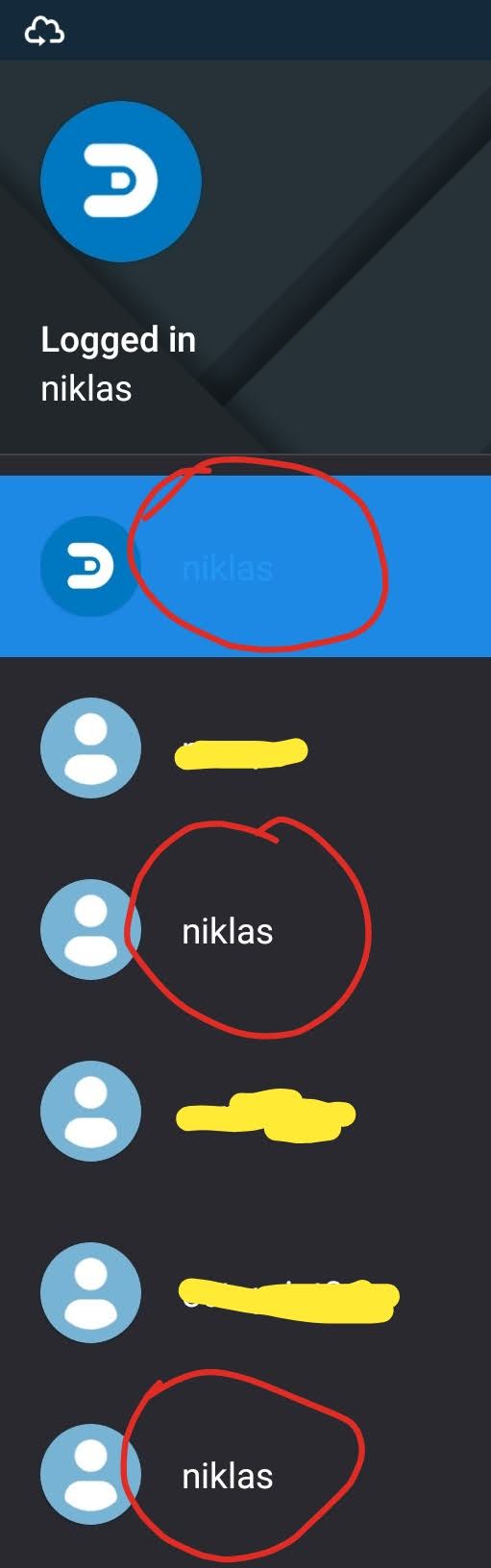
- Screenshot_20181031-183218__01__01.jpg (39.58 KiB) Viewed 2700 times
Re: Domoticz app 2.0
Posted: Wednesday 31 October 2018 21:29
by martk
Thanks for the great updates lately, but can you please fix one issue?
After every major updates all widgets are dead. It's very, really very annoying, not only do I need to remove all widgets and put new ones on my android desktop, but I also need to do this to my wife's phone.
Mine always comes first (beta).
This is an issue since widgets are available, they are all messed up and showing strange texts after a major update during night updates.
Re: Domoticz app 2.0
Posted: Thursday 01 November 2018 9:11
by galadril
martk wrote: Wednesday 31 October 2018 21:29
After every major updates all widgets are dead. It's very, really very annoying, not only do I need to remove all widgets and put new ones on my android desktop, but I also need to do this to my wife's phone.
Mine always comes first (beta).
This is an issue since widgets are available, they are all messed up and showing strange texts after a major update during night updates.
I'm really sorry on the widgets
. Maybe there is a developer op this forum with some more experience on Android Widgets then me..
The code is on github, so any help on this issue is appreciated
Re: Domoticz app 2.0
Posted: Thursday 01 November 2018 9:11
by galadril
NiklasO wrote: Wednesday 31 October 2018 18:41
Done. I still see three "niklas".
Point noted, ill look into this
Re: Domoticz app 2.0
Posted: Friday 02 November 2018 23:55
by wizzard72
I'm on version 0.2.25 (4912) and the doorlock button has the wrong state:

- 2018-11-02 23.47.27.jpg (79.5 KiB) Viewed 3670 times
The Status of the lock is Unlocked, but the switch button is enabled. If the lock has the status locked, the switch button is enabled (which is expected). With the lock unlocked the switch button state should be disabled.
Can this be solved?
Re: Domoticz app 2.0
Posted: Wednesday 07 November 2018 11:42
by galadril
galadril wrote: Thursday 01 November 2018 9:11
NiklasO wrote: Wednesday 31 October 2018 18:41
Done. I still see three "niklas".
Point noted, ill look into this
Should be fixed in this commit
https://github.com/domoticz/domoticz-an ... 1f1c7f604a
(dont know when it's released in the app store.. still needs quite some work on the beta version)