Page 10 of 36
Re: Blockly examples
Posted: Wednesday 24 June 2015 10:19
by HellStorm666
Why doesnt my event work?
It is active, And manualy checked the states of the switches and they are correct.
for example, Yesterday I came home at 21:45. The lights were off, that is correct, because we wheren't at home. But at the moment I am home, it should've turned on the lights.

Re: Blockly examples
Posted: Wednesday 24 June 2015 10:51
by StanHD
To start with, you do not have Logic Blocks on several of your devices. i.e. First Line:- "If aMobielR...."
What condition do you want to test, On - Off < > etc.?
Re: Blockly examples
Posted: Wednesday 24 June 2015 11:43
by HellStorm666
StanHD wrote:To start with, you do not have Logic Blocks on several of your devices. i.e. First Line:- "If aMobielR...."
What condition do you want to test, On - Off < > etc.?
Ohw, right.....
I guessed that on=true, off=false so no extra condition needed.
will change that.
Also simplified it with more events and less els-if in one event.
ea playing movies and controling the lights in a different event than turning the lights on.
Re: Blockly examples
Posted: Wednesday 24 June 2015 23:26
by lbouriez
I am looking to do an event who will notify me if the door is open more than 45sec (like I forget to close it).
With my HC2 I used GEA, an amazin scene who can do cofee, but in DomoticZ, I don't know how to do it with Blocky since I don't find any way to do a loop.
Any idea

?
Re: Blockly examples
Posted: Thursday 25 June 2015 8:49
by pj-r
Re: Blockly examples
Posted: Thursday 25 June 2015 9:52
by lbouriez
Ok, thanks for the link.
I thought I could do it with Blocks

Re: Blockly examples
Posted: Thursday 25 June 2015 23:20
by Shaggie_NB
http://www.domoticz.com/forum/viewtopic ... pir#p14415
I cannot understand why people always start with referring to LUA when people ask for a solution in blockly???

Re: home ventilation system
Posted: Sunday 12 July 2015 15:04
by Dlanor
macaidwin wrote:This is my working Blocky Event for my home ventilation system, level 1, 2, 3 and off.
Electrical scheme:

As i read your scheme right on L is 230v?
Re: Blockly examples
Posted: Friday 07 August 2015 11:08
by dressie
I have a question. I have the following blockly event made for turning off my tv, mediabox and Horizon.

The problem is the following; when away is set on, it will take 5 minuten before it turns off. But when Home is set within the 5 minutes, the media will turn off anyway. It looks like the event is not canceled. Is it something in my blockly event of is it perhaps a "bug"?
Re: Blockly examples
Posted: Thursday 13 August 2015 14:20
by pj-r
How do you think domoticz knows to cancel the timer you have set at "set off after..."?

You need to "build" your own timer. So add "AwayTimer" variable or virtual switch to use as a flag.
Then just add bit more cases there(Havent tested but it should work this way):
Code: Select all
If Away = On and AwayTimer = Off and Media = On <-- case when you leave the house
 set AwayTimer = On After 5 minutes
Else if Away = On and AwayTimer = On and Media = On <-- case when timer time has passed and you are still away
 set AwayTimer = Off
 set Media = Off
Else if Away = Off and AwayTimer = On <-- case where you cancel the timer eg. return home within 5 minutes
 set AwayTimer = Off
 set Media = On <-- not sure if needed here
Else if Away = Off <-- case when you return to home
 set Media = On
Perhaps some "cancel timers of device xxx" block could help to make these more simple looking.
I think its the same with PIR. You could check the "smart pir script" from wiki.
Re: Blockly examples
Posted: Thursday 13 August 2015 23:02
by dressie
Thanks @pj-r , I'll give it a try!!
Andrès
Re: Blockly examples
Posted: Saturday 22 August 2015 10:42
by Adam
Hello there,
is there perhaps someone who could help me with the building blocks in German?

Adam
Re: Blockly examples
Posted: Sunday 30 August 2015 10:54
by BarryT
dressie wrote:I have a question. I have the following blockly event made for turning off my tv, mediabox and Horizon.
The problem is the following; when away is set on, it will take 5 minuten before it turns off. But when Home is set within the 5 minutes, the media will turn off anyway. It looks like the event is not canceled. Is it something in my blockly event of is it perhaps a "bug"?
I've done the same here..
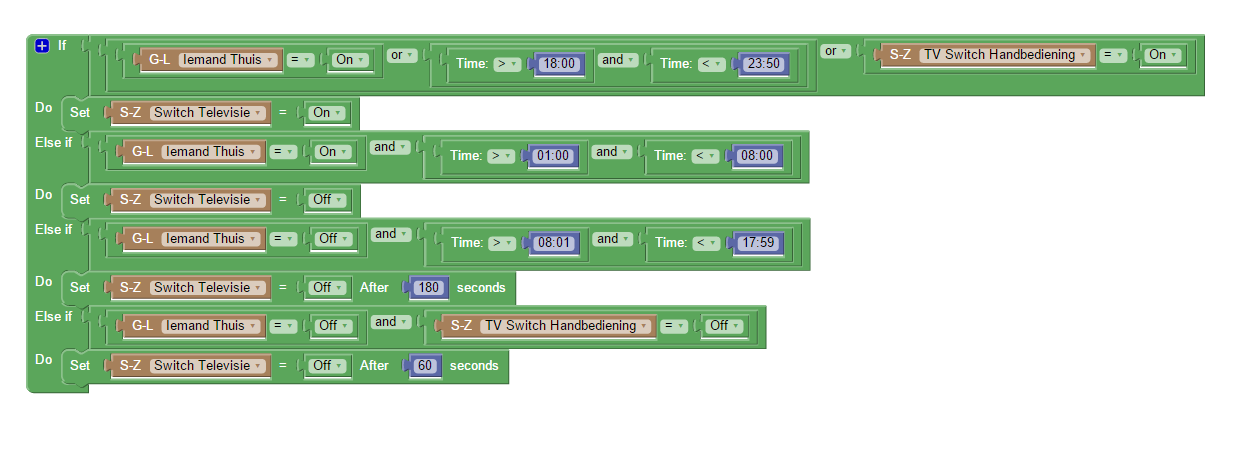
Maybe you can learn from this blocky?
G'Luck.
- test.png (52.73 KiB) Viewed 5183 times
Note, the time function to stay ON between 18.00 and 23.50 is for recording programs @ the horizon box
Re: Blockly examples
Posted: Sunday 13 September 2015 16:55
by Yury
Please Help.
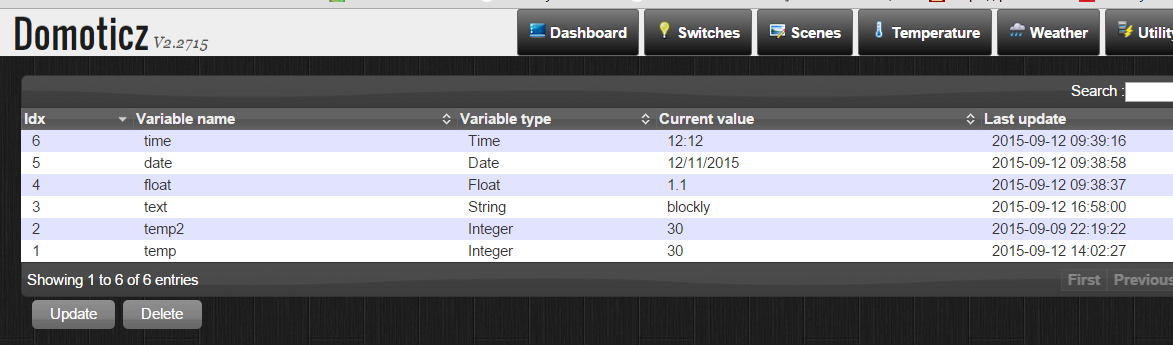
I do not understand variables comparison. Whenever I use user variables like Time, Integer or String in IF statement it does not work.
This event supposed to occur every minute. but not.
- var.PNG (70.32 KiB) Viewed 5085 times

- var3.PNG (30.54 KiB) Viewed 5085 times
Re: Blockly examples
Posted: Tuesday 15 September 2015 7:51
by Docc
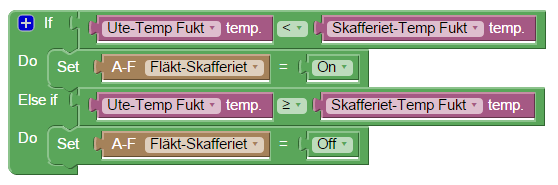
Can someone please help me understand why this is not working..? :-S
- FanCtrl.png (17.89 KiB) Viewed 5051 times
It is a simple fan control. Fan should go on if outside temp is lower than inside temp and goes off if not, but the fan stays off
Re: Blockly examples
Posted: Tuesday 15 September 2015 7:58
by Minglarn
À short question.
Is it possible to use LUX as a comparing in Blocky?
Trying to determine if lights should be on or off based on lux.
Re: Blockly examples
Posted: Tuesday 15 September 2015 8:20
by StanHD
@Minglarn, Yes you can use:-
If Lux < x
Do set Switch On
This works:-

Re: Blockly examples
Posted: Tuesday 15 September 2015 9:56
by ThinkPad
But be sure to have some margin.
<150 lux = On
> 200 lux = Off
Otherwise (with the on/off comparison value close to eachother) your lights might go acting very nervous if a cloud flies by, switching your lights on, and off very soon after.
Re: Blockly examples
Posted: Tuesday 15 September 2015 17:10
by Minglarn
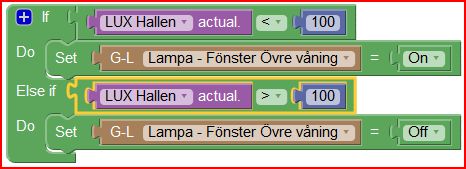
Cant get this to work. The actual value for "LUX Hallen" is 67.
But no reaction to this blocky..
Using: v2.311..
- Skärmklipp.JPG (30.54 KiB) Viewed 5009 times
As the abowe did not work I tryed a dummy swich and now it works...
Using this blocky:
Re: Blockly examples
Posted: Tuesday 15 September 2015 21:53
by Minglarn
OKey need some help here...
I Want this blocky to be active ony between time from morgning 06:00 and after midnight 00:30 . How do I make the time comparison?
Would this work?

- 3.JPG (17.59 KiB) Viewed 4991 times