Re: Dashticz - Show your dashboard and how-to's!
Posted: Sunday 09 July 2017 12:46
by Onrust
Hi all,
I've been playing with Dasticz last last couple of days (as posted in the General Discussions topic) and had some issues with graphs not being displayed properly. Somehow I managed to fix that, but ran into a different issue with blocks being displayed within the graph after selecting the 'laatste uren' or 'afgelopen maand' view. See screenshots below.
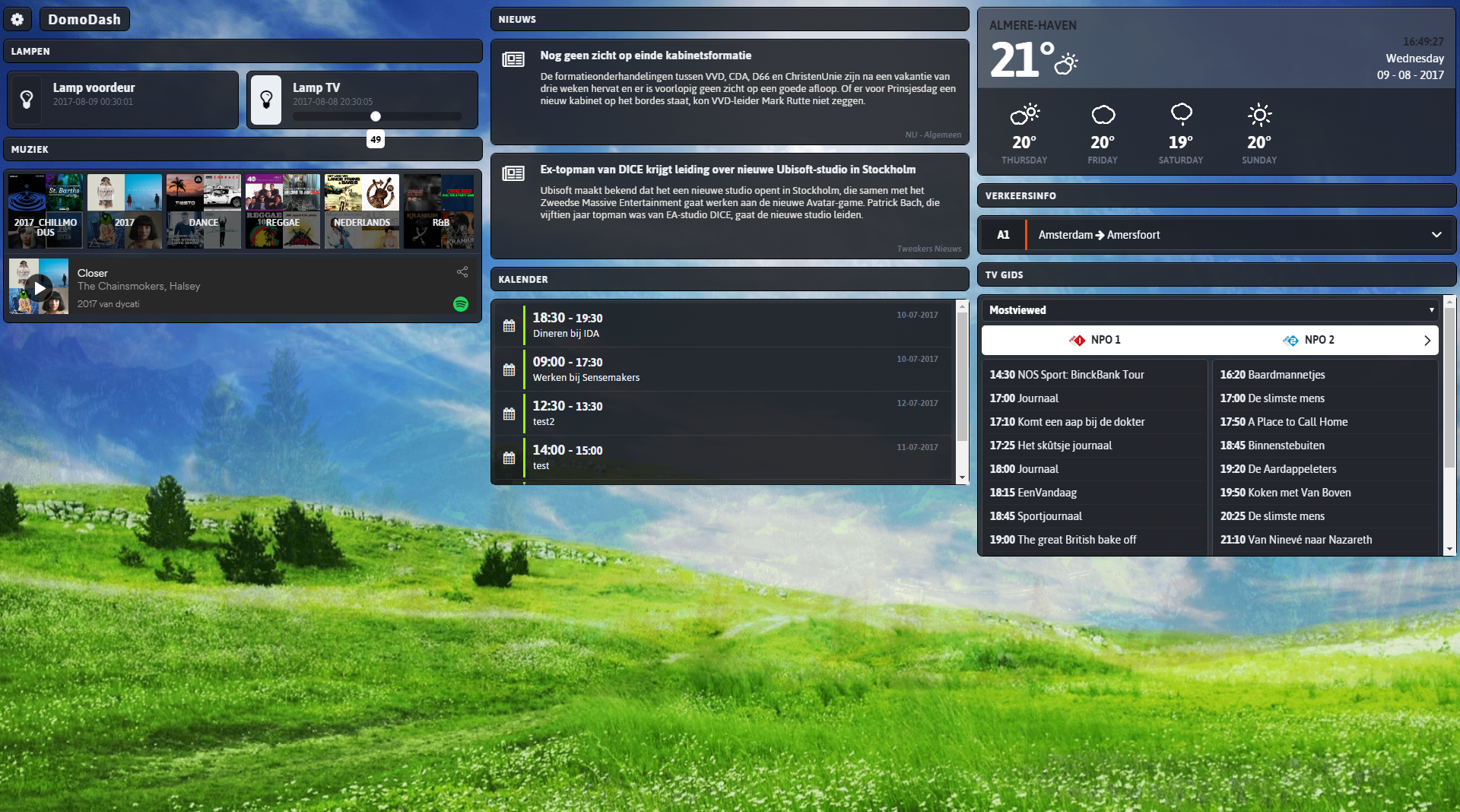
This is the dash I have when opening the page:
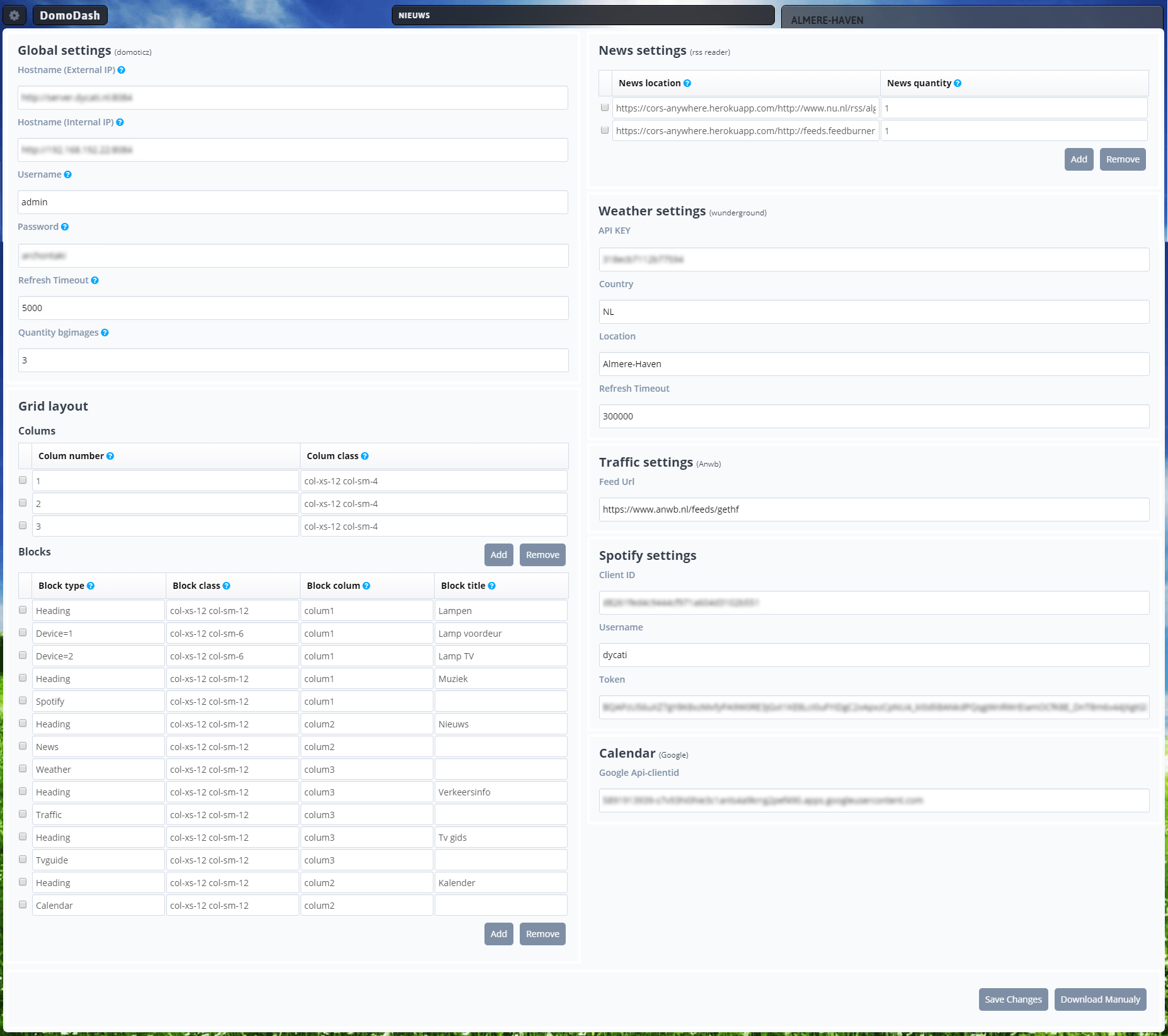
This is what I get when selecting 'laatste uren' or 'afgelopen maand'
What have I been doing wrong here?
Other question: How can I make the white surrounding of the secpanel transparent?
My CONFIG.js:
And custom.css:
I've been playing with Dasticz last last couple of days (as posted in the General Discussions topic) and had some issues with graphs not being displayed properly. Somehow I managed to fix that, but ran into a different issue with blocks being displayed within the graph after selecting the 'laatste uren' or 'afgelopen maand' view. See screenshots below.
This is the dash I have when opening the page:
- Dash-OK.jpeg (73.56 KiB) Viewed 5829 times
This is what I get when selecting 'laatste uren' or 'afgelopen maand'
- Dash-error.jpeg (72.39 KiB) Viewed 5829 times
What have I been doing wrong here?
Other question: How can I make the white surrounding of the secpanel transparent?
My CONFIG.js:
- Spoiler: show
- var _LANGUAGE = 'nl_NL'; //or: en_US, fr_FR, hu_HU
var _HOST_DOMOTICZ = 'http://username:[email protected]:xxxx';
var _DOMOTICZ_REFRESH = 10; //in seconds
var _DASHTICZ_REFRESH = 30; //in minutes
var _BACKGROUND_IMAGE = 'brushed.jpg'
var _THEME = 'default'; // default = dashticz default theme
/*
IF YOU HAVE A MEDIABOX FROM ZIGGO (HORIZON), COPY SWITCH_HORIZON.PHP ON A WEBSERVER INSIDE YOUR NETWORK AND CHANGE THE IP.
ENTER THE PATH TO THIS FILE BELOW.
*/
//var _HOST_ZIGGO_HORIZON = ''; //e.g. http://192.168.x.x/domoticz/switch_horizon.php';
var _APIKEY_WUNDERGROUND = 'xxxxxx';
var _WEATHER_CITY = 'EHGR';
var _WEATHER_CITYNAME = 'Weer Tilburg'; //show a different city name, leave empty if same as _WEATHER_CITY
var _WEATHER_COUNTRY = 'NL';
var _USE_AUTO_POSITIONING = false; //don't want to configure positions, use auto positioning
var _USE_FAVORITES = false; //only used when using auto positioning
var _HIDE_SECONDS_IN_CLOCK = false; //do not show the seconds in the clock
var _HIDE_MEDIAPLAYER_WHEN_OFF = false; //when you have a mediaplayer connected, hide it if nothing is playing
var _NEWS_RSSFEED = 'http://www.nu.nl/rss/algemeen';
var _USE_FAHRENHEIT = false;
var _USE_BEAUFORT = true; //Bft instead of m/s
var _TRANSLATE_SPEED = false; //windspeed, north northwest instead of NNW
var _STANDBY_AFTER_MINUTES = false; //enter amount of minutes like: 5 (5 minutes)
var _SCROLL_NEWS_AFTER = 7000; //milliseconds, so 7000 is 7 seconds
var _SHOW_LASTUPDATE = false;
var _LASTUPDATE_FORMAT = 'DD-MM-YY HH:mm';
var _SCREENSLIDER_EFFECT = 'slide'; //'slide' or 'fade' or 'cube' or 'coverflow' or 'flip'
var _HIDE_SECONDS_IN_STATIONCLOCK = false;
var _CLOCK_BOSS = 'RedBoss';
var _APIKEY_MAPS = 'xxxx';
var _MAPS_LATITUDE = '51.4946086';
var _MAPS_LONGITUDE = '5.2041633';
var _MAPS_ZOOMLEVEL = '10'
var _AUTO_SWIPEBACK_TO = 1; //when no activity, swipe back to main screen after x seconds
var _AUTO_SWIPEBACK_TIME = 900; //seconds
var blocks = {}
blocks['blocktitle_1'] = {}
blocks['blocktitle_1']['type'] = 'blocktitle'
blocks['blocktitle_1']['title'] = 'Verlichting'
blocks['blocktitle_2'] = {}
blocks['blocktitle_2']['type'] = 'blocktitle'
blocks['blocktitle_2']['title'] = 'Aanwezig'
blocks['blocktitle_3'] = {}
blocks['blocktitle_3']['type'] = 'blocktitle'
blocks['blocktitle_3']['title'] = 'Deuren/ramen'
blocks[1] = {}
blocks[1]['width'] = 4; //1 to 12, remove this line if you want to use the default (4)
blocks[1]['title'] = 'Electra verbruik'; //if you want change the name of switch different then domoticz
blocks[1]['icon'] = 'fa-line-chart'; //if you want an other icon instead of the default, choose from: http://fontawesome.io/cheatsheet/
//blocks[1]['image'] = 'bulb_off.png'; //if you want to show an image instead if icon, place image in img/ folder
blocks[1]['switch'] = true; //if you want to switch the title and data
blocks[1]['hide_data'] = false; //if you want to hide the data of this block
blocks[1]['show_lastupdate'] = false; //if you want to show the last update specific for this block
//blocks[1]['playsound'] = 'sounds/ping.mp3'; //play a sound when a device changes
//blocks[1]['protected'] = true; //protect switching manually in Dashticz
blocks[3] = {}
blocks[3]['width'] = 4;
blocks[3]['title'] = 'Temp buiten';
blocks[3]['switch'] = true;
blocks[3]['hide_data'] = false;
blocks[3]['show_lastupdate'] = false;
blocks[6] = {}
blocks[6]['width'] = 4;
blocks[6]['title'] = 'Temp woonkamer';
blocks[6]['switch'] = true;
blocks[6]['hide_data'] = false;
blocks[6]['show_lastupdate'] = false;
blocks[4] = {}
blocks[4]['width'] = 4;
blocks[4]['title'] = 'Temp verdieping 1';
blocks[4]['switch'] = true;
blocks[4]['hide_data'] = false;
blocks[4]['show_lastupdate'] = false;
blocks[68] = {}
blocks[68]['width'] = 6;
blocks[68]['title'] = 'Woonkamer';
blocks[68]['image'] = 'bulbyellow_on.png';
blocks[68]['switch'] = false;
blocks[68]['hide_data'] = false;
blocks[68]['show_lastupdate'] = false;
blocks[69] = {}
blocks[69]['width'] = 6;
blocks[69]['title'] = 'Voordeur';
blocks[69]['switch'] = false;
blocks[69]['hide_data'] = false;
blocks[69]['show_lastupdate'] = false;
blocks[70] = {}
blocks[70]['width'] = 6;
blocks[70]['title'] = 'Eetkamer';
blocks[70]['switch'] = false;
blocks[70]['hide_data'] = false;
blocks[70]['show_lastupdate'] = false;
blocks[108] = {}
blocks[108]['width'] = 4;
blocks[108]['title'] = 'Vriezer';
blocks[108]['icon'] = 'fa-line-chart';
blocks[108]['switch'] = true;
blocks[108]['hide_data'] = true;
blocks[108]['show_lastupdate'] = false;
blocks[111] = {}
blocks[111]['width'] = 4;
blocks[111]['title'] = 'Marc';
blocks[111]['icon'] = 'fa-male';
blocks[111]['switch'] = false;
blocks[111]['hide_data'] = false;
blocks[111]['show_lastupdate'] = false;
blocks[172] = {}
blocks[172]['width'] = 4;
blocks[172]['title'] = 'Astrid';
blocks[172]['icon'] = 'fa-female';
blocks[172]['switch'] = false;
blocks[172]['hide_data'] = false;
blocks[172]['show_lastupdate'] = false;
blocks[173] = {}
blocks[173]['width'] = 4;
blocks[173]['title'] = 'Thomas';
blocks[173]['icon'] = 'fa-male';
blocks[173]['switch'] = false;
blocks[173]['hide_data'] = false;
blocks[173]['show_lastupdate'] = false;
blocks[114] = {}
blocks[114]['width'] = 6;
blocks[114]['title'] = 'Slapen';
blocks[114]['switch'] = false;
blocks[114]['hide_data'] = false;
blocks[114]['show_lastupdate'] = false;
blocks[144] = {}
blocks[144]['width'] = 6;
blocks[144]['title'] = 'Raam voor';
blocks[144]['switch'] = false;
blocks[144]['hide_data'] = false;
blocks[144]['show_lastupdate'] = false;
blocks[148] = {}
blocks[148]['width'] = 6;
blocks[148]['title'] = 'Slaapkamer voor';
blocks[148]['switch'] = false;
blocks[148]['hide_data'] = false;
blocks[148]['show_lastupdate'] = false;
blocks[151] = {}
blocks[151]['width'] = 6;
blocks[151]['title'] = 'Voordeur';
blocks[151]['switch'] = false;
blocks[151]['hide_data'] = false;
blocks[151]['show_lastupdate'] = false;
blocks[155] = {}
blocks[155]['width'] = 6;
blocks[155]['title'] = 'Tuindeur';
blocks[155]['switch'] = false;
blocks[155]['hide_data'] = false;
blocks[155]['show_lastupdate'] = false;
blocks[174] = {}
blocks[174]['width'] = 12;
blocks[174]['title'] = 'Ventilatie';
blocks[174]['switch'] = true;
blocks[174]['hide_data'] = false;
blocks[174]['show_lastupdate'] = false;
var trashcan = {}
trashcan.afvalwijzer = { maxitems: 1, trashapp: 'mijnafvalwijzer', width:6, zipcode:'xxxx', housenumber:'xx' }
var frames = {}
frames.secpanel = {height:390,frameurl:"http://192.168.x.x:xxxx/secpanel/index.html",width:12}
var buttons = {}
buttons.buienradar = {width:5, isimage:true, refreshimage:3600000, image: 'http://api.buienradar.nl/image/1.0/Rada ... =285&h=256', url: 'http://www.weeronline.nl/Europa/Nederla ... rg/4058675'}
//buttons.floorplans = {width:6, isimage:false, refresh:10000, image:'', url:'http://192.168.x.x:xxxx/#/Floorplans'}
//buttons.nunl = {width:12, icon: 'fa-newspaper-o', title: 'Nu.nl', url: 'http://www.nu.nl'}
buttons.webcam = {width:12, isimage:true, refresh:1000, image: 'https://xx/record/current.jpg', url: 'https://xx/record/current.jpg'}
var columns = {}
columns[1] = {}
columns[1]['blocks'] = ['blocktitle_1',68,70,69,114,'blocktitle_3',151,155,144,148,'blocktitle_2',111,172,173]
columns[1]['width'] = 3;
columns[2] = {}
columns[2]['blocks'] = ['graph_1','1_1','1_2','108_2','3_1','6_1','4_1',174]
columns[2]['width'] = 5;
columns[3] = {}
columns[3]['blocks'] = [frames.secpanel,buttons.webcam]
columns[3]['width'] = 4;
columns[4] = {}
columns[4]['blocks'] = []
columns[4]['width'] = 6;
columns[5] = {}
columns[5]['blocks'] = ['trafficmap',buttons.buienradar,trashcan.afvalwijzer]
columns[5]['width'] = 6;
//if you want to use multiple screens, use the code below:
var screens = {}
screens[1] = {}
screens[1]['background'] = 'brushed.jpg';
//screens[1]['background_morning'] = 'bg_morning.jpg';
//screens[1]['background_noon'] = 'bg_noon.jpg';
//screens[1]['background_afternoon'] = 'bg_afternoon.jpg';
//screens[1]['background_night'] = 'bg_night.jpg';
screens[1]['columns'] = [1,2,3]
screens[2] = {}
screens[2]['background'] = 'brushed.jpg';
screens[2]['columns'] = [4,5]
And custom.css:
- Spoiler: show
- /*
CUSTOM CSS FILE
*/
/*
Hoeken afronden
*/
.transbg.col-xs-1,
.transbg.col-xs-2,
.transbg.col-xs-3,
.transbg.col-xs-4,
.transbg.col-xs-5,
.transbg.col-xs-6,
.transbg.col-xs-7,
.transbg.col-xs-8,
.transbg.col-xs-9,
.transbg.col-xs-10,
.transbg.col-xs-11,
.transbg.col-xs-12 {
padding-top:15px;
padding-bottom:15px;
border: 7px solid rgba(255,255,255,0)
background: rgba(0,0,0,0.2);
background-clip: padding-box;
border-radius: 15px;
}
/*
Verkleinen iframes
*/
iframe {
-moz-transform: scale(0.65, 0.65);
-webkit-transform: scale(0.65, 0.65);
-o-transform: scale(0.65, 0.65);
-ms-transform: scale(0.65, 0.65);
-transform: scale(0.65, 0.65);
-moz-transform-origin: top left;
-webkit-transform-origin: top left;
-o-transform-origin: top left;
-ms-transform-origin: top left;
transform-origin: top left;
height:700px !important;
width:50vw !important;
overflow:hidden !important;
}
.transbg.col-xs-12 {
overflow:hidden !important;
}
/*
Hoogte grafieken
*/
#graphoutput1 { height:282px;}
.trafficmap {
height: 100%;
}
.col-xs-1.block_trafficmap,
.col-xs-2.block_trafficmap
, .col-xs-3.block_trafficmap, .col-xs-4.block_trafficmap, .col-xs-5.block_trafficmap, .col-xs-6.block_trafficmap, .col-xs-7.block_trafficmap, .col-xs-8.block_trafficmap, .col-xs-9.block_trafficmap, .col-xs-10.block_trafficmap, .col-xs-11.block_trafficmap, .col-xs-12.block_trafficmap {
padding-left: 13px !important;
padding-right: 13px !important;
height:400px !important;
}