Page 8 of 32
Re: Testers wanted!
Posted: Wednesday 17 February 2016 16:20
by Minglarn
Ok, but nothing happens when I try to connect...
Strange... Same for everyone or is it just me?
Re: Testers wanted!
Posted: Wednesday 17 February 2016 16:26
by chimit
I see. I didn't notice, because it worked for me.
It seems that I am in kind of some eternal long lived connection. But new https connections aren't accepted. Something like that.
Could you try again right now?
Re: Testers wanted!
Posted: Wednesday 17 February 2016 16:31
by Minglarn
Now it works!
Online since 16:30:08 ...
Great!
Re: Testers wanted!
Posted: Wednesday 17 February 2016 19:59
by Minglarn
And now it's down again...
I know it's beta, but could it bee something on my side?
What should I look for?
Domoticz v2.4623
2016-02-17 16:36:32.166 Error: PROXY: Read failed, code = 335544539. Reconnecting: short read
2016-02-17 16:51:56.706 Error: PROXY: Read failed, code = 335544539. Reconnecting: short read
2016-02-17 16:52:26.726 Error: PROXY: StartThread(): Exception: resolve: Host not found (authoritative)
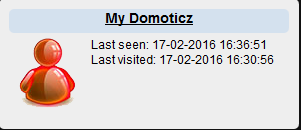
- 0.PNG (12.09 KiB) Viewed 3438 times
edit: Did uncheck "Apps Allowed" and now it's back online again.....
Re: Testers wanted!
Posted: Thursday 18 February 2016 10:28
by Minglarn
Strange, i can't open my.domoticz from my phone.
No response.
Trying:
https://my.domoticz.com
Nothing happens.

Edit: Restarted Domoticz and now it connects again... Seems that the Domoticz is the guilty one here...
Re: Testers wanted!
Posted: Saturday 20 February 2016 18:42
by Purejet
Today i've tested the mydomo proxy service. Nice sollution but have a few questions;
- I can't scan the QR-code in my google authenticator app. There appears a message that the code is not an code for the authenticator app.
- Why is there no 2-factor authentication native in domoticz?
- Do i have to adjust the allowed-ip list? Or what happend when i leave it default?
Because when i click on the instance, the domoticz offline screen appear. Inside the lan everything is correct.
Re: Testers wanted!
Posted: Sunday 21 February 2016 16:56
by chimit
@Minglarn: The error message looks like it's a (local) DNS problem. Not sure.
Re: Testers wanted!
Posted: Sunday 21 February 2016 17:00
by chimit
Purejet wrote:Today i've tested the mydomo proxy service. Nice sollution but have a few questions;
- I can't scan the QR-code in my google authenticator app. There appears a message that the code is not an code for the authenticator app.
- Why is there no 2-factor authentication native in domoticz?
- Do i have to adjust the allowed-ip list? Or what happend when i leave it default?
Because when i click on the instance, the domoticz offline screen appear. Inside the lan everything is correct.
- What QR authenticator are you using? Some apps are known to not work. Not sure why. Browse this very thread for apps that do work.
- Native 2 factor authentication in Domoticz is on the wish list. It will be there when some developer (or you) pick(s) it up.
- Are you talking about the ip allowed white list in the Domoticz settings? You can safely leave it to what it was. Worst thing that can happen is that you need to enter your password, if you have password protection enabled.
Re: Testers wanted!
Posted: Sunday 21 February 2016 17:02
by chimit
Update on the MyDomoticz service:
There have been some fixes that appear to make the service more stable (until now). Please continue testing.
Also there is a pull request pending for updated MyDomoticz code in Domoticz itself.
== Rene
Re: Testers wanted!
Posted: Monday 22 February 2016 10:28
by remb0
I use an ssl certificate on my raspi pi. so domain: port 443 is working.
but in my.domoticz it's down.
also my 2 shared connections from my brother appears to be offline.
It's not clear that the service has some issues or the clients. How can we help or test it the best?
Re: Testers wanted!
Posted: Wednesday 24 February 2016 20:08
by Gabe
Hi everybody,
I just install mydomoticz, but unfortunately I get no connection. DOmoticz will get MyDomoticz Instance ID: no problem.
I see My DOmoticz also on the Dashboard, but the Icon is still red. My actuall IP is none in the settings is it right?
COuld someone help me why the Icon will be not green.
Thanks
Re: Testers wanted!
Posted: Wednesday 24 February 2016 20:28
by Varazir
What do the log say? Look for proxy messages.
Sent from my Nexus 5 via Tapatalk
Re: Testers wanted!
Posted: Wednesday 24 February 2016 20:54
by Gabe
follow logs I found
Proxymanager started.
ccepting shared server connections via MyDomotiz (see settings menu).
PROXY: Authenticate result: IP not whitelisted.
but no error
Re: RE: Re: Testers wanted!
Posted: Wednesday 24 February 2016 20:57
by Varazir
Gabe wrote:follow logs I found
Proxymanager started.
ccepting shared server connections via MyDomotiz (see settings menu).
PROXY: Authenticate result: IP not whitelisted.
but no error
Ahh, then admin need white list you

Sent from my Nexus 5 via Tapatalk
Re: Testers wanted!
Posted: Wednesday 24 February 2016 21:03
by Gabe
so could I do something?
Re: Testers wanted!
Posted: Wednesday 24 February 2016 21:06
by Varazir
@chimit need to do it. He will send you a message. He had to do it for me too.
Sent from my Nexus 5 via Tapatalk
Re: Testers wanted!
Posted: Wednesday 24 February 2016 21:11
by Gabe
Thx
@chimit ccould you help me???
Re: Testers wanted!
Posted: Thursday 25 February 2016 22:22
by chimit
Gabe wrote:Thx
@chimit ccould you help me???
You can do it yourself. Login to my.domotic.com and edit the settings of your Domoticz instance. You can get there by clicking on the title ("My Domoticz" by default).
Then make the box "Allowed ip addresses" empty. Or enter the ip address (not a host name) where your domoticz is allowed to connect from.
=+= Rene
Re: Testers wanted!
Posted: Friday 26 February 2016 10:08
by Gabe
Hi everybody,
try it but no chance. It tell me everytime none also if I check my current ip it is everytime none...
Anybody a idea?
Re: Testers wanted!
Posted: Friday 26 February 2016 12:07
by chimit
Gabe wrote:Hi everybody,
try it but no chance. It tell me everytime none also if I check my current ip it is everytime none...
Anybody a idea?
Yeah, the field needs to be empty. Not "none"".
Sorry, the user interface is not clear here.