Page 8 of 10
Re: ESP8266 Air quality sensor
Posted: Wednesday 30 January 2019 21:01
by astrapowerrr
astrapowerrr wrote:
I think that disappeared at some point with an upgrade as I don't see them either anymore in the graph.
Looking at the code in js/domoticz.js, it seems the logic is still there but it is not showing up in the graph. I don't know enough of this part of the setup so hope somebody else can chime in here.
Jos[/quote]
Well i hope that too.
But for now I’m satisfied with a working esp board!! Thanks for your help.
Will try searching the forum for the graph.
Is on my later to do list.
Marco
Verzonden vanaf mijn iPhone met Tapatalk[/quote]
Just something I bumped into.
On iPhone no text in graph.
But on iPad it gives me the text in the graph...
Don’t know what the difference is...
Verzonden vanaf mijn iPhone met Tapatalk
Re: ESP8266 Air quality sensor
Posted: Friday 01 February 2019 9:48
by jvdz
astrapowerrr wrote: Wednesday 30 January 2019 21:01
Just something I bumped into.
On iPhone no text in graph.
But on iPad it gives me the text in the graph...
Don’t know what the difference is...
This made me check with Edge and that browser is nicely displaying the words on the graph as well. So maybe a Chrome thing?
Jos
Re: ESP8266 Air quality sensor
Posted: Monday 11 February 2019 20:59
by jvdz
Applying this workaround in domoticz.js does fix this issue of not showing the text:
https://github.com/highcharts/highchart ... -424353401
-or- highcharts needs to be updated.
Jos
Re: ESP8266 Air quality sensor
Posted: Monday 11 February 2019 23:08
by astrapowerrr
Hahah sorry but that is abracadabra for me...
Verzonden vanaf mijn iPhone met Tapatalk
Re: ESP8266 Air quality sensor
Posted: Monday 11 February 2019 23:22
by jvdz
I thought the same but after a little research found that at the top in file domoticz.js (line 18) found in /domoticz/www/js you can add this like below.
Then restart domoticz and clear your browser cache before loading the webpage again:
Code: Select all
// Add custom behaviour to highcharts.
if (typeof (Highcharts) !== 'undefined') {
    if (typeof (Storage) !== 'undefined') {
        (function (H_) {
            /*
                    // Use this code to debug excessive redrawing of graphs.
                    H_.wrap( H_.Chart.prototype, 'redraw', function ( fProceed_ ) {
                        console.log( 'draw ' + $( this.container ).parent().attr( 'id' ) );
                        fProceed_.apply( this, Array.prototype.slice.call( arguments, 1 ) );
                    } );
            */

                // Drop-in fix for Highcharts issue #8477 on older Highcharts versions. The
                // issue is fixed since Highcharts v6.1.1.
                Highcharts.wrap(Highcharts.Axis.prototype, 'getPlotLinePath', function(proceed) {
                    var path = proceed.apply(this, Array.prototype.slice.call(arguments, 1));
                    if (path) {
                        path.flat = false;
                    }
                    return path;
                });

                H_.wrap(H_.Series.prototype, 'setVisible', function (fProceed_) {
Jos
Re: ESP8266 Air quality sensor
Posted: Tuesday 12 February 2019 19:39
by astrapowerrr
jvdz wrote:I thought the same but after a little research found that at the top in file domoticz.js (line 18) found in /domoticz/www/js you can add this like below.
Then restart domoticz and clear your browser cache before loading the webpage again:
Code: Select all
// Add custom behaviour to highcharts.
if (typeof (Highcharts) !== 'undefined') {
    if (typeof (Storage) !== 'undefined') {
        (function (H_) {
            /*
                    // Use this code to debug excessive redrawing of graphs.
                    H_.wrap( H_.Chart.prototype, 'redraw', function ( fProceed_ ) {
                        console.log( 'draw ' + $( this.container ).parent().attr( 'id' ) );
                        fProceed_.apply( this, Array.prototype.slice.call( arguments, 1 ) );
                    } );
            */

                // Drop-in fix for Highcharts issue #8477 on older Highcharts versions. The
                // issue is fixed since Highcharts v6.1.1.
                Highcharts.wrap(Highcharts.Axis.prototype, 'getPlotLinePath', function(proceed) {
                    var path = proceed.apply(this, Array.prototype.slice.call(arguments, 1));
                    if (path) {
                        path.flat = false;
                    }
                    return path;
                });

                H_.wrap(H_.Series.prototype, 'setVisible', function (fProceed_) {
Jos
Thanks.
I will look at it when I have some Domoticz time left

Verzonden vanaf mijn iPhone met Tapatalk
Re: ESP8266 Air quality sensor
Posted: Saturday 16 February 2019 11:21
by sincze
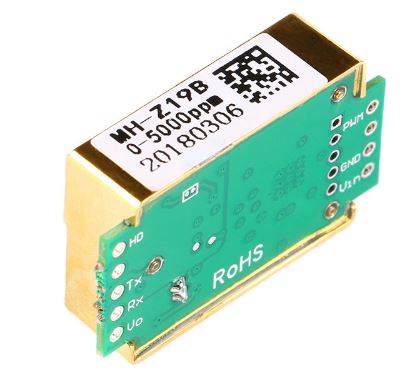
Just to be sure.. Should I buy the MH-Z19 or the MH-Z19
b
- MH-Z19B.JPG (28.52 KiB) Viewed 2888 times
Re: ESP8266 Air quality sensor
Posted: Saturday 16 February 2019 13:38
by jvdz
sincze wrote: Saturday 16 February 2019 11:21
Just to be sure.. Should I buy the MH-Z19 or the MH-Z19
b
MH-Z19B.JPG
I am using the MH-Z19
b and have no experience with the MH-Z19.
Jos
Re: ESP8266 Air quality sensor
Posted: Sunday 17 February 2019 7:38
by astrapowerrr
sincze wrote:Just to be sure.. Should I buy the MH-Z19 or the MH-Z19
b
MH-Z19B.JPG
Same here. Only experience with the b version.
And it works fine.
Verzonden vanaf mijn iPhone met Tapatalk
Re: ESP8266 Air quality sensor
Posted: Sunday 17 February 2019 9:44
by sincze
jvdz wrote: Friday 03 November 2017 17:27
Hi Matty,
No problem. We can do that here so others can also benefit from it... and maybe later convert that into a Wiki page once we have nailed down the appropriate process.
So lets start simple and work our way into the details depending on how far you are already.
Components used:
- Wemos D1 mini - https://wiki.wemos.cc/products:d1:d1_mini
- MH-Z19(b) (Either A or B version will work. I have a B version)
- ESPEasy - Latest Mega version will work but won't update via HTTP JSON with the standard settings. My version does work with JSON. So the below only works with my GIT version at this moment.
Assembling
Connect the following:
MH-Z19 Tx → Wemos pin D5
MH-Z19 Rx → Wemos pin D6
MH-Z19 gnd → Wemos gnd pin
MH-Z19 vin → Wemos 5V pin (Only for MHZ19B, else 3.3V if I remember correctly!)
Excellent description.
Do you have images of the end result of all the sensors in a nice box for example ?

Re: ESP8266 Air quality sensor
Posted: Thursday 21 February 2019 8:32
by jvdz
sincze wrote: Sunday 17 February 2019 9:44
Do you have images of the end result of all the sensors in a nice box for example ?
Nothing fancy really. I've made a small wooden box that allows the air in and painted that white.:
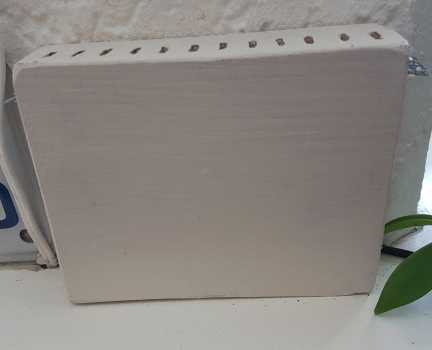
- HK-AIR-front.jpg (7.43 KiB) Viewed 2845 times
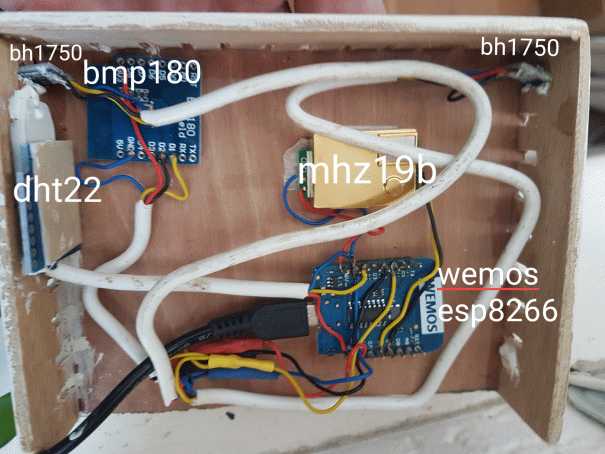
- HK-AIR-back.jpg (33.21 KiB) Viewed 2845 times
Jos

Re: ESP8266 Air quality sensor
Posted: Sunday 17 March 2019 19:07
by sincze
It looks promissing at least


- esp-co2.JPG (22.11 KiB) Viewed 2709 times
Re: ESP8266 Air quality sensor
Posted: Sunday 17 March 2019 22:51
by jvdz
mmm 5000ppm is a "little" high.

Jos
Re: ESP8266 Air quality sensor
Posted: Sunday 17 March 2019 22:56
by sincze
jvdz wrote:mmm 5000ppm is a "little" high.
Jos
Oh oh. Maybe the thing is broken?

Sent from my ONEPLUS A6003 using Tapatalk
Re: ESP8266 Air quality sensor
Posted: Monday 18 March 2019 18:53
by sincze
Maybe I need to re-calibrate?? Just got a bit lost here with the 5000 all over the time.
Sensor & ESP are powered with 12v -> 5v powersupply (separate)
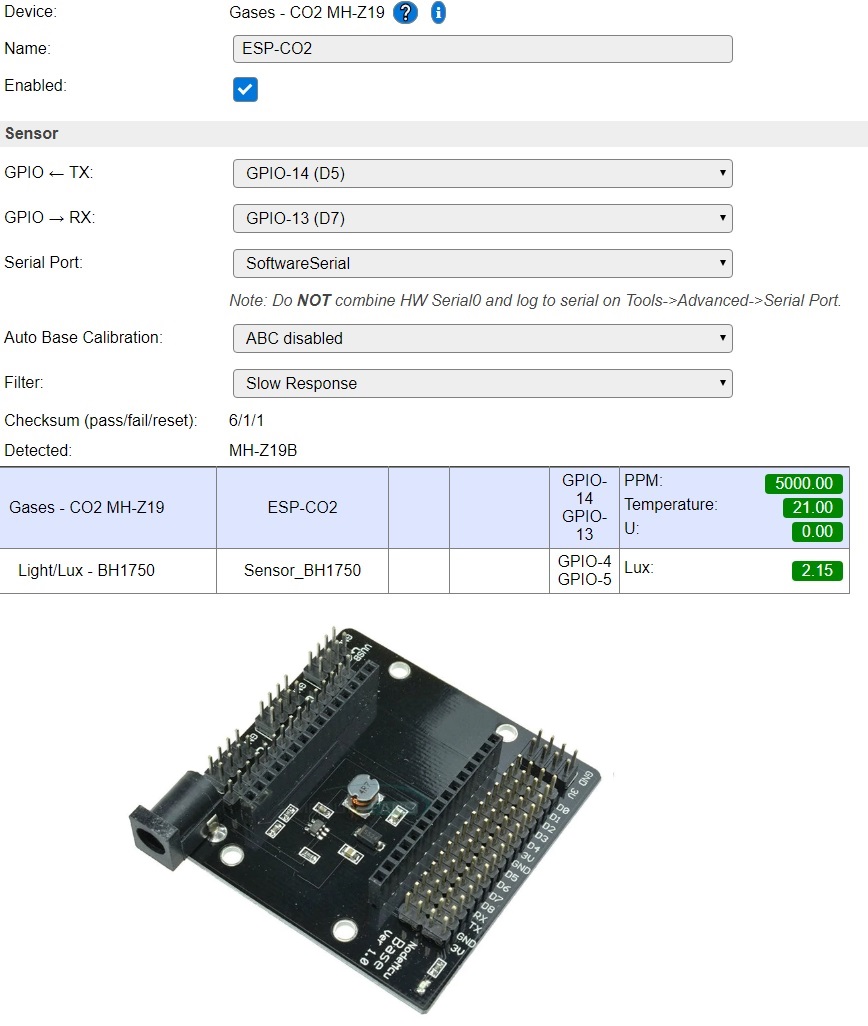
- esp-co2-v1.JPG (158.8 KiB) Viewed 2673 times
It now says...
Checksum (pass/fail/reset): 13/1/1
As stated here:
https://www.letscontrolit.com/forum/vie ... 785#p26804
I opened a window.
Waited 20 min.
Then Made a connection with DUPONT cable between HD & GND for 7 seconds.
Wait.....
PPM is now going down 5000 -> 4200 -> 3498.
Re: ESP8266 Air quality sensor
Posted: Monday 18 March 2019 20:09
by jvdz
You might want to switch on the ABC for a while to let it recalibrate and then switch that off again.
I have never had to do that so have no real experience but you can probably find more info here
https://gathering.tweakers.net/forum/li ... 3#56801303
Jos
Re: ESP8266 Air quality sensor
Posted: Monday 18 March 2019 20:10
by sincze
jvdz wrote: Monday 18 March 2019 20:09
You might want to switch on the ABC for a while to let it recalibrate and then switch that off again.
I have never had to do that so have no real experience but you can probably find more info here
https://gathering.tweakers.net/forum/li ... 3#56801303
Jos
Used the method to connect the 2 pins together

and voila.

- esp-co2-v2.JPG (17.22 KiB) Viewed 2668 times
Re: ESP8266 Air quality sensor
Posted: Monday 18 March 2019 20:43
by sincze
Got it
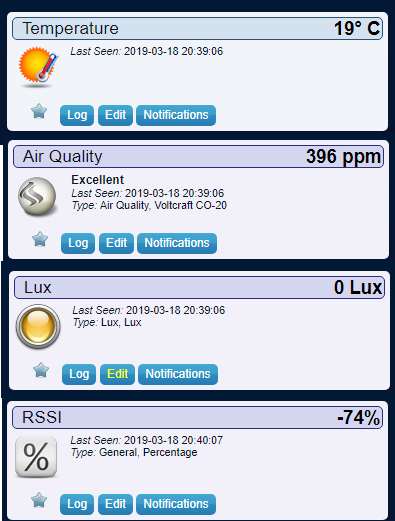
Used some rules to siend over the data.
Code: Select all
On System#Boot do // When the ESP boots, do
TimerSet,1,60 // Set Timer 1 for the next event in 60 seconds
EndOn
on Rules#Timer=1 do // When Timer 1 expires, do
SendToHTTP 192.*.*.*,8080,/json.htm?type=command¶m=udevice&idx=21&nvalue=[ESP-CO2#PPM]
SendToHTTP 192.*.*.*,8080,/json.htm?type=command¶m=udevice&idx=22&nvalue=0&svalue=[ESP-CO2#Temperature]
SendToHTTP 192.*.*.*,8080,/json.htm?type=command¶m=udevice&idx=23&svalue=[Sensor_BH1750#Lux]
SendToHTTP 192.*.*.*,8080,/json.htm?type=command¶m=udevice&idx=24&nvalue=0&svalue=[RSSI#RSSI]
endif
TimerSet,1,60 // Set Timer 1 for the next event in 60 seconds
endon
- CO2-result.png (36.26 KiB) Viewed 2664 times
Re: ESP8266 Air quality sensor
Posted: Wednesday 20 March 2019 22:36
by sincze
To get this to work if the Sensor is in a VLAN is a totally different story.
Code: Select all
SendToHTTP 192.*.*.*,8080,/json.htm?type=command¶m=udevice&idx=21&nvalue=[ESP-CO2#PPM]
Does not handle the required authentication.
In addition ESP Easy can not set the
nvalue directly from a main device.
https://github.com/letscontrolit/ESPEasy/issues/232
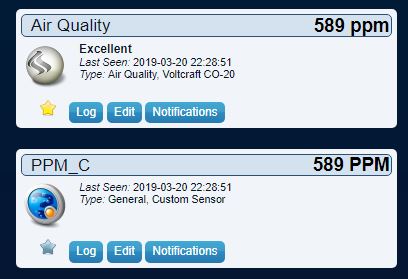
Quick work around...
- Create some Generic Dummy devices in ESPEASY to store the values you want to transfer in an authenticated way.
- Configure the Controller in ESPEASY with appropriate authentication fields (username and password)
- Create a custom sensor in Domoticz and store the PPM there. Have LUA or DZVENTS move it to a real Air Quality meter.
- nvalue_cheated.JPG (28.09 KiB) Viewed 2644 times
Code: Select all
commandArray = {}

-- loop through all the changed devices
for deviceName,deviceValue in pairs(devicechanged) do
    if (deviceName=='PPM_C') then
        devvalue=tostring(deviceValue)
        devidx=** -- your IDX of Dummy Air Quality Meter
        commandArray['UpdateDevice']=devidx .. "|" .. devvalue .. "|0"
    end
end

return commandArray
Re: ESP8266 Air quality sensor
Posted: Wednesday 20 March 2019 23:06
by jvdz
The version I have made doesn't need the rules and can use the normal domoticz controller config.
Jos
