DTGMenu4Docker (updated version of DTGBOT)

Client tools or tools that can connect with Domoticz. Tools for Windows, iOS, Android, Linux etc.

Moderator: leecollings

Post Reply
User avatar
jvdz
Posts: 2490
Joined: Tuesday 30 December 2014 19:25
Target OS: Raspberry Pi / ODroid
Domoticz version: 4.107
Location: Netherlands
Contact:

DTGMenu4Docker (updated version of DTGBOT)

Post by jvdz »

I have been working on a Docker version for DTGBOT, which will make the whole installation very simple and avoid all these LUA & SSL incompatibilities we have seen over the last couple of years.
It also has a web front end to make log checking and basic configuration easier.
This will be the only DTGBOT version I am supporting going forward, and I would like to thank @simonrg for all his work on the original DTGBOT project.

All info can be found here: https://github.com/jvanderzande/dtgbotmenu4docker

Some Screenscapture:
DTGBOTIndex.png
DTGBOTIndex.png (181.86 KiB) Viewed 2298 times
DTGBOTConfig_authorisation.png
DTGBOTConfig_authorisation.png (135.23 KiB) Viewed 2298 times
DTGBOTMENU_keyboard_menu1 (Klein).png
DTGBOTMENU_keyboard_menu1 (Klein).png (287.77 KiB) Viewed 2298 times
DTGBOTMENU_inline_menu1 (Klein).png
DTGBOTMENU_inline_menu1 (Klein).png (336.63 KiB) Viewed 2298 times
mojso
Posts: 95
Joined: Friday 08 November 2019 23:07
Target OS: Raspberry Pi / ODroid
Domoticz version:
Contact:

Re: DTGMenu4Docker (updated version of DTGBOT)

Post by mojso »

Very good and useful, especially when you don't have a public IP address.
You can control Domoticz from wherever you want.
User avatar
andreo
Posts: 48
Joined: Friday 07 August 2015 21:00
Target OS: Raspberry Pi / ODroid
Domoticz version: 2024.3
Location: Anna Paulowna, Netherlands
Contact:

Re: DTGMenu4Docker (updated version of DTGBOT)

Post by andreo »

Successfully implemented and this is so useful, very satisfied with it.
Latest version of Domoticz and more running on Docker|Raspberry Pi 4-B 8GB Bookworm|RF-Link|Klik Aan Klik Uit|Nefit easy|ESPeasy|P1 power meter|S0PCM-5 through Ser2Net|Alecto WS5500|FrtizBox|Satel Integra|Solis
Greetz Andre.
RNEE
Posts: 93
Joined: Sunday 05 August 2018 10:13
Target OS: Raspberry Pi / ODroid
Domoticz version: 2026.4
Location: NL/Eindhoven area
Contact:

Re: DTGMenu4Docker (updated version of DTGBOT)

Post by RNEE »

Hi Jos,

I have troubles implementing DTG bot.

Log :
2026-11-17 11:17:25 : >> Start Initial connectivity check for Domoticz and Telegram ==
2026-11-17 11:17:25 : Domoticz getversion failed
2026-11-17 11:17:25 : !> Initial test connection to Domoticz failed!
2026-11-17 11:17:25 : +> Initial test connection to Telegram successfull.
2026-11-17 11:17:25 : > ------------------------------------------------------------------
2026-11-17 11:17:25 : !> problem connecting to DomoticzURL=http://192.168.2.48:8080. Is it correct in the compose definitions ?
2026-11-17 11:17:25 : !> Fix your docker-compose.yml environment variable(s) and try to restart.
2026-11-17 11:17:25 : !> environment:
2026-11-17 11:17:25 : !> - TZ=Europe/Amsterdam # Timezone setting
2026-11-17 11:17:25 : !> - DomoticzURL=http://192.168.2.48:8080 # your domoticz url

Problem here is : DomoticzURL=http://dtgbot:domoticz@domoticz-host:8080 # your domoticz url
My IP for Domotics is 192.168.2.48
The Docker IP for the Domoticz container is 172.18.0.2

What should the DomoticzURL in the compose.yaml be exactly ? I tried several but no succes.

Thank you, Rene
Domoticz (since 2016) on Docker on Raspberry PI 5 with 500 Gb NVMe|Milight|KaKu + RFXCOM|Goodwe|Smartstuff P1 meter|Buienradar|Afval kalender|Tuya-wifi|Zigbee + deCONZ Conbee II|Marstek 5,12Kwh via Modbus on Pusr-dr134|MQTTMapper|Quatt v2|DTGbot|
User avatar
jvdz
Posts: 2490
Joined: Tuesday 30 December 2014 19:25
Target OS: Raspberry Pi / ODroid
Domoticz version: 4.107
Location: Netherlands
Contact:

Re: DTGMenu4Docker (updated version of DTGBOT)

Post by jvdz »

I am running them both on the same HOST(ip = 192.168.0.12) in seperate docker stacks and in DTGBOTMENU use:

Code: Select all

    environment:
      - TZ=Europe/Amsterdam     # Timezone setting
      - DomoticzURL=http://dtgbot:[email protected]:8080            # your domoticz url
Which is working fine for me.
Obviously the userid "dtgbot" needs to be defined in domoticz with password "domoticz".
RNEE
Posts: 93
Joined: Sunday 05 August 2018 10:13
Target OS: Raspberry Pi / ODroid
Domoticz version: 2026.4
Location: NL/Eindhoven area
Contact:

Re: DTGMenu4Docker (updated version of DTGBOT)

Post by RNEE »

Ah Oke, i used an existing Telegram account and its password for "dtgbot".
That does not match, my bad..

Now i made a user account for dtgbot with password, and it works now so far.

May you can add the "user : password" requirements / setup on the readme page on Github, something like :

DomoticzURL=http://dtgbot:domoticz@domoticz-host:8080 # ie your dtgbot-user:dtgbot-password@domoticz:8080 url
where dtgbot-user and dtgbot-password should be created in Domoticz->setup->users

Thank you , looks very nice , great enhancement for holiday use !
Domoticz (since 2016) on Docker on Raspberry PI 5 with 500 Gb NVMe|Milight|KaKu + RFXCOM|Goodwe|Smartstuff P1 meter|Buienradar|Afval kalender|Tuya-wifi|Zigbee + deCONZ Conbee II|Marstek 5,12Kwh via Modbus on Pusr-dr134|MQTTMapper|Quatt v2|DTGbot|
RNEE
Posts: 93
Joined: Sunday 05 August 2018 10:13
Target OS: Raspberry Pi / ODroid
Domoticz version: 2026.4
Location: NL/Eindhoven area
Contact:

Re: DTGMenu4Docker (updated version of DTGBOT)

Post by RNEE »

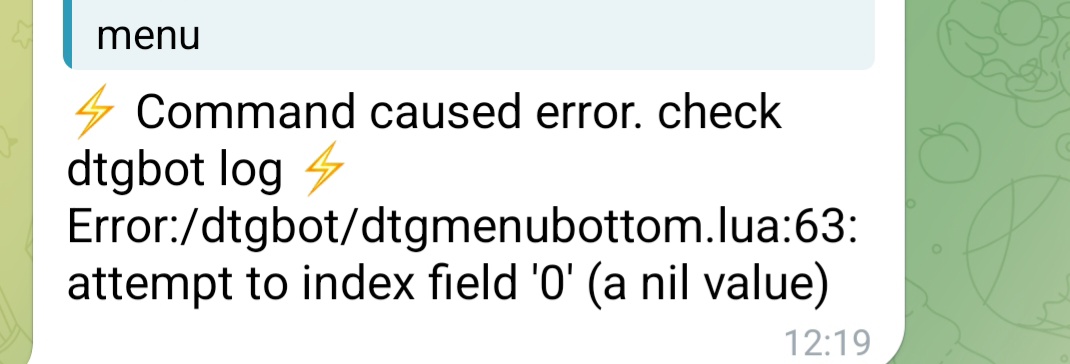
I noticed after plain setup(changed nothing) in "rooms selection" the "use default" gives an error in telegram:

Image

when "use default" is deselected it works as expected.
Domoticz (since 2016) on Docker on Raspberry PI 5 with 500 Gb NVMe|Milight|KaKu + RFXCOM|Goodwe|Smartstuff P1 meter|Buienradar|Afval kalender|Tuya-wifi|Zigbee + deCONZ Conbee II|Marstek 5,12Kwh via Modbus on Pusr-dr134|MQTTMapper|Quatt v2|DTGbot|
User avatar
jvdz
Posts: 2490
Joined: Tuesday 30 December 2014 19:25
Target OS: Raspberry Pi / ODroid
Domoticz version: 4.107
Location: Netherlands
Contact:

Re: DTGMenu4Docker (updated version of DTGBOT)

Post by jvdz »

I think I found that issue (bug), which only happens when the config is still empty.
Could you try the latest v1.3.11 available now in hub.docker.com?
Please email me to my github email account with the logs attached in case you still have issues.
Thanks for reporting.

PS: DTGMENU works with the Rooms defined in Domoticz as its basic menu structure. It is not required and can be defined manually, but defining Rooms is the easiest.
RNEE
Posts: 93
Joined: Sunday 05 August 2018 10:13
Target OS: Raspberry Pi / ODroid
Domoticz version: 2026.4
Location: NL/Eindhoven area
Contact:

Re: DTGMenu4Docker (updated version of DTGBOT)

Post by RNEE »

On 1.3.11 It is working now.
When "default" is selected i get "Misc" and "Exit"
when "default" is unselected i get my rooms.

Thankx for the quick response.
Domoticz (since 2016) on Docker on Raspberry PI 5 with 500 Gb NVMe|Milight|KaKu + RFXCOM|Goodwe|Smartstuff P1 meter|Buienradar|Afval kalender|Tuya-wifi|Zigbee + deCONZ Conbee II|Marstek 5,12Kwh via Modbus on Pusr-dr134|MQTTMapper|Quatt v2|DTGbot|
User avatar
jvdz
Posts: 2490
Joined: Tuesday 30 December 2014 19:25
Target OS: Raspberry Pi / ODroid
Domoticz version: 4.107
Location: Netherlands
Contact:

Re: DTGMenu4Docker (updated version of DTGBOT)

Post by jvdz »

You can define in the config menu the default rooms used. So this allows you to make a standard set of rooms to use for the users.
When you deselect Default, you can manually set the displayed rooms for that particular user.
Post Reply