Problem is solved with #6790gizmocuz wrote: Friday 24 April 2026 7:16Great, that is exactly how I designed it.Rik60 wrote: Thursday 23 April 2026 9:05Running 17798 now, it is worse now. The pushbuttons are indicating always 'On' now while they are not pushed. For the On/Off switch is there still the same delay in status change when pushed.gizmocuz wrote: Thursday 23 April 2026 8:06
I checked the Push On/Off buttons, and I think I found your issue.
Please have a look at beta 17798, the Push On/Off buttons should work much better now.
(They stay On/Off, and I added a click effect on them)
Edit: Question: When i look into the code of the widget (Dial), the 'On' means that it is a 'Push On' button? For a 'On/Off' button it is the status for a On/Off switch?
It is a Push ON and OFF button type switch right, you can only perform ON of OFF actions.
When you add a Dummy hardware virtual switch, and change the type to Push ON, you also only see the ON icon.
What you are trying to do should not be done with a Push On/Off button at all. You should use a normal switch.
And when you change that above virtual button to a normal on/off switch type, you will see it correctly changing it's state
Dynamic Dashboards and easier theming
Moderator: remb0
-
Rik60
- Posts: 228
- Joined: Sunday 25 June 2023 21:54
- Target OS: Raspberry Pi / ODroid
- Domoticz version: 2026.3
- Location: The Netherlands
- Contact:
Re: Dynamic Dashboards and easier theming
-
gizmocuz

- Posts: 3024
- Joined: Thursday 11 July 2013 18:59
- Target OS: Raspberry Pi / ODroid
- Domoticz version: beta
- Location: Top of the world
- Contact:
Re: Dynamic Dashboards and easier theming
- Rik60
Perfect!
I just implemented the option to add a 'bar' to the Stat Counter widget as well as the Water/Gas/kWh Summary widgets (beta 17825)
https://postimg.cc/bsP0sPkj
Perfect!
I just implemented the option to add a 'bar' to the Stat Counter widget as well as the Water/Gas/kWh Summary widgets (beta 17825)
https://postimg.cc/bsP0sPkj
Quality outlives Quantity!
-
janpep
- Posts: 321
- Joined: Thursday 14 March 2024 10:11
- Target OS: Linux
- Domoticz version: v2026.3
- Location: Netherlands
- Contact:
Re: Dynamic Dashboards and easier theming
I really like the new dashboard with the option to select, add and order the widgets that you want.
I am missing one thing, or at least I can not seem to find it.
In short, I feel that the dynamic dashboard is fixed, whereas the original dashboard was much more dynamic.
This concerns the effect where the widgets displayed in three columns slide neatly one below the other when I view the same layout on my smartphone. (And I think the latter looks much better than the mobile option.)
Is there a way to achieve this in the new dynamic dashboard as well? I currently see that I have to scroll horizontally because the widgets remain side-by-side. So that part is not dynamic.
I am missing one thing, or at least I can not seem to find it.
In short, I feel that the dynamic dashboard is fixed, whereas the original dashboard was much more dynamic.
This concerns the effect where the widgets displayed in three columns slide neatly one below the other when I view the same layout on my smartphone. (And I think the latter looks much better than the mobile option.)
Is there a way to achieve this in the new dynamic dashboard as well? I currently see that I have to scroll horizontally because the widgets remain side-by-side. So that part is not dynamic.
Dz on Ubuntu VM on Proxmox behind FRITZ!Box.
EvoHome; MELCloud; P1 meter; Z-Stick GEN5; Z-Wave-js-ui; Sonoff USB-Dongle Plus-E; Zigbee2Mqtt; MQTT; Greenwave powernodes 1+6; Fibaro switch, plugs, smoke; FRITZ!DECT 200. Scripts listed in profile interests.
EvoHome; MELCloud; P1 meter; Z-Stick GEN5; Z-Wave-js-ui; Sonoff USB-Dongle Plus-E; Zigbee2Mqtt; MQTT; Greenwave powernodes 1+6; Fibaro switch, plugs, smoke; FRITZ!DECT 200. Scripts listed in profile interests.
-
imautohuttraeger

- Posts: 392
- Joined: Saturday 14 March 2020 13:40
- Target OS: Raspberry Pi / ODroid
- Domoticz version: latest
- Location: Germany
- Contact:
Re: Dynamic Dashboards and easier theming
I think, it would be a big challenge to achieve what you are looking for, because the classic dashboard (like all pages) are showing only devices with a fixed and identical width. So a responsive design is possible here.
The old dashboard is actually just a collection of devices, which is completely different to the new dynamic dashboard. I guess the word "dynamic" here does not refer to be responsive.
I have solved it by simply creating different dashboards for different devices. One for the tablet and one for the smartphone.
The old dashboard is actually just a collection of devices, which is completely different to the new dynamic dashboard. I guess the word "dynamic" here does not refer to be responsive.
I have solved it by simply creating different dashboards for different devices. One for the tablet and one for the smartphone.
Stop, look and listen.
-
janpep
- Posts: 321
- Joined: Thursday 14 March 2024 10:11
- Target OS: Linux
- Domoticz version: v2026.3
- Location: Netherlands
- Contact:
Re: Dynamic Dashboards and easier theming
Thank you for this tip!!imautohuttraeger wrote: Monday 27 April 2026 16:17 I have solved it by simply creating different dashboards for different devices. One for the tablet and one for the smartphone.
I had not thought of that yet. I will try that out. I only want to add a few things, and for me, that can be done within the "regular" width of the old layout. Furthermore, I do not make changes to it very often, so that should be doable.
Dz on Ubuntu VM on Proxmox behind FRITZ!Box.
EvoHome; MELCloud; P1 meter; Z-Stick GEN5; Z-Wave-js-ui; Sonoff USB-Dongle Plus-E; Zigbee2Mqtt; MQTT; Greenwave powernodes 1+6; Fibaro switch, plugs, smoke; FRITZ!DECT 200. Scripts listed in profile interests.
EvoHome; MELCloud; P1 meter; Z-Stick GEN5; Z-Wave-js-ui; Sonoff USB-Dongle Plus-E; Zigbee2Mqtt; MQTT; Greenwave powernodes 1+6; Fibaro switch, plugs, smoke; FRITZ!DECT 200. Scripts listed in profile interests.
-
imautohuttraeger
- Posts: 392
- Joined: Saturday 14 March 2020 13:40
- Target OS: Raspberry Pi / ODroid
- Domoticz version: latest
- Location: Germany
- Contact:
 .....
.....-
Filnet
- Posts: 83
- Joined: Tuesday 06 March 2018 13:55
- Target OS: Raspberry Pi / ODroid
- Domoticz version: 2026.1 ß
- Location: FR
- Contact:
Re: Dynamic Dashboards and easier theming
In the text of some of my alert devices, I use color tags (e.g., <font color='#f9ff00'>). In this case, Domoticz displays the text correctly in color but removes all the \n and \r characters from the device text.
2026.1 ß17841
2026.1 ß17841
-
Filnet
- Posts: 83
- Joined: Tuesday 06 March 2018 13:55
- Target OS: Raspberry Pi / ODroid
- Domoticz version: 2026.1 ß
- Location: FR
- Contact:
Re: Dynamic Dashboards and easier theming
@ Filnet
Solved by replacing /r /n... by <br> <p>
Solved by replacing /r /n... by <br> <p>
-
gizmocuz
- Posts: 3024
- Joined: Thursday 11 July 2013 18:59
- Target OS: Raspberry Pi / ODroid
- Domoticz version: beta
- Location: Top of the world
- Contact:
Re: Dynamic Dashboards and easier theming
@janpep,
It has never been the intension to view the normal dashboard on a mobile device.
For this we have the mobile dashboard look (which I just converted so it uses the selected theme setting much better and looks also modern/fresh now
Beta 17926
Yes, the dynamic dashboard was indeed designed to support different dashboards for different devices.
A tablet on the wall will probably have a different resolution then a tabled you use daily (or a laptop, desktop pc)
It has never been the intension to view the normal dashboard on a mobile device.
For this we have the mobile dashboard look (which I just converted so it uses the selected theme setting much better and looks also modern/fresh now
Beta 17926
Yes, the dynamic dashboard was indeed designed to support different dashboards for different devices.
A tablet on the wall will probably have a different resolution then a tabled you use daily (or a laptop, desktop pc)
Quality outlives Quantity!
-
janpep
- Posts: 321
- Joined: Thursday 14 March 2024 10:11
- Target OS: Linux
- Domoticz version: v2026.3
- Location: Netherlands
- Contact:
Re: Dynamic Dashboards and easier theming
Thank you for your explanation and for all the work you do!gizmocuz wrote: Monday 04 May 2026 8:39 It has never been the intension to view the normal dashboard on a mobile device.
Until now I did not use the mobile dashboard, because in my opinion the "normal dasboard" looked better on my smartphone.
The same appearance, better with the text devices, more colorfull and better recognition with the icons, and and neatly stacked dynamically in the smaller window. Because of that, that is perfectly fine for me.
I will look at it again with the newest build later today but I think I will stick with the standard dashboard there.
Dz on Ubuntu VM on Proxmox behind FRITZ!Box.
EvoHome; MELCloud; P1 meter; Z-Stick GEN5; Z-Wave-js-ui; Sonoff USB-Dongle Plus-E; Zigbee2Mqtt; MQTT; Greenwave powernodes 1+6; Fibaro switch, plugs, smoke; FRITZ!DECT 200. Scripts listed in profile interests.
EvoHome; MELCloud; P1 meter; Z-Stick GEN5; Z-Wave-js-ui; Sonoff USB-Dongle Plus-E; Zigbee2Mqtt; MQTT; Greenwave powernodes 1+6; Fibaro switch, plugs, smoke; FRITZ!DECT 200. Scripts listed in profile interests.
-
gizmocuz
- Posts: 3024
- Joined: Thursday 11 July 2013 18:59
- Target OS: Raspberry Pi / ODroid
- Domoticz version: beta
- Location: Top of the world
- Contact:
Re: Dynamic Dashboards and easier theming
You are totally describing the mobile dashboard view where you have a quick overview of your favorite devices that you find important and want to quickly see and control. (and scroll as less as possible)
Can't please 'm all!
There are also mobile applications that work with Domoticz, you might consider those as well.
To solve your current 'issue', create a dynamic dashboard pure for your mobile, set this as default on your mobile
For me, it is not a matter of 'cool displaying icons', 'looks nice' , when I use my mobile to look at my Domoticz instances.
For those, I use a tablet/laptop/desktop.
If I need to quickly turn on/off something, control the thermostat, the mobile dashboard is the way to go.
Anyway, enjoy the more themed mobile dashboard
Can't please 'm all!
There are also mobile applications that work with Domoticz, you might consider those as well.
To solve your current 'issue', create a dynamic dashboard pure for your mobile, set this as default on your mobile
For me, it is not a matter of 'cool displaying icons', 'looks nice' , when I use my mobile to look at my Domoticz instances.
For those, I use a tablet/laptop/desktop.
If I need to quickly turn on/off something, control the thermostat, the mobile dashboard is the way to go.
Anyway, enjoy the more themed mobile dashboard
Quality outlives Quantity!
-
imautohuttraeger
- Posts: 392
- Joined: Saturday 14 March 2020 13:40
- Target OS: Raspberry Pi / ODroid
- Domoticz version: latest
- Location: Germany
- Contact:
Re: Dynamic Dashboards and easier theming
All widgets in one dynamic dashboard for testing and playing
In order to get a visual overview about all widgets and play around with it, I have created a dynamic dashboard (ugly) called "Test all Widgets". Each Widget has a text headline with its name. Because it takes some time, I thought it might be useful for others. Here is the export code so you can quickly import it (external, because it exceeds the max. number of characters of this forum):
https://pastebin.com/eCtih0tn
I hope I haven't missed any widget
Thank you very much for developing this - it really is a big step forward!
In order to get a visual overview about all widgets and play around with it, I have created a dynamic dashboard (ugly) called "Test all Widgets". Each Widget has a text headline with its name. Because it takes some time, I thought it might be useful for others. Here is the export code so you can quickly import it (external, because it exceeds the max. number of characters of this forum):
https://pastebin.com/eCtih0tn
I hope I haven't missed any widget

Thank you very much for developing this - it really is a big step forward!
Stop, look and listen.
-
gizmocuz
- Posts: 3024
- Joined: Thursday 11 July 2013 18:59
- Target OS: Raspberry Pi / ODroid
- Domoticz version: beta
- Location: Top of the world
- Contact:
Re: Dynamic Dashboards and easier theming
I remember a forum question about the possibility to get a link that can be used to directly go to a certain dynamic dashboard
(But am unable to find it)
This has been implemented in the latest beta, and the documentation on the wiki has been updated
(Deep-linking to a specific dashboard)
(But am unable to find it)
This has been implemented in the latest beta, and the documentation on the wiki has been updated
(Deep-linking to a specific dashboard)
Quality outlives Quantity!
-
gmarchionni
- Posts: 32
- Joined: Sunday 11 June 2017 0:00
- Target OS: Raspberry Pi / ODroid
- Domoticz version:
- Contact:
Re: Dynamic Dashboards and easier theming
i think it was me in the Custom tabs issue on Github, maybe. it looks like a great job, but on latest beta it seems maybe to be disabled?gizmocuz wrote: Monday 11 May 2026 9:10 I remember a forum question about the possibility to get a link that can be used to directly go to a certain dynamic dashboard
(But am unable to find it)
This has been implemented in the latest beta, and the documentation on the wiki has been updated
(Deep-linking to a specific dashboard)
-
gmarchionni
- Posts: 32
- Joined: Sunday 11 June 2017 0:00
- Target OS: Raspberry Pi / ODroid
- Domoticz version:
- Contact:
Re: Dynamic Dashboards and easier theming
Never mind...supported beta is 17951, but latest docker beta is 17950. i'll wait for next docker beta!!i think it was me in the Custom tabs issue on Github, maybe. it looks like a great job, but on latest beta it seems maybe to be disabled?

-
gmarchionni
- Posts: 32
- Joined: Sunday 11 June 2017 0:00
- Target OS: Raspberry Pi / ODroid
- Domoticz version:
- Contact:
Re: Dynamic Dashboards and easier theming
compiled the sources on the latest commit...and checked the new deeplink function....it seems great!! thanks!!Never mind...supported beta is 17951, but latest docker beta is 17950. i'll wait for next docker beta!!
-
Arjan2019
- Posts: 37
- Joined: Tuesday 16 July 2019 12:47
- Target OS: Raspberry Pi / ODroid
- Domoticz version: Beta
- Location: Netherlands
- Contact:
Re: Dynamic Dashboards and easier theming
I like the new dashboard, but I am still missing one thing.
You can resize the widget, but the content of the widget does not move with it. I would find it useful if this were possible.
I would use this to make the widget larger on a wall display.
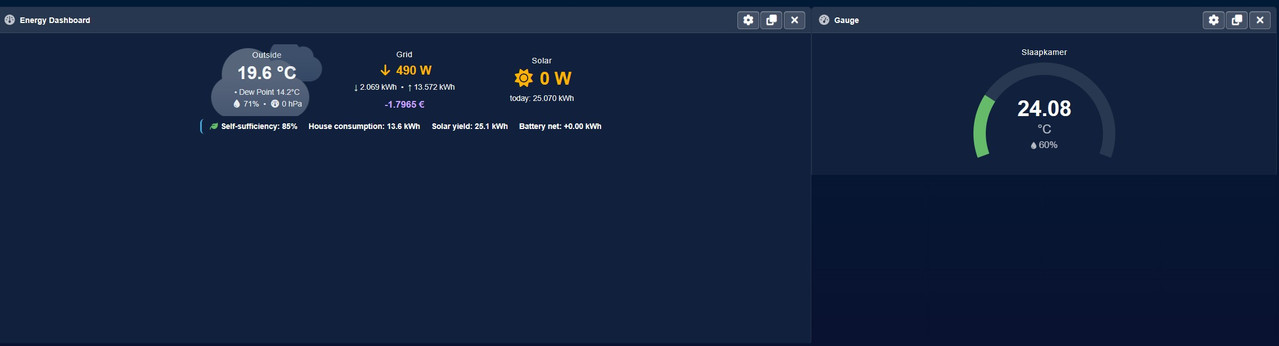
See here the widget is way bigger then the content
You can resize the widget, but the content of the widget does not move with it. I would find it useful if this were possible.
I would use this to make the widget larger on a wall display.
See here the widget is way bigger then the content
-
imautohuttraeger
- Posts: 392
- Joined: Saturday 14 March 2020 13:40
- Target OS: Raspberry Pi / ODroid
- Domoticz version: latest
- Location: Germany
- Contact:
Re: Dynamic Dashboards and easier theming
Within certain limits, the content of some widgets scales up - or their elements rearrange themselves - when the widget is resized. However, it cannot be enlarged indefinitely. Perhaps, therefore, the maximum scaling factor should be limited.
Stop, look and listen.
-
bblaszkiewicz
- Posts: 1
- Joined: Sunday 05 April 2026 17:43
- Target OS: Raspberry Pi / ODroid
- Domoticz version:
- Contact:
Re: Dynamic Dashboards and easier theming
I'm having trouble displaying data on a custom graph. Temperature, energy, etc. work fine, but when I create a custom graph with any General/Voltage devices, I get the message "No data to display."

edit: the problem also applies to the General/Current type
edit: the problem also applies to the General/Current type
Last edited by bblaszkiewicz on Tuesday 02 June 2026 10:31, edited 1 time in total.
-
willemd
- Posts: 790
- Joined: Saturday 21 September 2019 17:55
- Target OS: Raspberry Pi / ODroid
- Domoticz version: 2026.3
- Location: The Netherlands
- Contact:
feedback 2026.2 new dashboard design
First of all thanks for this great new development in 2026.2. I am going to replace my Dashticz dashboard gradually with this new possibility of custom drag and drop dashboard design in Domoticz.
Maybe need a central place for feedback? Can I suggest this thread is a good start?
One small bug I found so far:
1) If I add a custom chart with a kwh device, even if I choose timescale 24 hrs, it shows me the graph of the full short log (7 days in my case).
Maybe need a central place for feedback? Can I suggest this thread is a good start?
One small bug I found so far:
1) If I add a custom chart with a kwh device, even if I choose timescale 24 hrs, it shows me the graph of the full short log (7 days in my case).