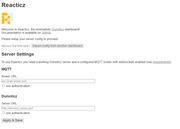
Reacticz dashboard: no install, no hassle

In this subforum you can show projects you have made, or you are busy with. Please create your own topic.

Moderator: leecollings

User avatar
G3rard
Posts: 669
Joined: Wednesday 04 March 2015 22:15
Target OS: -
Domoticz version: No
Location: The Netherlands
Contact:

Re: Reacticz dashboard: no install, no hassle

Post by G3rard »

sylar wrote: Another thing I just noticed with my rain gauge from Netatmo:
- in Domoticz, I can reed 0mm, with a rate of 0.0mm/h,
- while in Reacticz, I reed 0.4mm, with a rate of 0.0mm/h.
The value 0.4mm seems to be related to the total week mm, and not to the current day as indicated in Domoticz. Is this on purpose?
That has to do with the value that is being sent in the MQTT message.
Check https://github.com/t0mg/reacticz/pull/6 ... -277484293 for some more information.
So yeah, it is on purpose, although it's not how we actually like to have it.
Not using Domoticz anymore
DomoArigato
Posts: 36
Joined: Monday 30 April 2018 13:41
Target OS: NAS (Synology & others)
Domoticz version:
Contact:

Re: Reacticz dashboard: no install, no hassle

Post by DomoArigato »

Hello there.

Just tried to setup Reacticz (0.1.21) yesterday without success.
I am on domoticz beta 3.9390 on a synology NAS. I tried to use the prebuilt package for local usage, copied this to the domoticz/www folder (so it is ...domoticz/www/reacticz), set up MQTT locally on the synology as well and configured websockets on MQTT.
When I try to call http://myIP:8080/reacticz I only get a ‚unknown website‘ error.
I saw that there is no ‚package.json‘ in the ...www/reacticz folder with the 0.1.21. Is that the way it should be?

Any other hints?

Thanks a lot for any help.
DomoArigato
Posts: 36
Joined: Monday 30 April 2018 13:41
Target OS: NAS (Synology & others)
Domoticz version:
Contact:

Re: Reacticz dashboard: no install, no hassle

Post by DomoArigato »

Ok. Figured it out and it works now :)

Do I have a chance to rename the devices within the dashboard?
So far I see the systems names which I choose for handling them but which are not so good for a dashboard.

Regards. :)
ptitneo
Posts: 68
Joined: Tuesday 06 December 2016 22:42
Target OS: Raspberry Pi / ODroid
Domoticz version:
Contact:

Re: Reacticz dashboard: no install, no hassle

Post by ptitneo »

DomoArigato wrote: Wednesday 16 May 2018 6:25 Ok. Figured it out and it works now :)
Nice ! I hope you'll find it useful :)
DomoArigato wrote: Wednesday 16 May 2018 6:25 Do I have a chance to rename the devices within the dashboard?
So far I see the systems names which I choose for handling them but which are not so good for a dashboard.
I'm afraid this is not possible at the moment. Reacticz was meant to be light and simple (even though MQTT configuration is a pain to many users, but it's what makes the system fast to respond so I can't really do without it) so I tried to keep the configuration layer as minimal as possible. Personally I just try to name my devices in a way that looks OK in both reacticz and domoticz :)

That being said, if you feel strongly about this, please feel free to file an issue in the GitHub repository and ask for development support (as I can't help with that myself in the short term).

Cheers,
alarm_guy1
Posts: 132
Joined: Tuesday 14 January 2014 0:03
Target OS: Linux
Domoticz version:
Contact:

Re: Reacticz dashboard: no install, no hassle

Post by alarm_guy1 »

reacticz.jpg
reacticz.jpg (116.29 KiB) Viewed 4232 times
Hi guys, just having some trouble getting this going.
Im connected to my Domoticz but can't seem to connect to Mosquitto, I have the right address and port.
I have added the user and password as sonoff (to be changed later maybe :-) )
but is will not connect
I have used this commabd in terminal to listen:
mosquitto_sub -d -u sonoff -P sonoff -t dev/test
and this command to send:
mosquitto_pub -d -u sonoff -P sonoff -t dev/test -m "testing testing sonoff sonoff"

this works but for some reason Reacticz is having none of it, any help appreciated
enboer
Posts: 38
Joined: Tuesday 02 October 2018 15:56
Target OS: Raspberry Pi / ODroid
Domoticz version:
Contact:

Re: Reacticz dashboard: no install, no hassle

Post by enboer »

I am trying to setup the reacticz dashboard. First running it from the public server. Connections are ok, select devices. But when I am in the dashboard I see all devices are offline.
If I check with mqtt explorer I see a message coming in (getdeviceinfo) and quickly after that I see the info of the device in the domoticz/out topic. So that seems to work ok. But what is wrong for not getting the data in the dashboard ?
enboer
Posts: 38
Joined: Tuesday 02 October 2018 15:56
Target OS: Raspberry Pi / ODroid
Domoticz version:
Contact:

Re: Reacticz dashboard: no install, no hassle

Post by enboer »

Found the issue. MQTT needs to be on FLAT, I had it hierarchical on IDX or NAME which is much easier to debug in MQTT Explorer. But this seems to be unsupported by Reacticz.
Another issue is that I have devices which shows the actual current. These appear as unsupported, is there a way to add these myself? Watt or Kwh devices are working fine.
wewa
Posts: 16
Joined: Saturday 11 May 2019 10:30
Target OS: Raspberry Pi / ODroid
Domoticz version: 2020.2
Contact:

Re: Reacticz dashboard: no install, no hassle

Post by wewa »

Hi there,

I really like Reacticz and used it for years with Domoticz 2022.1. Now I'd like to update to Domoticz 2025.2. But Reacticz won't connect to Domoticz 2025.2 anymore.

Has anyone used Reacticz with recent Domoticz versions?

Best regards
wewa
User avatar
waltervl
Posts: 6683
Joined: Monday 28 January 2019 18:48
Target OS: Linux
Domoticz version: 2025.1
Location: NL
Contact:

Re: Reacticz dashboard: no install, no hassle

Post by waltervl »

As reacticz seems to communicate with Domoticz through MQTT is should keep working on newer version. Not a lot has changed here since 2022.
But perhaps check the changed security settings as you have migratoed from a very old version. https://wiki.domoticz.com/Security#The_Security-tab
If you also updated mosquitto check the security settings there too.
Domoticz running on Udoo X86 (on Ubuntu)
Devices/plugins: ZigbeeforDomoticz (with Xiaomi, Ikea, Tuya devices), Nefit Easy, Midea Airco, Omnik Solar, Goodwe Solar
wewa
Posts: 16
Joined: Saturday 11 May 2019 10:30
Target OS: Raspberry Pi / ODroid
Domoticz version: 2020.2
Contact:

Re: Reacticz dashboard: no install, no hassle

Post by wewa »

No, Reacticz is also needing the http:// (or https:// in my case) connection to Domoticz (like you can see on the public server https://reacticz.t0m.fr/ or on the picture below). And this is the issue with Domoticz 2025.2.

MQTT connection is still working (sure, nothing was changed here). But for the Domoticz connection it will show "unavailable". So the issue has to be somewhere in between Reacticz to Domoticz.

Image
User avatar
waltervl
Posts: 6683
Joined: Monday 28 January 2019 18:48
Target OS: Linux
Domoticz version: 2025.1
Location: NL
Contact:

Re: Reacticz dashboard: no install, no hassle

Post by waltervl »

Then probably the change of the Domoticz API (announced in 2023) has broken the connection.
Domoticz running on Udoo X86 (on Ubuntu)
Devices/plugins: ZigbeeforDomoticz (with Xiaomi, Ikea, Tuya devices), Nefit Easy, Midea Airco, Omnik Solar, Goodwe Solar
User avatar
waltervl
Posts: 6683
Joined: Monday 28 January 2019 18:48
Target OS: Linux
Domoticz version: 2025.1
Location: NL
Contact:

Re: Reacticz dashboard: no install, no hassle

Post by waltervl »

I added some comments in the GitHub issue you made https://github.com/domoticz/Reacticz/issues/68
Domoticz running on Udoo X86 (on Ubuntu)
Devices/plugins: ZigbeeforDomoticz (with Xiaomi, Ikea, Tuya devices), Nefit Easy, Midea Airco, Omnik Solar, Goodwe Solar
Post Reply

Who is online

Users browsing this forum: Amazon [Bot] and 1 guest