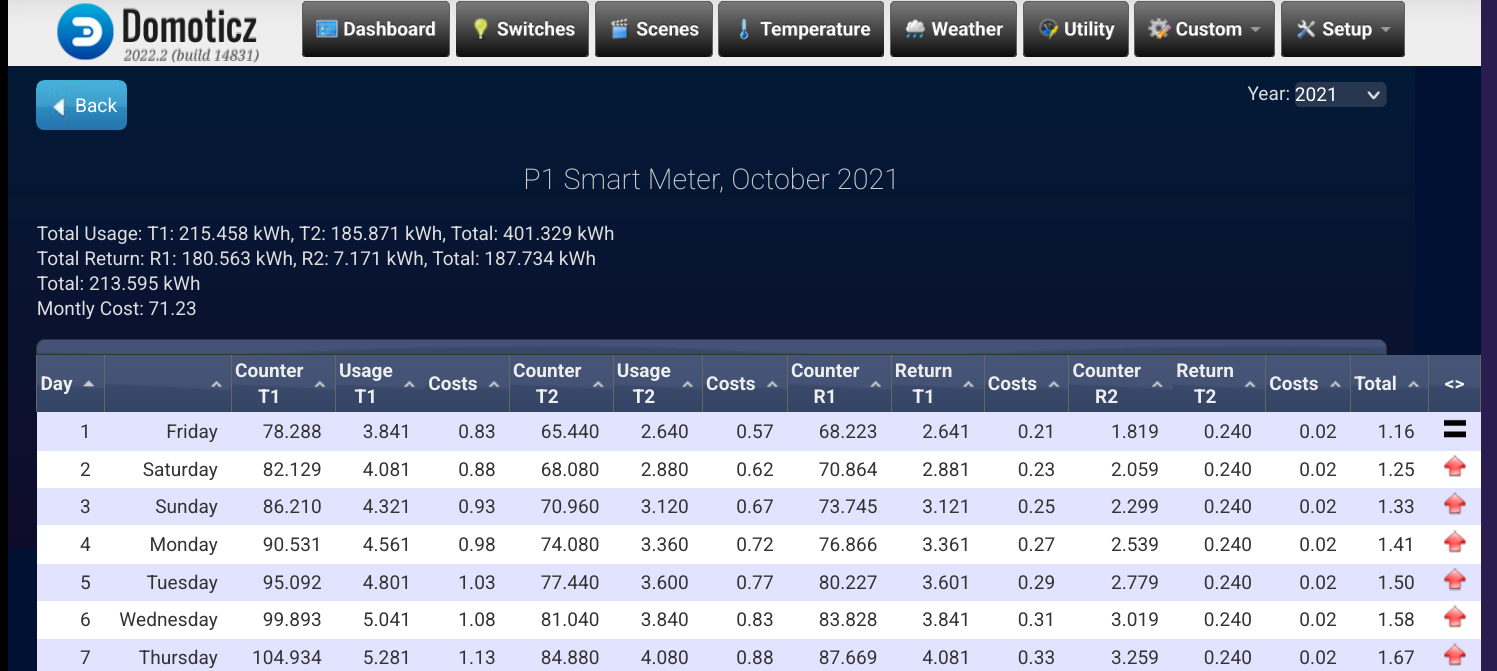
P1 meter log T1 and T2 static after meter swap Topic is solved

Subforum for general discussions. Do not dump your questions/problems here, but try to find the subforum where it belongs!

Moderators: leecollings, remb0

Post Reply
Gravityz
Posts: 755
Joined: Wednesday 16 December 2015 19:13
Target OS: NAS (Synology & others)
Domoticz version: 2026.3
Location: Netherlands
Contact:

P1 meter log T1 and T2 static after meter swap

Post by Gravityz »

Yesterday my P1 meter was swapped for a new 3 phase one.
everything seems to work and the domoticz P1 meter is receiving data again.

HOWEVER.
when checking the T1 and T2 counters i noticed they are static and do not update anymore.

i have a script running which splits the total values of the P1 meter into High and low tariff counters.
These counters still work and show the correct, actual T1 and T2 counter values.

i suspect that there is some kind of protection code in the domoticz meter which filters out negative or lower values.
the new T1 and T2 values are close to 0 (new meter)

So counter values are ok but logvalues of P1 meter are wrong. pictures clearly show the problem
Scherm­afbeelding 2026-07-23 om 10.22.36.png
Scherm­afbeelding 2026-07-23 om 10.22.36.png (233.17 KiB) Viewed 1121 times
Scherm­afbeelding 2026-07-23 om 10.16.00.png
Scherm­afbeelding 2026-07-23 om 10.16.00.png (125.78 KiB) Viewed 1121 times
User avatar
waltervl
Posts: 7019
Joined: Monday 28 January 2019 18:48
Target OS: Linux
Domoticz version: 2026.3
Location: NL
Contact:

Re: P1 meter log T1 and T2 static after meter swap

Post by waltervl »

What does the report log of the P1 meter show?
Domoticz running on Udoo X86 (on Ubuntu)
Devices/plugins: ZigbeeforDomoticz (with Xiaomi, Ikea, Tuya devices), Nefit Easy, Midea Airco, Omnik Solar, Goodwe Solar
Gravityz
Posts: 755
Joined: Wednesday 16 December 2015 19:13
Target OS: NAS (Synology & others)
Domoticz version: 2026.3
Location: Netherlands
Contact:

Re: P1 meter log T1 and T2 static after meter swap

Post by Gravityz »

the report log shows the last screenshot i posted.

so all the data from all the counters are correct but the counter info in the log is wrong.
i think this is caused when they removed the total counter value from the counters so time ago and added them later

i just checked the vlaues of the virtual counters

the virtual counter total in the device is ok
the counter total in the log is ok (with a ? after the value)
but the total usage seems to be the old total

i think the total usage accumulates which is understandable.
The total T1 and T2 counters however need to represent the values from the meter ALWAYS

Scherm­afbeelding 2026-07-23 om 14.19.12.png
Scherm­afbeelding 2026-07-23 om 14.19.12.png (78.66 KiB) Viewed 1088 times
Scherm­afbeelding 2026-07-23 om 14.19.24.png
Scherm­afbeelding 2026-07-23 om 14.19.24.png (75.99 KiB) Viewed 1088 times
User avatar
waltervl
Posts: 7019
Joined: Monday 28 January 2019 18:48
Target OS: Linux
Domoticz version: 2026.3
Location: NL
Contact:

Re: P1 meter log T1 and T2 static after meter swap

Post by waltervl »

It should also show the details per day per tariff. as shown in the screenshots on the wiki: https://wiki.domoticz.com/Dutch_DSMR_sm ... th_P1_port

There is a bug in current stable and fixed in current beta that the total cost per day is calculated on only T1 tariff and not T1/R1/T2/R2
It is by the way perhaps a difference between the old and new meter telegram as the meter decides it is reporting T1 or T2 values, not Domoticz.

Image
Domoticz running on Udoo X86 (on Ubuntu)
Devices/plugins: ZigbeeforDomoticz (with Xiaomi, Ikea, Tuya devices), Nefit Easy, Midea Airco, Omnik Solar, Goodwe Solar
Gravityz
Posts: 755
Joined: Wednesday 16 December 2015 19:13
Target OS: NAS (Synology & others)
Domoticz version: 2026.3
Location: Netherlands
Contact:

Re: P1 meter log T1 and T2 static after meter swap

Post by Gravityz »

obviously the new meter is reporting the T1 and T2 values because i have them in the low and high virtual counters.
the domoticz P1 meter itself however does not seems to show them from the received telegram(which it should do)
i think the domoticz energy meter is getting them from the database which is not updated anymore because the reported T1 and T2 are lower than trhe ones in the database thus it thinks this is an error
Gravityz
Posts: 755
Joined: Wednesday 16 December 2015 19:13
Target OS: NAS (Synology & others)
Domoticz version: 2026.3
Location: Netherlands
Contact:

Re: P1 meter log T1 and T2 static after meter swap

Post by Gravityz »

i thecked the script i use for splitting into high/low tariff.

the T1 and T2 number are coming from the P1 energie device.
So to be clear.
i get the correct T1 and T2 from the domoticz P1 meter and put them in seperate counters.
these counters are correct.
When check in the domoticz p1 meter log for the T1 and T2 number they still show the old values
problem clearly lies in the P1 smartmeter code and the way it receives the data
the data is there but it shows differently

here is the script

Code: Select all

-- Script wat de totale P1 meterstand opsplitst in aparte tellers voor hoog en laag tarief
return {
	on = {
		devices = {
			'Energie'
		}
	},
    --logging = {
        --level = domoticz.LOG_DEBUG,    -- Uncomment this line to override the dzVents global logging setting
        -- marker = 'SME '.. ScriptVersion
    -- },	
	execute = function(domoticz, device)
	    local gas = domoticz.devices('Gas').counter
	    local water = domoticz.devices('Watermeter').counter
	    local usage1 = tonumber(device.rawData[1])
		local usage2 = tonumber(device.rawData[2])
		local return1 = tonumber(device.rawData[3])
		local return2= tonumber(device.rawData[4])
		local usage = tonumber(device.rawData[5])
		local usageDelivered = tonumber(device.rawData[6])
        local P1data  = 280                                 -- Electra, P1 Smart Meter device
        local idxu1   = 323                                 -- Meter Usage low, Virtual device, counter
        local idxu2   = 324                                 -- Meter Usage High, Virtual device, counter
        --local idxr1   = 44                                -- Meter Return Low, Virtual device, counter
        --local idxr2   = 45                                -- Meter Return High, Virtual device, counter
        --local idxcons = 74                                -- Meter Actual Usage, Virtual device, counter
        --local idxprod = 75                                -- Meter Actual Production, Virtual device, counter		
        local function updateCounter(idx,value)   
            domoticz.devices(idx).updateCounter(value)
        -- domoticz.log("Set " .. domoticz.devices(idx).name .. " to: ",domoticz.LOG_DEBUG)
        end  
        updateCounter(idxu1,usage1)
        updateCounter(idxu2,usage2) 
        --updateCounter(idxr1,return1)
        --updateCounter(idxr2,return2)
        --updateCounter(idcons,usage)
        --updateCounter(idprod,usageDelivered)
        -- Helper functions
        --local function spaces(count)
         --   return string.rep(" ", count)
       -- end
        
       -- local function round(num, decimals)
       --     local mult = 10^(decimals or 0)
        --    return math.floor(num * mult + 0.5) / mult
      --  end
       -- line = "Gas: "..spaces(12)..gas.."\r\n".."Water: "..spaces(10)..water.."\r\n".."Laagtarief: "..spaces(1)..(usage1/1000).."\r\n".."Hoogtarief: "..(usage2/1000).."\r\n"
       -- domoticz.devices('Meterstanden').updateText(line)

       --
  	end
  
}
User avatar
waltervl
Posts: 7019
Joined: Monday 28 January 2019 18:48
Target OS: Linux
Domoticz version: 2026.3
Location: NL
Contact:

Re: P1 meter log T1 and T2 static after meter swap

Post by waltervl »

If the script gets the correct values from the Domoticz P1 device it is strange the Domoticz P1 itself does not show the correct values.....
That is why I asked to see the P1 report data as that should be correct.
Domoticz running on Udoo X86 (on Ubuntu)
Devices/plugins: ZigbeeforDomoticz (with Xiaomi, Ikea, Tuya devices), Nefit Easy, Midea Airco, Omnik Solar, Goodwe Solar
Gravityz
Posts: 755
Joined: Wednesday 16 December 2015 19:13
Target OS: NAS (Synology & others)
Domoticz version: 2026.3
Location: Netherlands
Contact:

Re: P1 meter log T1 and T2 static after meter swap

Post by Gravityz »

Indeed. Since the t1 and t2 values are correct but do not show up correct in the report this is definately a bug.
Gizmocuz needs to look into this.
My educated guess. There is code in place to supress wrong faulty readings. Since the new t1 and t2 are way lower than before they might not get displayed because they are interpretd as a fluke and ignored. I know there is code regarding this for negative readings. Normally no problem but in case of a p1 meter swap this is causing problems. I uploaded al the pictures which show the error.

fact:physical p1 meter is sending out good values.
fact: these good values are used and splitted by script into 2 different dummy counters
fact: when looking in the log of the domoticz p1 smartmeter the T1 and T2 counter values displayed are the values of the old meter, the new, lower values are not displayed(but they arre somewhere in the device because the script is getting the good values from the domoticz p1 smartmeter device
Gravityz
Posts: 755
Joined: Wednesday 16 December 2015 19:13
Target OS: NAS (Synology & others)
Domoticz version: 2026.3
Location: Netherlands
Contact:

Re: P1 meter log T1 and T2 static after meter swap

Post by Gravityz »

i checked the database and the entry under multimeter( 5 minute interval)has the correct values.
the entries under multimeter_calendar(1day inteerval) have the old counter values which stopped on 21-7-26(the day before the meter swap)
maybe if i add the correct values for 22-7-and 23-7 it will correct itself but still there is something wrong with the displayed counter values in the domoticz p1 smartmeter
Gravityz
Posts: 755
Joined: Wednesday 16 December 2015 19:13
Target OS: NAS (Synology & others)
Domoticz version: 2026.3
Location: Netherlands
Contact:

Re: P1 meter log T1 and T2 static after meter swap

Post by Gravityz »

ok i see what you mean. did not know i could see usge per day.

with these screenshots you can see that the meter is using the new T1 and T2 values in the report
The info above the report is still showing the old numbers

it looks like the report is using the info from multimeter but the info above the rapport(showing T1 and T2) are using the last numbers from multimeter_calendar.

because there are no new entries made under multimeter_calendar(probably because the new numbers are lower than the previous ones) it falls back to the last numbers under multimeter_calendar.

i think 2 things need to be changed.

1:reports always need to use the actual T1 and T2 numbers from multimeter(both in details as well as summary on top)
the multimeter_calendar numbers are probably used because that is 1 entry per day.
In de old situation however(before removing the totals and adding them back) the realtime numbers were used.
2: we need to look at the reason why there are no new entries made under multimeter_calendar.
UPDATE:i just noticed that there now is a new entry made under multimeter_calendar on 23-7-26 which displays the correct numbers.
so we have the correct T1 and T2 numbers under multimeter and multimeter_calendar but the rapport info on top is still showing the old numbers.
Maybe i will have to wait for another day to see what happens


if we can solve problem nr 2 i can live with nr being as it is because i have seperate counters which do display the realtime numbers


everything works so there should be no reason why not since the entries under multimeter obviously are created despite the fact that the previous old meter numbers were present

Scherm­afbeelding 2026-07-24 om 08.32.00.png
Scherm­afbeelding 2026-07-24 om 08.32.00.png (59.74 KiB) Viewed 956 times
Scherm­afbeelding 2026-07-24 om 08.32.15.png
Scherm­afbeelding 2026-07-24 om 08.32.15.png (123.72 KiB) Viewed 956 times
User avatar
waltervl
Posts: 7019
Joined: Monday 28 January 2019 18:48
Target OS: Linux
Domoticz version: 2026.3
Location: NL
Contact:

Re: P1 meter log T1 and T2 static after meter swap

Post by waltervl »

Still your conclusion is not complete.
I only see a couple of columns in your screenshot, as in the example of the wiki I see 15 columns. This could also be related to the P1 report setting (dynamic or high low) in the counter tab of menu settings.

It seems your new meter started to count from 0 again, confusing Domoticz reporting so the totals are not correct. I am not sure how to fix this. Best would be to start with a new P1 device but it will delete your history and you do not want that.
Domoticz running on Udoo X86 (on Ubuntu)
Devices/plugins: ZigbeeforDomoticz (with Xiaomi, Ikea, Tuya devices), Nefit Easy, Midea Airco, Omnik Solar, Goodwe Solar
Gravityz
Posts: 755
Joined: Wednesday 16 December 2015 19:13
Target OS: NAS (Synology & others)
Domoticz version: 2026.3
Location: Netherlands
Contact:

Re: P1 meter log T1 and T2 static after meter swap

Post by Gravityz »

this is the total screen(had to resize because of that irritating to big message)

Scherm­afbeelding 2026-07-24 om 10.09.18.png
Scherm­afbeelding 2026-07-24 om 10.09.18.png (358.67 KiB) Viewed 933 times
as you can see all these numbers are correct and it is using the new counters

this is what you see on the main log screen
as you can see Counter T1 and T2 are wrong on this screen

maybe it will be corrected tomorrow since the entry from 23-7-26 with the good numbers are now in the system.
if not this is a bug
Scherm­afbeelding 2026-07-24 om 10.14.38.png
Scherm­afbeelding 2026-07-24 om 10.14.38.png (240.08 KiB) Viewed 933 times
User avatar
imautohuttraeger
Posts: 403
Joined: Saturday 14 March 2020 13:40
Target OS: Raspberry Pi / ODroid
Domoticz version: latest
Location: Germany
Contact:

Re: P1 meter log T1 and T2 static after meter swap

Post by imautohuttraeger »

Just a guess by me: Have you made an update to latest beta before the "numbers became good"?

If so, it might be that the fix of this issue has a positive effect:

https://github.com/domoticz/domoticz/issues/6915
Stop, look and listen.
Gravityz
Posts: 755
Joined: Wednesday 16 December 2015 19:13
Target OS: NAS (Synology & others)
Domoticz version: 2026.3
Location: Netherlands
Contact:

Re: P1 meter log T1 and T2 static after meter swap

Post by Gravityz »

yes i can try that but i doubt it will fix things because this problem is optical
i will wait until tomorrow to see if this gets corrected.
like i said today i noticed the entry for 23-7-26 is in de database (22-7-26 got skipped) so it might settle in.
ofcourse the totals do not add up this year but i do not care about that.
the history however is very important. this is the reason i will not create a new clean device because i will loose that history

keep you posted and thanks everybody for helping me out
User avatar
imautohuttraeger
Posts: 403
Joined: Saturday 14 March 2020 13:40
Target OS: Raspberry Pi / ODroid
Domoticz version: latest
Location: Germany
Contact:

Re: P1 meter log T1 and T2 static after meter swap

Post by imautohuttraeger »

OK. My post seems to have a misunderstanding character. I haven't suggested to make an update. I was just wondering if you maybe had made an update and thus the numbers "became good".
Stop, look and listen.
Gravityz
Posts: 755
Joined: Wednesday 16 December 2015 19:13
Target OS: NAS (Synology & others)
Domoticz version: 2026.3
Location: Netherlands
Contact:

Re: P1 meter log T1 and T2 static after meter swap

Post by Gravityz »

no i did not made any update.

de p1 meter was swapped for a new 3 phase one.
stopped domoticz
meter swap
start domoticz
plugged in p1 cable.
energy meter came to life
gas meter came to life one day later.

The T1 and T2 total counters (the counters as they are on the physical meter) are correct on most places.
they only place i discovered where the T1 total and T2 total numbers are incorrecct is when you goto the energy meter
press log
press report.

Those T1 and T2 TOTAL counters are displaying the wrong old values(before the meter was swapped)
Gravityz
Posts: 755
Joined: Wednesday 16 December 2015 19:13
Target OS: NAS (Synology & others)
Domoticz version: 2026.3
Location: Netherlands
Contact:

Re: P1 meter log T1 and T2 static after meter swap

Post by Gravityz »

i filed a bug report because it is clear that there is a problem

this screen says it all
if you look sat the bottom at Total Counter T1 and Total Counter T2 you clearly see that the total bar does not represent the last values(which they should)

In this case the total bar should display
4.579 instead of 14016.956
6.059 instead of 16241.661

i suspect indeed some kind of protection code which prevents glitchs rom screing up the total numbers.
in this case it is not a glitch
Scherm­afbeelding 2026-07-24 om 18.02.36.png
Scherm­afbeelding 2026-07-24 om 18.02.36.png (178.91 KiB) Viewed 851 times
User avatar
FireWizard
Posts: 1975
Joined: Tuesday 25 December 2018 12:11
Target OS: Raspberry Pi / ODroid
Domoticz version: Beta
Location: Voorthuizen (NL)
Contact:

Re: P1 meter log T1 and T2 static after meter swap

Post by FireWizard »

Hi @Gravityz,

Maybe this thread, viewtopic.php?p=276025#p276025, will help you.

Regards
Gravityz
Posts: 755
Joined: Wednesday 16 December 2015 19:13
Target OS: NAS (Synology & others)
Domoticz version: 2026.3
Location: Netherlands
Contact:

Re: P1 meter log T1 and T2 static after meter swap

Post by Gravityz »

thanks.
i looked at that
as far as i can tell that thread is to even out the usage spikes so you do not need to delete spike numbers
even when you do the things in that thread then you still end up with my problem.
The energy meter has the correct T1 and T2 number only does not use them in the total below.
Since it calculates this total per month and obviously can not deal with lower numbers(it ignores them) i might get lucky when we shift to. a new month

If a new month begins with the last total numbers on the bottom this problem will remain throughout the year and maybe the next year.

If a new month begins with the actual(correct) Counter T1 and T2 then it starts calculating the total on the bottom with the right numbers and start using these in the report in the top screen.

Well Gizmocuz is probably the only one who knows how this code works.

i understand it is the easiest way to use the calculated totals because that field stays the same throughout the month.
However using the latest counter T1,T2 entries in the table is the correct way because that will always work

if the problem evens out after a month shift then perhaps a change is not necessarry because a meter swap dows not happen that often
Gravityz
Posts: 755
Joined: Wednesday 16 December 2015 19:13
Target OS: NAS (Synology & others)
Domoticz version: 2026.3
Location: Netherlands
Contact:

Re: P1 meter log T1 and T2 static after meter swap

Post by Gravityz »

This issue was fixed in a new release.
thanks
Post Reply