I played a bit with the dynamic dashboard.
I wonder why 'last seen' is there. It takes lots of space.
Furtheremore it migt be nice if the widgets can be smaller. Now there's lots of unused space left.
Is it an intention to also have floorplans in the dashboards as well? If so it might be a big step forward if such a plan could be replaced by an anotherone easy.
Looking forward to next progress.
For now it looks promising.
Dynamic Dashboards and easier theming
Moderator: remb0
-
BartSr
- Posts: 540
- Joined: Sunday 03 July 2016 16:16
- Target OS: Raspberry Pi / ODroid
- Domoticz version: V2024.7
- Location: Netherlands
- Contact:
Re: Dynamic Dashboards and easier theming
Raspberry pi 3b
Arduino
KAKU
RfxCom
Zwave2MQTT
OTGW
Chinese sensors temp (Dallas),movement
Tasmota
Esp8266 / 32 espeasy
Zigbee2MQTT
Arduino
KAKU
RfxCom
Zwave2MQTT
OTGW
Chinese sensors temp (Dallas),movement
Tasmota
Esp8266 / 32 espeasy
Zigbee2MQTT
-
gizmocuz

- Posts: 3025
- Joined: Thursday 11 July 2013 18:59
- Target OS: Raspberry Pi / ODroid
- Domoticz version: beta
- Location: Top of the world
- Contact:
Re: Dynamic Dashboards and easier theming
Yes eventually the default style of the device widgets will also be styled to the new theme.waltervl wrote: Thursday 09 April 2026 12:01 Looking at the screenshot below (and my own dashboard). Is it on the roadmap to match the style of the device widgets to the style of the Dashboard?
You can already create your own style based on the default style and make the changes
Maybe you don't want to use them at all on the dashboard but use the widgets to display them?
Quality outlives Quantity!
-
gizmocuz
- Posts: 3025
- Joined: Thursday 11 July 2013 18:59
- Target OS: Raspberry Pi / ODroid
- Domoticz version: beta
- Location: Top of the world
- Contact:
Re: Dynamic Dashboards and easier theming
Great you like my latest efforts, many hours have been into this before the first version was published in the repository, and are still putting into it. It is almost ready for a initial release.BartSr wrote: Thursday 09 April 2026 16:51 I played a bit with the dynamic dashboard.
I wonder why 'last seen' is there. It takes lots of space.
Furtheremore it migt be nice if the widgets can be smaller. Now there's lots of unused space left.
Is it an intention to also have floorplans in the dashboards as well? If so it might be a big step forward if such a plan could be replaced by an anotherone easy.
Looking forward to next progress.
For now it looks promising.
Regarding the 'Last Seen', I think you are talking about the scene/device widget? These reflect the actual scene/device widgets used throughout Domoticz (like on the switches/utility/temperature tabs).
There are a exact copy, so this is there. If you create your own style/theme and remove it, it will not be displayed.
You do not have to use the scene/device widgets, you can use the quick action/stat widgets (and also put them in list view mode).
This will give you small device/scene controllers.
Floorplans are not planned, A roomplan widget has been included.
The floorplan tab spans the whole browser, the dashboard is not meant as a floorplan, it is a dashboard where you can control your devices quickly independently of which floor they are.
You can add multiple dynamic dashboards, so you can create a kind-da floorplan.
Quality outlives Quantity!
-
superprzemo
- Posts: 10
- Joined: Tuesday 22 February 2022 23:12
- Target OS: Raspberry Pi / ODroid
- Domoticz version: 2022.1
- Location: Warsaw
- Contact:
Re: Dynamic Dashboards and easier theming
On my tablet I use Dashticz v3 for visualizing Domoticz for my household members, but the Dynamic Dashboard offers new visualization possibilities without the need for an additional overlay. I know it’s still in a relatively early development phase, and that’s why I have a few questions:
• Is it possible to change the icons in the forecast weather widget to more customized ones, for example animated *.svg icons?
• Is it possible to replace the moon phase images (more atractive)?
• Is there a way to add a device of the “switch” type (for example with 3 or more selectable options) and have the device’s color (or at least its border color) change depending on which switch option is selected?
• Is it possible to change the icons in the forecast weather widget to more customized ones, for example animated *.svg icons?
• Is it possible to replace the moon phase images (more atractive)?
• Is there a way to add a device of the “switch” type (for example with 3 or more selectable options) and have the device’s color (or at least its border color) change depending on which switch option is selected?
-
imautohuttraeger

- Posts: 393
- Joined: Saturday 14 March 2020 13:40
- Target OS: Raspberry Pi / ODroid
- Domoticz version: latest
- Location: Germany
- Contact:
Re: Dynamic Dashboards and easier theming
BTW: I felt motivated to establish an old tablet as wall display now - thank you for the fun I have!
Here is some more Feedback. See the following link for illustrations (honestly I can't see any discussions on Github in order to post images although I am logged in)
https://photos.app.goo.gl/WNPXRSDYQiD61fWz8
Favourite Widget:
The orientation and size of the classic device views are not well adaptive for multiple devices / different display widths (e.g. Smartphone 1 column, Tablet 3 columns)Therefore at least the option for list view would be beneficial for Favourite Widget (like it is implemented for Room Widget already)
Room Plan without list view:
Generally, the width of devices is not always eaqual, e.g. width of scenes are smaller than of switches.
Room widget with list view:
Utility devices type "General / kWh" shows Energy in kWh. But I thing, the actual Power on Watt is more interesting. This is also the basic figure in classic view of such a device.
Quick Actions without list layout:
Blinds and Scenes: Call-To-Action button is at the bottom
Switches: Call-To-Action button is at the top
So the headlines and buttons are not evenly aligned
Here is some more Feedback. See the following link for illustrations (honestly I can't see any discussions on Github in order to post images although I am logged in)
https://photos.app.goo.gl/WNPXRSDYQiD61fWz8
Favourite Widget:
The orientation and size of the classic device views are not well adaptive for multiple devices / different display widths (e.g. Smartphone 1 column, Tablet 3 columns)Therefore at least the option for list view would be beneficial for Favourite Widget (like it is implemented for Room Widget already)
Room Plan without list view:
Generally, the width of devices is not always eaqual, e.g. width of scenes are smaller than of switches.
Room widget with list view:
Utility devices type "General / kWh" shows Energy in kWh. But I thing, the actual Power on Watt is more interesting. This is also the basic figure in classic view of such a device.
Quick Actions without list layout:
Blinds and Scenes: Call-To-Action button is at the bottom
Switches: Call-To-Action button is at the top
So the headlines and buttons are not evenly aligned
Stop, look and listen.
-
gizmocuz
- Posts: 3025
- Joined: Thursday 11 July 2013 18:59
- Target OS: Raspberry Pi / ODroid
- Domoticz version: beta
- Location: Top of the world
- Contact:
Re: Dynamic Dashboards and easier theming
Lot's of questions:
- Is it possible to change the icons in the forecast weather widget to more customized ones, for example animated *.svg icons?
I was thinking about that when designing it, but if it is a tabled on the wall with many animations going on it gets to much attraction, specially when it has a dominant place.
The forecast has 30+ states, and grouped to some icons.
• Is it possible to replace the moon phase images (more attractive)?
Do you have a link to a better icons (SVG probably prefered for the size)? I am now using the emoji font that is available on any system and this does not cost any image/diskspace
There are 8 states... and all need to be replaced.
Code: Select all
        if (phase < 1.85)  { return { name: 'New Moon',        emoji: '\uD83C\uDF11' }; }
        if (phase < 7.38)  { return { name: 'Waxing Crescent', emoji: '\uD83C\uDF12' }; }
        if (phase < 9.22)  { return { name: 'First Quarter',   emoji: '\uD83C\uDF13' }; }
        if (phase < 14.76) { return { name: 'Waxing Gibbous',  emoji: '\uD83C\uDF14' }; }
        if (phase < 16.61) { return { name: 'Full Moon',       emoji: '\uD83C\uDF15' }; }
        if (phase < 22.15) { return { name: 'Waning Gibbous',  emoji: '\uD83C\uDF16' }; }
        if (phase < 24.0)  { return { name: 'Last Quarter',    emoji: '\uD83C\uDF17' }; }
        return                { name: 'Waning Crescent',       emoji: '\uD83C\uDF18' };
- Is there a way to add a device of the “switch” type (for example with 3 or more selectable options) and have the device’s color (or at least its border color) change depending on which switch option is selected?
You mean a 'selector switch' type? This is already possible. You can also add a html widget where you can make your own 'switches' if you like (like squares with colors) that link to the JSON API to trigger switches/scenes/groups.
I suspect/hope that people will share there dashboard/html widgets later (when we have a dedicated forum group/topic for it)
Quality outlives Quantity!
-
gizmocuz
- Posts: 3025
- Joined: Thursday 11 July 2013 18:59
- Target OS: Raspberry Pi / ODroid
- Domoticz version: beta
- Location: Top of the world
- Contact:
Re: Dynamic Dashboards and easier theming
@imautohuttraeger,
Thanks for the feedback again! Great you're having fun!
- Quick Actions without list layout
Fixed in beta 17698
- Room widget with list view:
- Utility devices type "General / kWh" shows Energy in kWh. But I thing, the actual Power on Watt is more interesting. This is also the basic figure in classic view of such a device.
Depends, I have for instance a Total PV generated kWh sensor, at the time I look at this value there is probably no Watt anymore to be displayed.
If you use a Usage sensor (Watt) it displays correctly.
I changed the view to kWh / Watt now. This has one negative side, the widget needs a certain width to display correctly.
- Room Plan without list view:
- Generally, the width of devices is not always eaqual, e.g. width of scenes are smaller than of switches.
I can't reproduce this. my scenes/groups/switches/blinds are the same width
Did you test with the latest beta?
- Favorite Widget:
- The orientation and size of the classic device views are not well adaptive for multiple devices / different display widths (e.g. Smartphone 1 column, - Tablet 3 columns)Therefore at least the option for list view would be beneficial for Favourite Widget (like it is implemented for Room Widget already)
I can't reproduce this. my scenes/groups/switches/blinds are the same width
Did you test with the latest beta?
Thanks for the feedback again! Great you're having fun!
- Quick Actions without list layout
Fixed in beta 17698
- Room widget with list view:
- Utility devices type "General / kWh" shows Energy in kWh. But I thing, the actual Power on Watt is more interesting. This is also the basic figure in classic view of such a device.
Depends, I have for instance a Total PV generated kWh sensor, at the time I look at this value there is probably no Watt anymore to be displayed.
If you use a Usage sensor (Watt) it displays correctly.
I changed the view to kWh / Watt now. This has one negative side, the widget needs a certain width to display correctly.
- Room Plan without list view:
- Generally, the width of devices is not always eaqual, e.g. width of scenes are smaller than of switches.
I can't reproduce this. my scenes/groups/switches/blinds are the same width
Did you test with the latest beta?
- Favorite Widget:
- The orientation and size of the classic device views are not well adaptive for multiple devices / different display widths (e.g. Smartphone 1 column, - Tablet 3 columns)Therefore at least the option for list view would be beneficial for Favourite Widget (like it is implemented for Room Widget already)
I can't reproduce this. my scenes/groups/switches/blinds are the same width
Did you test with the latest beta?
Quality outlives Quantity!
-
ressof
- Posts: 71
- Joined: Thursday 20 April 2017 7:20
- Target OS: Linux
- Domoticz version: Latest
- Contact:
Re: Dynamic Dashboards and easier theming
Fantastic update. Thank you.
I have seen one thing that could be improved.
On the weather forecast widget the wind speed is in km/h, can it be in m/s or the same unit as in the settings tab?
Thank you again for your work with Domoticz.
I have seen one thing that could be improved.
On the weather forecast widget the wind speed is in km/h, can it be in m/s or the same unit as in the settings tab?
Thank you again for your work with Domoticz.
-
imautohuttraeger
- Posts: 393
- Joined: Saturday 14 March 2020 13:40
- Target OS: Raspberry Pi / ODroid
- Domoticz version: latest
- Location: Germany
- Contact:
Re: Dynamic Dashboards and easier theming
Yes, tested with latest beta. Appearance is like shown on the picture I've linked to. Maybe the existing widgets are behaving still that way and I have to create these widgets new from scratch - will try tonight and report.gizmocuz wrote: Friday 10 April 2026 13:46 I can't reproduce this. my scenes/groups/switches/blinds are the same width
Did you test with the latest beta?
Stop, look and listen.
-
imautohuttraeger
- Posts: 393
- Joined: Saturday 14 March 2020 13:40
- Target OS: Raspberry Pi / ODroid
- Domoticz version: latest
- Location: Germany
- Contact:
Re: Dynamic Dashboards and easier theming
Some more little findings:
I do like the new availability of all the rooms in the drop-down list with classic dashboard view on click. Super!
My list of rooms ect. is quite long. Can the drop-down list be made scrollable?
Counter / Energy Chart:
Choosing e.g. 7 days, the energy figures are displayed divided by thousand (e.g. 0.015 kWh instead of 15 kWh).
Eye-Icon mode behaviour on reload:
If this view without top-menu is activated, it is deactivated after you have jumped to a log view of a device after clicking "back" button. Or generally after reloading the browser page. Would be nice if this is kept "remembered".
I do like the new availability of all the rooms in the drop-down list with classic dashboard view on click. Super!
My list of rooms ect. is quite long. Can the drop-down list be made scrollable?
Counter / Energy Chart:
Choosing e.g. 7 days, the energy figures are displayed divided by thousand (e.g. 0.015 kWh instead of 15 kWh).
Eye-Icon mode behaviour on reload:
If this view without top-menu is activated, it is deactivated after you have jumped to a log view of a device after clicking "back" button. Or generally after reloading the browser page. Would be nice if this is kept "remembered".
Stop, look and listen.
-
superprzemo
- Posts: 10
- Joined: Tuesday 22 February 2022 23:12
- Target OS: Raspberry Pi / ODroid
- Domoticz version: 2022.1
- Location: Warsaw
- Contact:
Re: Dynamic Dashboards and easier theming
I was thinking about icons similar to the ones used in Dashticz https://github.com/domoticz/domoticz/t ... ww/images .gizmocuz wrote: Friday 10 April 2026 13:16
Do you have a link to a better icons (SVG probably prefered for the size)? I am now using the emoji font that is available on any system and this does not cost any image/diskspace
Regarding the switch selector , I also had in mind something similar to the DIAL element from Dashticz
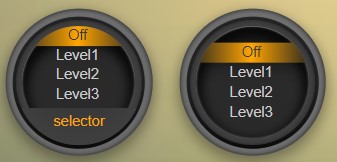
I’ll take another look at the HTML widget to see what can be achieved with it.
By the way, I’m really impressed with the look of the new Dynamic Dashboard and the pace at which it’s evolving — great job and thank you!
-
gizmocuz
- Posts: 3025
- Joined: Thursday 11 July 2013 18:59
- Target OS: Raspberry Pi / ODroid
- Domoticz version: beta
- Location: Top of the world
- Contact:
Re: Dynamic Dashboards and easier theming
@superprzemo
Latest beta () has new moon icons! I found some, those where labeled wrong and needed to rotate one as well...
But all should work now
Latest beta () has new moon icons! I found some, those where labeled wrong and needed to rotate one as well...
But all should work now
Quality outlives Quantity!
-
gizmocuz
- Posts: 3025
- Joined: Thursday 11 July 2013 18:59
- Target OS: Raspberry Pi / ODroid
- Domoticz version: beta
- Location: Top of the world
- Contact:
Re: Dynamic Dashboards and easier theming
- I do like the new availability of all the rooms in the drop-down list with classic dashboard view on click. Super!
- My list of rooms ect. is quite long. Can the drop-down list be made scrollable?
Do you have such a big house? Would you not also have this problem in the light/switches tab or old dashboard?
I don't know if that is possible or desired. Specially for tablets. A better alternative is to make the dropdown wider so we can have to or three rows
- Counter / Energy Chart:
- Choosing e.g. 7 days, the energy figures are displayed divided by thousand (e.g. 0.015 kWh instead of 15 kWh).
Fixed in latest beta 17702
Eye-Icon mode behaviour on reload:
- If this view without top-menu is activated, it is deactivated after you have jumped to a log view of a device after clicking "back" button. Or generally - after reloading the browser page. Would be nice if this is kept "remembered".
Implemented in latest beta
Quality outlives Quantity!
-
imautohuttraeger
- Posts: 393
- Joined: Saturday 14 March 2020 13:40
- Target OS: Raspberry Pi / ODroid
- Domoticz version: latest
- Location: Germany
- Contact:
Re: Dynamic Dashboards and easier theming
No, my house is not that big  I am using room plans not only for rooms but also for groups like "Roller Shutters", "Energy", "Christmas lights" "Test Devices" and many more.
See the following screen capture videos to understand what I mean (video is not automatically startet. You must click on it to start the video):
Old dashboard drop-down list ist fully scrollable:
https://photos.app.goo.gl/7j9xi7ES2vHzPJKW9
New drop-down list not fully scrollable until the end of the list and a little buggy (page in the background is scrolling, too):
https://photos.app.goo.gl/cFBvzK4tFQUt5iRL7
 I am using room plans not only for rooms but also for groups like "Roller Shutters", "Energy", "Christmas lights" "Test Devices" and many more.
See the following screen capture videos to understand what I mean (video is not automatically startet. You must click on it to start the video):
Old dashboard drop-down list ist fully scrollable:
https://photos.app.goo.gl/7j9xi7ES2vHzPJKW9
New drop-down list not fully scrollable until the end of the list and a little buggy (page in the background is scrolling, too):
https://photos.app.goo.gl/cFBvzK4tFQUt5iRL7
Stop, look and listen.
-
gizmocuz
- Posts: 3025
- Joined: Thursday 11 July 2013 18:59
- Target OS: Raspberry Pi / ODroid
- Domoticz version: beta
- Location: Top of the world
- Contact:
Re: Dynamic Dashboards and easier theming
@imautohuttraeger,
Okey that are a lot of room plans, room plans are not designed for this but ok....
I will see what I can do about this... Do you need these groups? I have a scene/group for Christmas lights, one button and on they go...
I do not need a groep to see the kWh/Switch... I guess that is what you are using this for...
Okey that are a lot of room plans, room plans are not designed for this but ok....
I will see what I can do about this... Do you need these groups? I have a scene/group for Christmas lights, one button and on they go...
I do not need a groep to see the kWh/Switch... I guess that is what you are using this for...
Thanks! Not sure if it is easy to implement a dial widget, but I have a look at thissuperprzemo wrote: Friday 10 April 2026 15:23 Regarding the switch selector , I also had in mind something similar to the DIAL element from Dashticz
I’ll take another look at the HTML widget to see what can be achieved with it.
By the way, I’m really impressed with the look of the new Dynamic Dashboard and the pace at which it’s evolving — great job and thank you!
Quality outlives Quantity!
-
imautohuttraeger
- Posts: 393
- Joined: Saturday 14 March 2020 13:40
- Target OS: Raspberry Pi / ODroid
- Domoticz version: latest
- Location: Germany
- Contact:
Re: Dynamic Dashboards and easier theming
gizmocuz wrote: Friday 10 April 2026 16:40 @imautohuttraeger,
Okey that are a lot of room plans, room plans are not designed for this but ok....
I felt free to interpret this statement for floorplans also for roomplansQuote Wiki:
https://wiki.domoticz.com/Floorplans
"It is called floorplan but off course it also can be used to group devices based on function eg Heating, Cooling, Lights, Weather etc."

Stop, look and listen.
-
imautohuttraeger
- Posts: 393
- Joined: Saturday 14 March 2020 13:40
- Target OS: Raspberry Pi / ODroid
- Domoticz version: latest
- Location: Germany
- Contact:
Re: Dynamic Dashboards and easier theming
On the energy dashboard, a small blue background is appearing on the left.
https://photos.app.goo.gl/W91UvreN8UrUAGbw6
https://photos.app.goo.gl/W91UvreN8UrUAGbw6
Stop, look and listen.
-
Filnet
- Posts: 83
- Joined: Tuesday 06 March 2018 13:55
- Target OS: Raspberry Pi / ODroid
- Domoticz version: 2026.1 ß
- Location: FR
- Contact:
Re: Dynamic Dashboards and easier theming
This update is fantastic! Thank you.
Is it possible to adjust the vertical spacing of the widgets on the grid? I'd like the widget rows to be closer together.
There should be some spacing between the widgets with a round border. You can edit most widget settings and disable the background card if you like.
Maybe 'some' widgets can be made larger, so I need to know which widget/s your are talking about
Is it possible to adjust the vertical spacing of the widgets on the grid? I'd like the widget rows to be closer together.
There should be some spacing between the widgets with a round border. You can edit most widget settings and disable the background card if you like.
Maybe 'some' widgets can be made larger, so I need to know which widget/s your are talking about
-
imautohuttraeger
- Posts: 393
- Joined: Saturday 14 March 2020 13:40
- Target OS: Raspberry Pi / ODroid
- Domoticz version: latest
- Location: Germany
- Contact:
Re: Dynamic Dashboards and easier theming
What a nice new Easter egg function in case of insomniaYou are up late - everything looks calm

Curious to see more. How about
"You are missing your after-lunch-sleep"
at 12:30 PM?
Stop, look and listen.
-
imautohuttraeger
- Posts: 393
- Joined: Saturday 14 March 2020 13:40
- Target OS: Raspberry Pi / ODroid
- Domoticz version: latest
- Location: Germany
- Contact:
Re: Dynamic Dashboards and easier theming
Batterie Monitor:
Settings option
"Alert threshold % (show devices at or below)"
is ignored.
Settings option
"Alert threshold % (show devices at or below)"
is ignored.
Stop, look and listen.